1. Sarrera
This manual provides essential information for the safe and efficient operation of your TOPTRO Quadra Projector. Please read this manual thoroughly before using the projector and retain it for future reference. The TOPTRO Quadra Projector is designed to deliver a high-quality visual and audio experience with its advanced features and smart capabilities.
2. Segurtasun informazioa
- Ez blokeatu aireztapen-irekidurak. Ziurtatu aire-fluxu egokia proiektorearen inguruan gehiegi berotzea saihesteko.
- Ez jarri proiektorea euripean edo hezetasunean deskarga elektrikoak edo suteak saihesteko.
- Erabili proiektorearekin batera datorren korronte-egokitzailea soilik.
- Ez begiratu zuzenean proiektorearen lentera lamp piztuta dago, argi distiratsuak begietan kalteak eragin ditzakeelako.
- Jarri proiektorea gainazal egonkor eta lau batean, eror ez dadin.
- Ez saiatu proiektorea zeuk desmuntatzen edo konpontzen. Mantendu konponketa guztiak langile kualifikatuen esku.
3. Paketearen edukia
Egiaztatu elementu guztiak paketean daudela:
- 1 x TOPTRO Quadra Projector
- 1 x HDMI kablea
- 1 x Erabiltzailearen eskuliburua
- 1 x Urruneko kontrola
4. Produktua amaitu daview
Familiarize yourself with the main components and interfaces of your TOPTRO Quadra Projector.
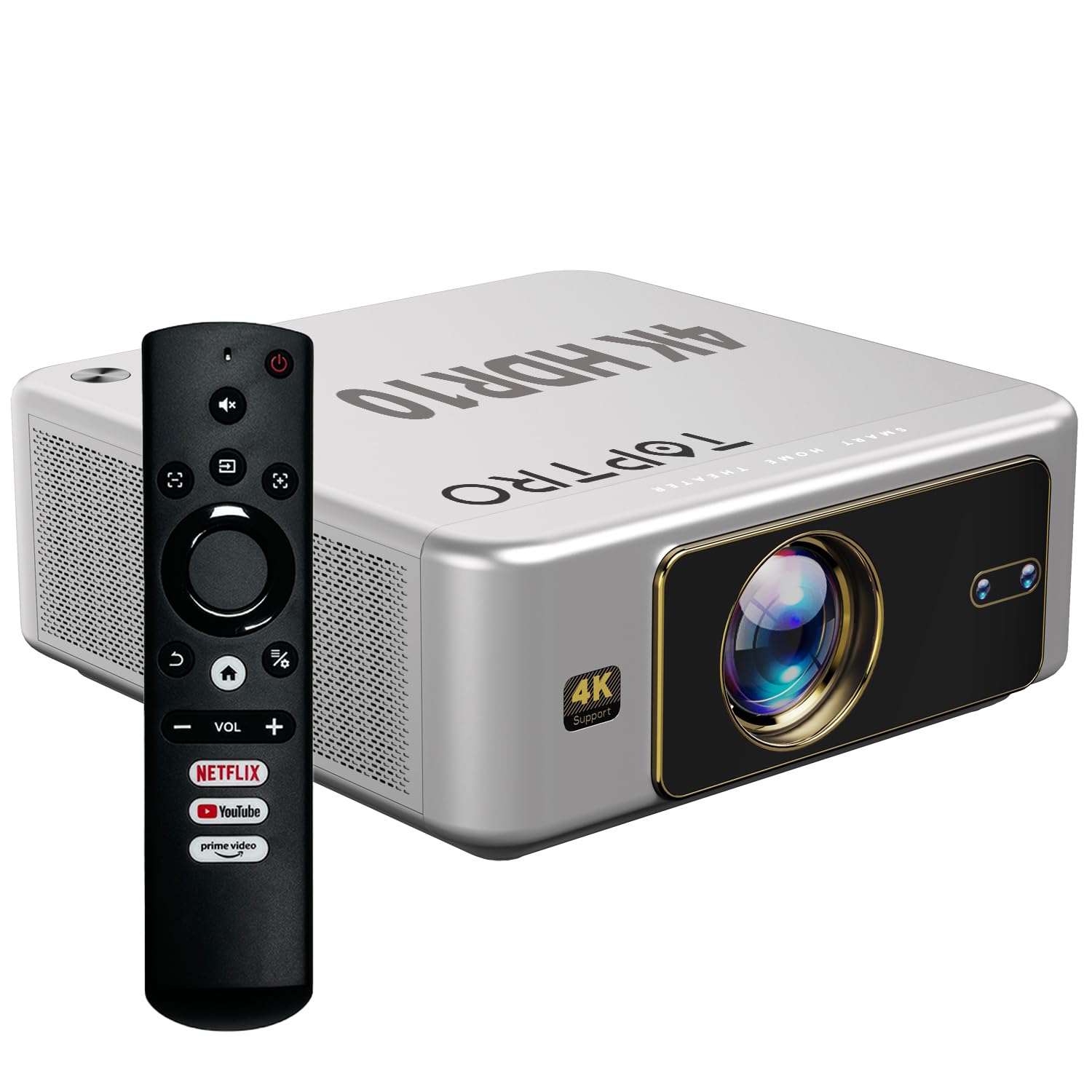
4.1. irudia: Aurrealdea view of the TOPTRO Quadra Projector with included remote control.

Figure 4.2: Rear panel of the projector displaying the power input, audio jack, HDMI ports, and USB ports.
5. Konfigurazioa
5.1 Placement and Projection Size
Position the projector on a stable surface. The TOPTRO Quadra Projector supports a maximum screen size of 300 inches. Adjust the distance from the wall or screen to achieve your desired image size.

5.1. irudia: Gomendatutako proiekzio-distantziak pantaila-tamaina desberdinetarako.
5.2 Energia-konexioa
- Konektatu elikatze-kablea proiektorearen elikatze-sarrera atakara.
- Entxufatu kablearen beste muturra entxufe elektriko egoki batera.
5.3 Hasierako piztea eta oinarrizko ezarpenak
- Sakatu pizteko proiektorearen edo urrutiko agintearen pizteko botoia pizteko.
- Upon first use, the projector may guide you through initial setup steps, including language selection and network connection.
5.4 Fokua eta Keystone zuzenketa
The TOPTRO Quadra Projector features AI-powered automatic focus and keystone correction. This system automatically adjusts the image for optimal clarity and shape.
- Fokatze automatikoa: The projector will automatically adjust the image sharpness.
- Auto Keystone: The projector will automatically correct trapezoidal distortion to ensure a rectangular image.
- Auto Obstacle Avoidance & Screen Fit: The projector can detect obstacles and adjust the image to fit the screen area.
If automatic adjustments are not satisfactory, manual adjustments can be made through the settings menu. Navigate to the 'Display & Sound' settings to access these options.

Figure 5.2: Automatic image correction features.
6. Funtzionamendua
6.1 Erabiltzaile interfazea eta nabigazioa
The TOPTRO Quadra Projector runs on a Net-Flix Certified Linux OS, providing a user-friendly interface. Use the remote control to navigate through menus and select applications.

Figure 6.1: Home screen with pre-installed streaming applications.
6.2 Konektibitatea
The projector offers various connectivity options for external devices.
- HDMI: Connect your laptop, MacBook, Blu-ray player, TV sticks, TV boxes, or gaming consoles (e.g., PS4) using the dual HDMI ports. The projector supports HDMI CEC and HDMI EARC for enhanced audio return channel functionality.
- USBa: Two USB ports are available for connecting pendrives or hard disks to play media files zuzenean.
- 3.5 mm-ko audio irteera: Connect external headphones or speakers for a personalized audio experience.
- Wi-Fi: Utilize the 6th Gen Dual Band Wi-Fi (2.4 GHz + 5 GHz) for internet access and streaming.
- Bluetooth 5.2: Connect Bluetooth speakers, headphones, or other compatible audio devices. The projector also supports two-way Bluetooth, allowing it to function as a Bluetooth speaker.
- Miracast: Wirelessly mirror your screen from compatible devices.

Figure 6.2: Connectivity options for external devices.
6.3 Pantailaren ezarpenak
Adjust image quality and display features through the 'Display & Sound' menu.
- Irudi modua: Select from various preset picture modes (e.g., Vivid) or customize settings like brightness, contrast, and color.
- 4K HDR10+ Support: The projector plays true 4K resolution HDR10+ videos, offering enhanced contrast and color depth.
- MEMC (Mugimenduaren Estimazioa, Mugimenduaren Konpentsazioa): This technology improves video smoothness and clarity, especially for fast-moving scenes, by interpolating frames.

Figure 6.3: MEMC technology for smoother visuals.
6.4 Audio ezarpenak
Manage audio output and formats via the 'Display & Sound' menu.
- Dolby Atmos & Dolby Digital Plus: The projector supports these advanced audio technologies for immersive sound.
- eARC modua: Enable eARC for high-quality audio return from compatible devices.
- Irteera formatua: Select the appropriate audio output format (e.g., Auto, PCM, Passthrough, Dolby Digital, Dolby Digital Plus) based on your connected audio system.

Figure 6.4: Immersive audio with Dolby Atmos support.
7. Mantentzea
Mantentze egokiak zure proiektorearen iraupena eta errendimendu optimoa bermatzen ditu.
- Lenteen garbiketa: Garbitu proiektorearen lentea astiro-astiro gainazal optikoetarako bereziki diseinatutako zapi leun eta lint-gabe batekin. Saihestu material urratzaileak edo produktu kimiko gogorrak.
- Kanpoko garbiketa: Erabili zapi leun eta lehor bat proiektorearen kanpoaldea garbitzeko.
- Hautsaren prebentzioa: The TOPTRO Quadra Projector features a fully sealed optical engine, which helps prevent dust, dirt, and moisture from entering the light path. This design reduces the need for frequent internal cleaning and maintains consistent image quality.
8. Arazoak
Proiektorearekin arazoak badituzu, jo ezazu honako arazo eta irtenbide ohikoenei:
| Arazoa | Kausa posiblea | Irtenbidea |
|---|---|---|
| Ez da irudirik bistaratzen | Incorrect input source selected; loose HDMI/USB connection; power issue. | Verify input source in settings; check cable connections; ensure projector is powered on. |
| Soinurik ez | Volume too low or muted; incorrect audio output setting; external audio device not connected properly. | Adjust volume; check 'Sound output' settings; ensure external speakers are connected and powered. |
| Irudia lausoa edo distortsionatua dago | Focus or keystone correction issues; projector not placed correctly. | Allow auto-focus/keystone to complete. If issues persist, manually adjust focus and keystone in 'Display & Sound' settings. Ensure the projector is perpendicular to the screen. |
| Urruneko kontrola ez dabil | Batteries are low or depleted; remote not pointed at IR receiver; obstruction. | Aldatu bateriak; ziurtatu proiektorearen IR hargailuarekiko ikusmen-lerro garbia dagoela. |
| Haizagailuaren zarata nabaria da | Normal operation; projector is working hard; ventilation blocked. | Ensure adequate ventilation around the projector. Fan noise is a normal part of projector operation, especially during high-performance tasks. |
9. Zehaztapenak
Key technical specifications of the TOPTRO Quadra Projector:
| Ezaugarri | Xehetasuna |
|---|---|
| Marka | TOPTRO |
| Ereduaren izena | TOPTRO Quadra Projector 4K HDR10+ Dolby |
| Produktuaren neurriak | 24 x 20 x 10 cm |
| Elementuaren pisua | 2 kg |
| Hardware interfazea | 3.5mm Audio, Bluetooth 5.2, Dual HDMI (CEC, EARC), Dual USB |
| Gailu bateragarriak | Gaming Console, Laptop, Smartphone, Speaker, Television |
| Ezaugarri bereziak | Dolby Atmos - Dolby Digital Plus, 4K HDR 10+/HLG, Net-Flix Certified Linux OS, 2GB RAM, 32GB ROM, Auto Focus & Keystone, Native 1080p Full HD & True 4K Support, 32000 Lumens Brightness (2600 ANSI), 15W Big Speakers, HDMI ARC, Dual HDMI, Built-in Apps, Dual 5G & 2.4G WiFi 6, Bluetooth, WiFi Display, Electronic Focus & 6D Electronic correction, Fully Sealed Optical Engine, MEMC |
| Bistaratzeko Teknologia | LCDa |
| Irudiaren distira | 32000 lumen (2600 ANSI) |
| Irudien kontraste-ratioa | 22000:1 |
| Aspektu-erlazioa | 16:9 |
| Native Screen Resolution | 1920 x 1080 (HD osoa) |
| Onartutako Ebazpena | Gehienez 3840 x 2160 pixel (4K) |
| Freskatze tasa | 60 Hz |
| Lamp Bizitza | 50000 ordu |
| Forma-faktorea | Eramangarria |
| Muntatze Mota | Sabaiko Muntaia |
| Jatorrizko Herrialdea | Txina |
10. Bermea eta Laguntza
For warranty information, technical support, or service inquiries, please contact TOPTRO Projectors India using the details below:
- Posta elektronikoa: support@toptro.in or sreeprojectors@gmail.com
- Whatsapp: 8341888860
- Webgunea: toptro.in
Please have your product model number (Quadra 4K HDR10+ Dolby) and purchase details ready when contacting support.


