1. Sarrera
This manual provides essential information for the safe and efficient use of your Fujitsu FMVF75K1BA FMV Desktop F 23.8-inch PC. Please read this manual thoroughly before operating the device and retain it for future reference. This desktop PC is designed for general computing tasks, featuring a 23.8-inch Full HD display, an Intel Core i7 processor, 16GB of RAM, and a 512GB storage drive, running Windows 11 Home.
2. Segurtasun informazioa
Produktuari kalterik ez egiteko eta erabiltzailearen segurtasuna bermatzeko, jarraitu segurtasun neurri hauek:
- Elikatze-iturria: Use only the power adapter supplied with the device. Ensure the power outlet is properly grounded.
- Aireztapena: Do not block ventilation openings. Maintain adequate space around the PC for proper airflow to prevent overheating.
- Ingurumena: Avoid exposing the PC to extreme temperatures, humidity, dust, or direct sunlight. Operate in a stable, dry environment.
- Likidoak eta objektu arrotzak: Keep liquids and foreign objects away from the PC. If liquid enters the device, immediately disconnect power and contact support.
- Zerbitzua: Do not attempt to service the PC yourself. Refer all servicing to qualified service personnel.
- Garbiketa: Deskonektatu kablea garbitu aurretik. Erabili zapi leun eta lehor bat. Ez erabili garbitzaile likido edo aerosolik.
3. Paketearen edukia
Egiaztatu elementu guztiak paketean daudela:
- Fujitsu FMVF75K1BA FMV Desktop F 23.8-inch PC
- Korronte egokitzailea eta korronte kablea
- Teklatua
- Sagua
- Hasiera Azkarreko Gida (barne badago)
- Berme Txartela (barne badago)
4. Produktua amaitu daview
The Fujitsu FMVF75K1BA is an all-in-one desktop PC featuring a 23.8-inch display. Key components include the integrated display, CPU, memory, storage, and various input/output ports.
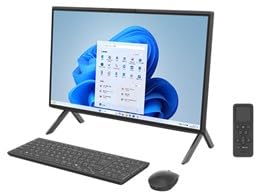
4.1. irudia: Aurrealdea view of the Fujitsu FMVF75K1BA FMV Desktop F PC. This image shows the integrated display and the sleek design of the all-in-one unit.
4.1 Aurreko panela
- Pantaila: 23.8 hazbeteko Full HD (1920x1080) pantaila.
- Pizteko botoia: Located typically on the bottom right or side of the display bezel.
- Webkamera: Integrated at the top center of the display.
4.2 Rear/Side Panels
- USB atakak: For connecting peripherals like keyboard, mouse, external drives.
- HDMI ataka: Kanpoko monitore edo telebista bat konektatzeko.
- LAN ataka: Kable bidezko sare konexiorako.
- Audio-konektoreak: For headphones, microphone, or external speakers.
- Potentzia sarrera: Korronte-egokigailua konektatzeko.
5. Konfigurazioa
Jarraitu urrats hauek hasierako konfiguraziorako:
- Desegin: Carefully remove the PC and all accessories from the packaging.
- Posizioa: Place the PC on a stable, flat surface with adequate ventilation space around it.
- Konektatu teklatua eta sagua: Plug the USB keyboard and mouse into the available USB ports on the PC.
- Konektatu energia: Connect the power adapter to the power input port on the PC, then plug the power cord into a grounded electrical outlet.
- Piztu: Sakatu pizteko botoia ordenagailua pizteko.
- Hasierako Windows konfigurazioa: Follow the on-screen instructions to complete the Windows 11 Home initial setup, including language, region, network connection, and user account creation.
6. Funtzionamendu-argibideak
6.1 Piztu/Itzaltzea
- Pizteko: Sakatu pizteko botoia.
- Itzateko: Egin klik Hasi botoian, ondoren Pizteko botoian eta hautatu "Itzali".
- Berrabiarazteko: Egin klik Hasi botoian, ondoren Pizteko botoian eta hautatu "Berrabiarazi".
- Lo egiteko: Egin klik Hasi botoian, ondoren Pizteko botoian eta hautatu "Lo egiteko".
6.2 Sare batera konektatzea
- Kable bidezko konexioa: Connect an Ethernet cable from your router/modem to the LAN port on the PC.
- Haririk gabeko konexioa (Wi-Fi):
- Egin klik ataza-barran dagoen Wi-Fi ikonoan.
- Hautatu nahi duzun Wi-Fi sarea zerrendatik.
- Sareko segurtasun-gakoa (pasahitza) idatzi eskatzen bazaizu.
- Click "Connect". The PC supports IEEE802.11ax (Wi-Fi 6E) for high-speed wireless connectivity.
6.3 Using Microsoft Office + 365
Your PC comes with Microsoft Office + 365. Follow the on-screen instructions upon first launch of any Office application (e.g., Word, Excel) to activate your subscription. An internet connection and a Microsoft account are typically required for activation.
7. Mantentzea
7.1 Garbiketa
- Pantaila: Use a soft, lint-free cloth specifically designed for electronics. For stubborn marks, lightly dampen the cloth with water or a screen cleaner. Do not spray cleaner directly onto the screen.
- Xasea: Garbitu kanpoko gainazalak zapi leun eta lehor batekin. Saihestu material urratzaileak edo produktu kimiko gogorrak.
- Aireztapena: Periodically check and gently clean the ventilation openings to prevent dust buildup, which can impede airflow.
7.2 Software eguneraketak
Eguneratu aldizka zure Windows sistema eragilea eta kontrolatzaileak errendimendu eta segurtasun optimoa bermatzeko. Windows Update-k normalean automatikoki kudeatzen du hau, baina eskuz egiaztatu dezakezu honera joanez. Ezarpenak > Windows eguneratzea.
7.3 Datuen babeskopia
Datuen galerak saihesteko, oso gomendagarria da datu garrantzitsuen babeskopiak aldizka egitea kanpoko disko gogor batean edo hodeiko biltegi batean.
8. Arazoak
| Arazoa | Kausa posiblea | Irtenbidea |
|---|---|---|
| PCa ez da pizten. | Power cable loose, power outlet issue, power adapter fault. | Egiaztatu konexio guztiak. Saiatu beste entxufe batekin. Ziurtatu egokitzailea ondo funtzionatzen duela. |
| Ez da pantailan bistaratzen. | PC is off, display brightness too low, external monitor not connected (if applicable). | Ensure PC is on. Adjust display brightness. If using an external monitor, check its power and cable connection. |
| Ezin da wifira konektatu. | Incorrect password, Wi-Fi adapter off, router issue, out of range. | Verify Wi-Fi password. Check if Wi-Fi is enabled in Windows settings. Restart your router. Move closer to the router. |
| PC is running slow. | Too many programs open, low disk space, malware, outdated drivers. | Close unnecessary applications. Free up disk space. Run a virus scan. Update Windows and drivers. |
9. Zehaztapenak
| Ereduaren izena | FMVF75K1BA |
| Marka | Fujitsu |
| Bistaratzea | 23.8-inch, 1920x1080 resolution |
| Prozesadorea | Intel Core i7 |
| RAM | 16 GB |
| Biltegiratzea | 512 GB |
| Sistema eragilea | Windows 11 Home |
| Haririk gabeko LAN | IEEE802.11ax (Wi-Fi 6E compatible)/ac/a/b/g/n |
| Portuak | USB, HDMI, LAN, Audio Jacks (specific number and type may vary) |
10. Bermea eta Laguntza
Your Fujitsu FMVF75K1BA PC is covered by a manufacturer's warranty. Please refer to the warranty card included in your package for specific terms and conditions, including the warranty period and coverage details.
For technical support, service, or warranty claims, please contact Fujitsu customer support through their official website or the contact information provided in your warranty documentation. Have your model number (FMVF75K1BA) and serial number ready when contacting support.
Lineako laguntza: Bisitatu Fujitsuren laguntza ofiziala website for drivers, FAQs, and further assistance.


