Ajazz AK35I V4 Customizable Wireless Gaming Mechanical Keyboard User Manual
Sarrera
This manual provides detailed instructions for the setup, operation, and maintenance of your Ajazz AK35I V4 Customizable Wireless Gaming Mechanical Keyboard. Please read this manual thoroughly to ensure optimal performance and longevity of your device.
Ezaugarri nagusiak
- Smart Color Screen and Multifunction Knob: Displays essential information and allows for quick adjustments.
- Hiru moduko konektibitatea: Bluetooth 5.0, 2.4 GHz haririk gabeko eta USB-C kable bidezko konexioak onartzen ditu.
- Advanced Gasket Structure: Features silicone pads and PCB groove design for enhanced typing feel and reduced noise.
- Full-Color RGB Backlighting: Offers 20 lighting effects and 16.8 million colors with side-illuminated lighting.
- Programmable Software: Customize key mappings, macros, screen animations, and RGB effects.
- Hot-Swappable Key Zone: Compatible with 3-pin/5-pin switches for personalized customization.
- 10000 mAh bateria: Provides extended usage for gaming and productivity.

Amaituview of the Ajazz AK35I V4 keyboard highlighting its main features.
Konfigurazioa
Paketearen edukia
Kutxa irekitzean, ziurtatu elementu guztiak daudela:
- Ajazz AK35I V4 Mechanical Keyboard
- USB-C USB-A kablea
- 2.4GHz Wireless Dongle (often stored in the keyboard's base)
- Keycap tiratzailea
- Switch Puller
- Extra Switches (for replacement or customization)
- Erabiltzailearen eskuliburua (dokumentu hau)
Konektibitate moduak
The Ajazz AK35I V4 keyboard offers three versatile connection options:
- Kable bidezko modua (USB-C): Konektatu teklatua zuzenean zure gailura emandako USB-C kablea erabiliz. Modu honek teklatua ere kargatzen du.
- 2.4 GHz Haririk gabeko modua: Insert the 2.4GHz USB dongle into your computer's USB port. Switch the keyboard's mode selector to 2.4G.
- Bluetooth 5.0 modua: Switch the keyboard's mode selector to BT. On your device, search for available Bluetooth devices and select "Ajazz AK35I V4" to pair. The keyboard supports pairing with multiple Bluetooth devices.

Illustration of the keyboard's triple-mode connectivity.
Funtzionamendu-argibideak
Smart Color Screen and Multifunction Knob
The keyboard features a 1.14-inch color screen and a multifunction knob for intuitive control:
- Pantaila bistaratzea: The screen shows date, time, battery level, system information, connection mode, and status indicators.
- Knob Functions:
- Biratu ezkerrera/eskuinera bolumena doitzeko.
- Sakatu audioa isilarazteko/aktibatzeko.
- Press and hold to access system settings, connection mode selection, RGB lighting modes, language, and screen images/GIFs.

Xehetasuna view of the multifunction knob and its controls.
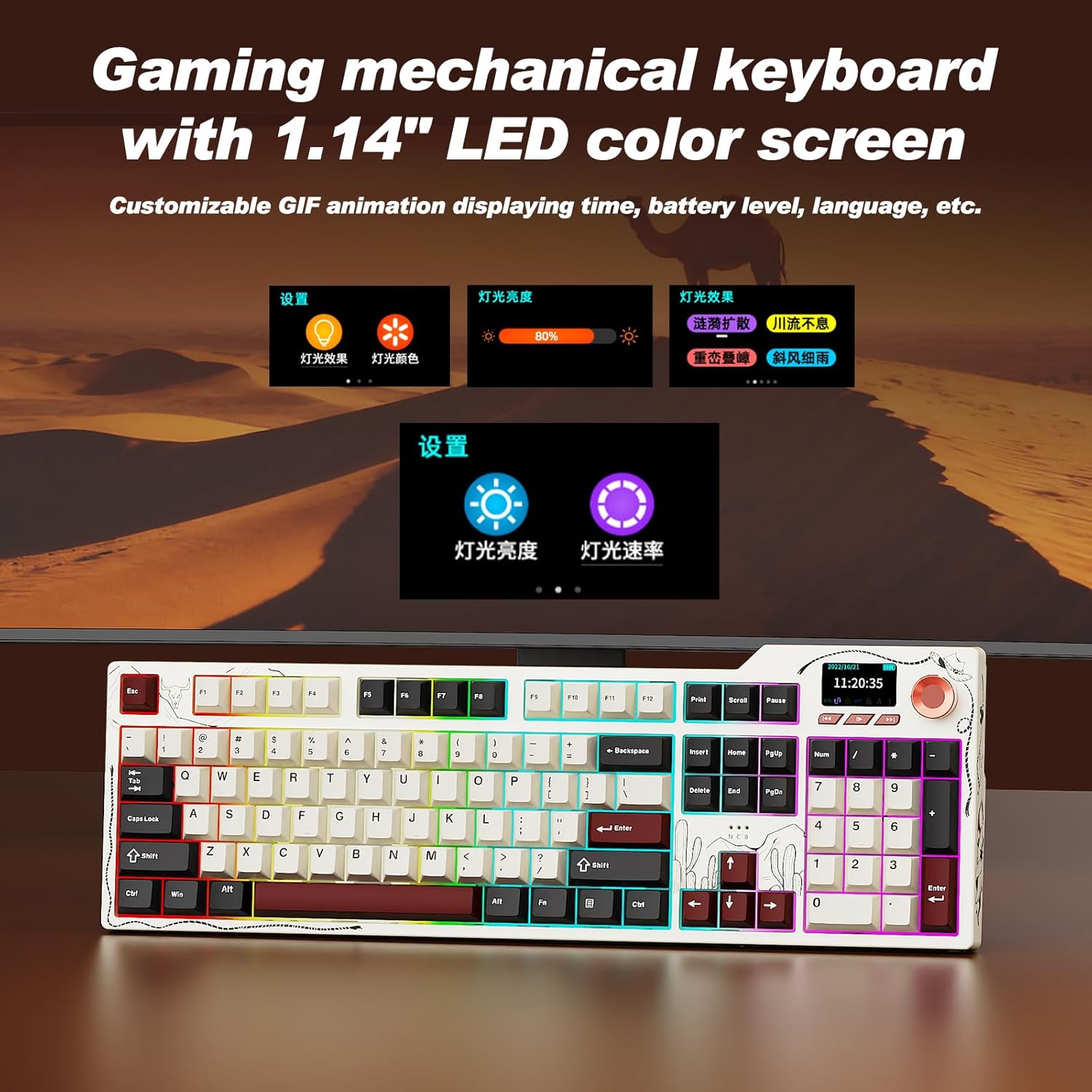
The 1.14-inch color screen displaying various customizable information.
Video demonstrating the mechanical keyboard with its integrated screen.
RGB atzeko argiztapenaren kontrola
The keyboard features 20 lighting effects and 16.8 million RGB colors. Use the following key combinations to adjust the backlighting:
- FN + ↑ (Gora gezia): Argiztapenaren distira handitu.
- FN + ↓ (Behera gezia): Argiztapenaren distira murriztu.
- FN + ← (Ezkerreko gezia): Adjust lighting effect direction.
- FN + → (Eskuineko gezia): Switch interface colors.
- FN + \|: Aldatu argi-efektuak.

Visual guide for controlling the RGB backlighting.
Software programagarria
The keyboard supports full key programming through dedicated software. This allows you to:
- Customize key mappings.
- Set macro commands.
- Adjust sleep time.
- Upload on-screen GIF animations.
- Modify RGB lighting effects, including music-synced backlighting.
Hot-Swappable Key Zone
The AK35I V4 features a hot-swappable design, allowing you to easily change switches without soldering. It supports both 3-pin and 5-pin mechanical switches, offering extensive customization options for your typing experience.

Diagram illustrating the internal gasket structure of the keyboard.
Mantentzea
- Garbiketa: Regularly clean the keyboard with a soft, dry cloth. For deeper cleaning, remove keycaps using the provided keycap puller and use compressed air to clear debris.
- Bateria zaintzea: To prolong battery life, avoid fully discharging the keyboard frequently. Charge it when the battery indicator on the screen shows low power.
- Biltegiratzea: Gorde teklatua leku fresko eta lehor batean, eguzki-argitik eta muturreko tenperaturetatik babestuta.
Arazoak konpontzea
- Teklatuak ez du erantzuten: Ensure the keyboard is charged and properly connected (wired, 2.4GHz dongle, or Bluetooth paired). Try restarting your computer or device.
- Konektibitate arazoak:
- For 2.4GHz, ensure the dongle is securely plugged in and the keyboard is in 2.4G mode.
- For Bluetooth, ensure Bluetooth is enabled on your device and the keyboard is in BT mode and successfully paired. Try re-pairing if necessary.
- RGB argiak ez funtzionatzen: Check the keyboard's RGB settings via the multifunction knob or programmable software. Ensure brightness is not set to zero.
- Screen Not Displaying Correctly: Try restarting the keyboard. If issues persist, consult the programmable software for screen settings or contact support.
- Giltzak ez dira erregistratzen: If individual keys are not working, try replacing the switch using the provided switch puller and extra switches.
Zehaztapenak
| Ezaugarri | Xehetasuna |
|---|---|
| Modelo zenbakia | AK35I V4 |
| Konektibitate Teknologia | 2.4 GHz haririk gabekoa, Bluetooth 5.0, USB-C kable bidezkoa |
| Bateria Edukiera | 10000mAh |
| Teklatuaren deskribapena | Mekanikoa |
| Teklen atzeko argiztapena | RGB (20 effects, 16.8 million colors) |
| Ezaugarri bereziak | Backlit, Hot-Swappable, Hotkeys and Media Keys, TFT Display Screen, Volume Roller |
| Gailu bateragarriak | Laptop, PC, Smart TV, Smartphone, Tablet (Windows, Mac, iOS, Android) |
| Produktuaren neurriak | 17 x 5 x 1.22 hazbete |
| Elementuaren pisua | 4.55 kilo |
Bideo emanaldiaasing the multifunctionality of the Ajazz AK35I V4 gaming keyboard.
Bermea eta Laguntza
The Ajazz AK35I V4 keyboard comes with a manufacturer's warranty. For specific warranty details, please refer to the warranty card included in your product packaging or visit the official Ajazz website. For technical support, troubleshooting assistance, or any product-related inquiries, please contact Ajazz customer service through their official channels.