1. Bukatu daview
The Element 32-inch 720p HD Xumo Smart TV offers reliable performance and smart functionality in a compact design. Ideal for smaller spaces such as kitchens, dorm rooms, guest rooms, or offices, this television combines a clear HD display with a versatile smart platform and modern connectivity options.
Key features include a 720p resolution display, a 120Hz effective refresh rate for smooth motion, and the integrated Xumo OS for access to numerous streaming applications and free live channels. Connectivity is robust with multiple HDMI ports, USB, LAN, Bluetooth, and Apple AirPlay support. The TV also comes with a voice remote for convenient navigation.
2. Zer dago kutxan
Upon unboxing your Element 32-inch Xumo Smart TV, please ensure all the following components are present:
- 32-inch Element Xumo TV
- Voice Remote + 2 AAA batteries
- TV Stand & Screws
- Hasierako gida azkarra

Image: The contents of the TV box, showing the 32-inch television, its remote control, two stand feet, and a bag of screws for assembly. Dimensions of the TV are also displayed.
3. Konfigurazioa
3.1 Telebistaren euskarria muntatzea
- Kontu handiz jarri telebistaren pantaila beherantz gainazal leun eta garbi batean, marradurak saihesteko.
- Align each stand foot with the corresponding screw holes on the bottom of the TV.
- Secure each stand foot using the provided screws. Ensure they are tightened firmly but do not overtighten.
- Kontu handiz altxatu telebista eta jarri gainazal egonkor eta mailakatu batean.
Alternatively, the TV supports VESA mounting for wall installation (wall mount hardware sold separately).
3.2 Energia-konexioa
Connect the power cord to the TV's power input and then plug it into a standard electrical outlet. A pilot light on the TV will indicate that it is receiving power.
3.3 Initial Setup (Xumo OS)
Lehen aldiz piztean, telebistak hasierako konfigurazio prozesuan zehar gidatuko zaitu. Honek honako hauek barne hartzen ditu:
- Hizkuntza hautaketa: Aukeratu zure hizkuntza hobetsia.
- Sare-konexioa: Connect the TV to your home Wi-Fi network or via an Ethernet cable.
- Xumo OS Account Setup: Follow on-screen prompts to set up or log in to your Xumo OS account. This is necessary to access smart features and apps.
- Kanalen miaketa: If connecting an antenna, the TV will scan for available channels.

Image: The Element 32-inch Xumo Smart TV is shown on a wooden TV stand, displaying its smart interface with various streaming app icons.
4. Konexioak
The Element Xumo Smart TV provides a variety of ports for connecting external devices:
- HDMI atakak (3): Connect high-definition devices such as Blu-ray players, gaming consoles, or cable/satellite boxes. One HDMI port supports eARC (enhanced Audio Return Channel) for simplified audio connections to compatible soundbars or AV receivers.
- USB ataka (1): Konektatu USB biltegiratze gailuak view argazkiak atera, musika erreproduzitu edo bideoak ikusi.
- LAN (Ethernet) ataka: Interneteko kable bidezko konexio baterako.
- Audio Out (Optical) / Headphone Jack: For connecting external audio systems or headphones.
- Composite Input / Analog Tuner: For connecting older devices or an antenna.
5. Zure telebista funtzionatzea
5.1 Urruneko kontrola
The included voice remote allows for intuitive control of your TV. It features dedicated buttons for popular streaming services and a microphone for voice commands.
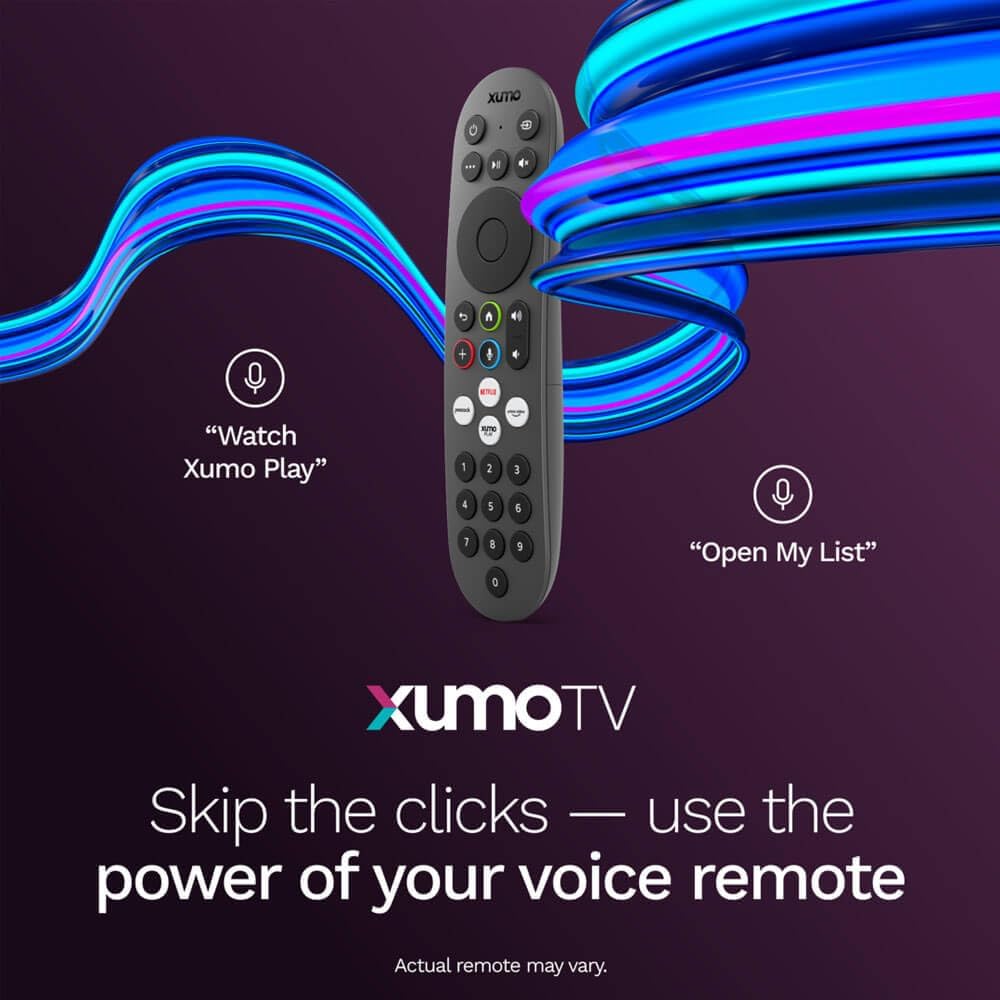
Image: A close-up of the Element Xumo Smart TV voice remote, highlighting its various buttons including a microphone for voice commands and quick access buttons for streaming services.
5.2 Smart Features & Streaming (Xumo OS)
The Xumo OS provides access to over 250 preloaded apps and more than 750 free live channels. You can:
- Search Content: Use the unified search function to find content across all your installed apps.
- My List: Curate your personal watchlist for easy access to your favorite shows and movies.
- Free On-Demand Libraries: Explore a wide selection of free on-demand content.
- Ahots kontrola: Use the voice remote to navigate, search, and control your TV hands-free.

Image: The Xumo TV interface showing a selection of popular streaming applications and content recommendations.
5.3 Irudi eta soinu ezarpenak
Your TV delivers a crisp 720p HD display with a 120Hz effective refresh rate, minimizing motion blur for clear visuals. Dolby Audio processing enhances the sound experience. You can adjust picture and sound settings via the TV's menu to suit your preferences.
- Irudi moduak: Select from various preset picture modes (e.g., Standard, Vivid, Movie, Sports) or customize settings like brightness, contrast, and color.
- Soinu moduak: Choose from different sound modes (e.g., Standard, Music, Movie, Speech) or adjust bass and treble levels.
5.4 Apple AirPlay & Home Support
Seamlessly stream content or mirror your screen from your iPhone, iPad, or Mac directly to your Element TV using Apple AirPlay. With Apple Home support, you can integrate your TV into your Apple smart home ecosystem for convenient control.
6. Mantentzea
To ensure the longevity and optimal performance of your Element Xumo Smart TV, follow these maintenance guidelines:
- Pantaila garbitzea: Garbitu pantaila astiro-astiro zapi leun, lehor eta pelusik gabeko batekin. Orba egoskorrak izanez gero, garbitu astiro-astiro.ampGarbitu oihalak urarekin edo pantailarako garbiketa-soluzio espezifiko batekin (inoiz ez ihinztatu zuzenean pantailan).
- Armairua garbitzea: Erabili zapi leun eta lehor bat telebistaren armairua garbitzeko. Saihestu garbitzaile edo disolbatzaile urratzaileak erabiltzea.
- Aireztapena: Ziurtatu telebistaren atzealdeko aireztapen-irekidurak ez daudela blokeatuta, gehiegi berotzea saihesteko.
- Itzali erabiltzen ez denean: Itzali telebista erabiltzen ez duzunean energia aurrezteko eta bere iraupena luzatzeko.
7. Arazoak
If you encounter any issues with your Element Xumo Smart TV, refer to the following common troubleshooting tips:
- Potentziarik gabe: Egiaztatu elikatze-kablea ondo konektatuta dagoela telebistan eta entxufean. Ziurtatu entxufea funtzionatzen duela.
- Irudi/soinurik ez: Verify that the correct input source is selected. Check all cable connections (HDMI, antenna, etc.) for secure fit.
- Urrunekoa ez dabil: Replace the AAA batteries in the remote control. Ensure there are no obstructions between the remote and the TV's IR sensor.
- Sareko konexio arazoak: Restart your Wi-Fi router. Check the TV's network settings to ensure it's connected to the correct network and the password is entered correctly.
- Smart App Problems: Try restarting the app. If the issue persists, clear the app's cache or reinstall it. Ensure your TV's software is up to date.
For persistent issues, please contact Element customer support.
8. Zehaztapenak
| Ezaugarri | Zehaztapena |
|---|---|
| Modelo zenbakia | E300AE32C |
| Pantailaren tamaina | 32 hazbete |
| Bistaratzeko ebazpena | 720p (1366x768) |
| Freskatze tasa | 60 Hz (120Hz Effective) |
| Aspektu-erlazioa | 1.78:1 |
| Sistema eragilea | Xumo OS |
| Konektibitatea | 3x HDMI (1x eARC), 1x USB, LAN (Ethernet), Optical Audio Out, Headphone Jack, Composite Input, Wi-Fi, Bluetooth |
| Ezaugarri bereziak | Bezel-Less Design, Built-In Speaker, Voice Remote, Apple AirPlay & Home Support |
| TV with Stand Dimensions (W x H x D) | 28.8" x 19.2" x 7.0" |
| TV without Stand Dimensions (W x H x D) | 28.8" x 17.0" x 2.7" |
| Elementuaren pisua | 8.8 kilo |
9. Bermea eta Laguntza
The Element 32-inch 720p HD Xumo Smart TV comes standard with a 2 urteko fabrikatzailearen bermeaBerme honek materialen eta fabrikazioaren akatsak estaltzen ditu erabilera normalaren pean. Gorde erosketaren egiaztagiria bermearen erreklamazioak egiteko.
For technical support, warranty inquiries, or further assistance, please refer to the contact information provided in your Quick Start Guide or visit the official Element Electronics webgunea.


