Sarrera
Thank you for choosing the LogiLink BT0070 BT 6.0 Gaming Headset. This manual provides essential information for the proper setup, operation, and maintenance of your headset. Please read these instructions carefully before using the product to ensure optimal performance and longevity.
The LogiLink BT0070 is a versatile wireless gaming headset designed for clear communication and immersive audio experiences. It features a 360° microphone, comfortable ear pads, an adjustable headband, and a long-lasting battery.
Segurtasun Informazioa
- Ez jarri entzungailuak muturreko tenperaturen, hezetasunaren edo substantzia korrosiboen eraginpean.
- Saihestu entzungailuak erortzea edo kolpe gogorren eraginpean jartzea.
- Do not attempt to disassemble or modify the headset. This will void the warranty and may cause damage.
- Mantendu entzungailuak uretatik eta beste likido batzuetatik urrun.
- Erabili zehaztutako karga-bolumena bakarriktage eta egungoa.
- Bolumen maila altuan denbora luzez entzuteak entzumen kalteak eragin ditzake. Egokitu bolumena maila seguru batera.
Paketearen edukia
Mesedez, egiaztatu paketea elementu hauek dituen:
- LogiLink BT0070 Gaming Headset
- USB kargatzeko kablea
- 3.5 mm-ko AUX audio kablea
- Erabiltzailearen eskuliburua (dokumentu hau)
Produktua amaituview
Familiarize yourself with the components of your LogiLink BT0070 Gaming Headset.

Irudia: Amaituview of the LogiLink BT0070 headset highlighting its adjustable headband, adjustable microphone, soft memory earmuffs, and flexible design for various head shapes.
- Buruko banda erregulagarria: Egokitzapen pertsonalizatua eta erosoa ahalbidetzen du.
- Mikrofono erregulagarria: A 360° noise-isolating microphone for clear voice communication.
- Soft Memory Ear Pads: Designed for extended comfort during long gaming sessions.
- Kontrol-botoiak: (Specific button functions will be detailed in the Operating section).
- 3.5 mm-ko AUX ataka: Gailuetara kable bidez konektatzeko.
- Kargatzeko ataka: Barneko bateria berriro kargatzeko.
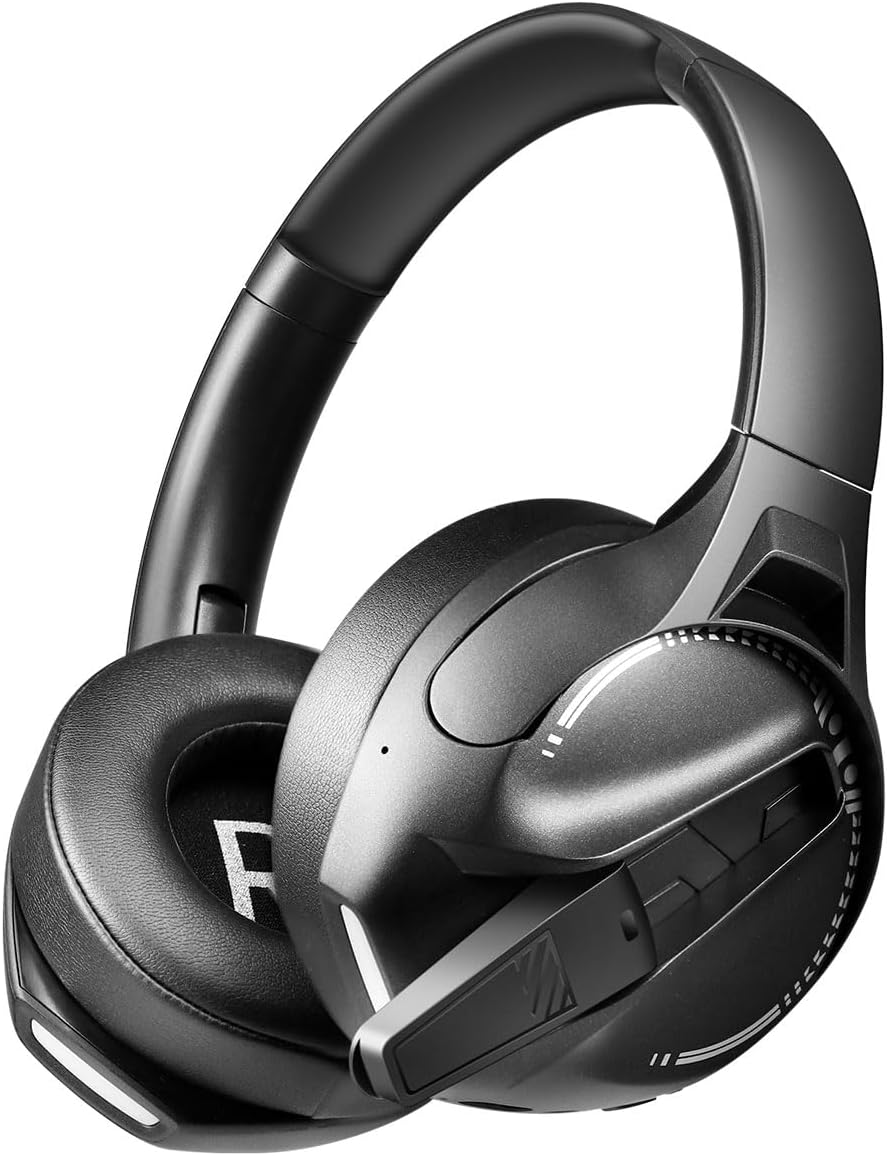
Irudia: Aldea view of the LogiLink BT0070 headset, showing the extended microphone arm and ear cup design.

Irudia: Aurrealdea view of the LogiLink BT0070 headset, showcasinbere diseinu orokorra g.
Konfigurazioa
1. Entzungailua kargatzea
Before first use, fully charge the headset. Connect the USB charging cable to the headset's charging port and the other end to a compatible USB power source (e.g., computer USB port, USB wall adapter).

Irudia: Illustration of power adapter requirements. Use a 3.0-3.0W power adapter. Note that a power adapter is not included with the headset.
- A full charge typically takes approximately [X] hours (specific time not provided, refer to product packaging or LED indicator).
- The LED indicator on the headset will change color or turn off once charging is complete.
- Ensure the power source provides 3.0-3.0W for optimal charging.
2. Piztu/Itzaltzea
- Pizteko: Sakatu eta eutsi pizteko botoia 3 segundo inguru, LED adierazlea piztu arte.
- Itzaltzeko: Sakatu eta eutsi pizteko botoia 5 segundo inguru LED adierazlea itzali arte.
3. Bluetooth parekatzea
Aurikularrak haririk gabe gailu batera konektatzeko:
- Ziurtatu entzungailua itzalita dagoela.
- Press and hold the Power button for approximately 5-7 seconds until the LED indicator flashes rapidly (usually blue and red), indicating pairing mode.
- Zure gailuan (smartphone-an, ordenagailu eramangarrian, etab.), gaitu Bluetooth-a eta bilatu gailu berriak.
- Select "LogiLink BT0070" from the list of available devices.
- Once paired, the LED indicator on the headset will typically flash slowly or turn solid blue.
4. Wired Connection (3.5mm AUX)
For a wired connection, use the included 3.5mm AUX audio cable:
- Konektatu 3.5 mm-ko audio kablearen mutur bat entzungailuen AUX atakan.
- Konektatu beste muturra zure gailuaren 3.5 mm-ko audio-hartunean.
- The headset will operate in passive mode, drawing no power from its battery.
5. Egokitzapena doitzea
For optimal comfort and sound quality, adjust the headset to fit your head:
- Extend or retract the adjustable headband until the ear cups comfortably cover your ears.
- Ensure the soft memory ear pads create a good seal around your ears.
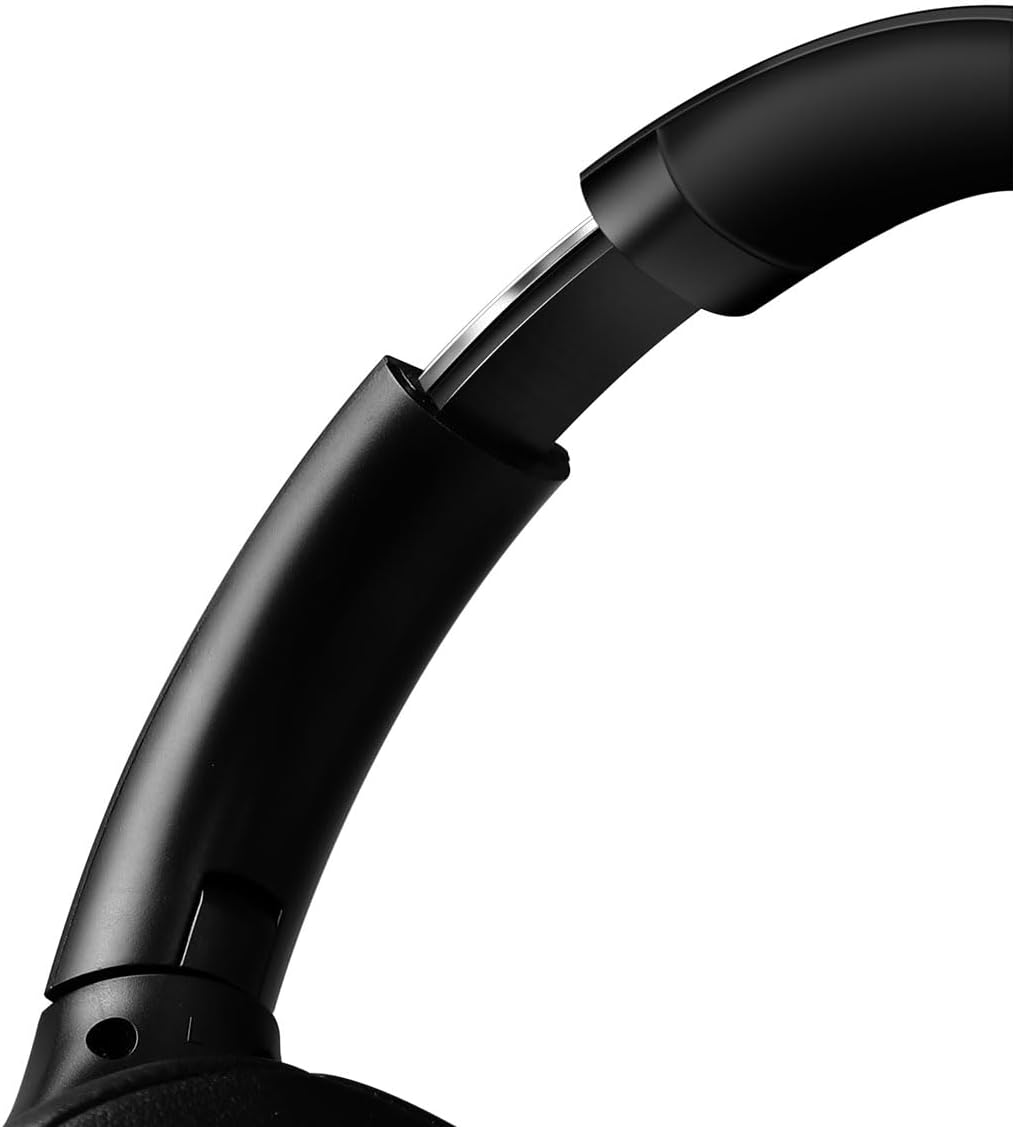
Irudia: Gertutik view of the adjustable headband mechanism, demonstrating how to customize the fit.
Entzungailuaren funtzionamendua
1. Oinarrizko Kontrolak
The headset features intuitive controls, typically located on the ear cups:
- Pizteko botoia: Press and hold to power on/off. Short press for [X function, e.g., play/pause, answer call - specifics not provided, common functions listed].
- Bolumena igo / Hurrengo pista: Sakatu labur bolumena igotzeko. Sakatu luze hurrengo abestia ikusteko.
- Bolumena jaitsi / Aurreko pista: Sakatu labur bolumena jaisteko. Sakatu luze aurreko abestira joateko.
- Funtzio anitzeko botoia (MFB): (Often combined with Power button) Single press to Play/Pause music or Answer/End calls. Double press to Redial last number.
2. Mikrofonoaren erabilera
The integrated 360° noise-isolating microphone is designed for clear communication.
- Mikrofonoa doitzea: Ahotsaren harrapaketa optimoa lortzeko, jarri mikrofonoa ahotik gertu.
- Ezkutatu/Aktibatu: (Specific button for mute not provided, common methods listed) Look for a dedicated mute button on the headset or use your device's software controls.
3. Zarata Ezabatze Aktiboa (ANC)
Entzungailuak Zarata Ezeztapen Aktiboa du inguruko zarata murrizteko.
- ANC aktibatzea: (Specific button for ANC not provided, common methods listed) Look for a dedicated ANC button or a combination press on existing buttons.
- When ANC is active, you may notice a slight change in audio characteristics.

Irudia: Users experiencing immersive audio with the LogiLink BT0070 headset, emphasizing its 3D surround sound capabilities for gaming.
Mantentzea
1. Garbiketa
- Garbitu entzungailuak zapi leun, lehor eta lihorik gabeko batekin.
- Ez erabili garbitzaile urratzailerik, alkoholik edo disolbatzaile kimikorik.
- Clean the ear pads gently to remove any buildup.
2. Biltegiratzea
- Gorde entzungailuak leku fresko eta lehor batean, eguzki-argitik eta muturreko tenperaturetatik babestuta.
- Denbora luzez gordetzen baduzu, ziurtatu bateria partzialki kargatuta dagoela (% 50 inguru), bateriaren osasuna mantentzeko.

Irudia: The LogiLink BT0070 headset shown in a folded configuration, suitable for compact storage or transport.
3. Bateria zaintzea
- Saihestu bateria maiz erabat deskargatzea.
- Charge the headset regularly, even if not in use, to maintain battery health.
Arazoak konpontzea
Aurikularrekin arazoak badituzu, jo ezazu honako arazo eta irtenbide ohikoenei:
| Arazoa | Irtenbide posiblea |
|---|---|
| Aurikularrak ez dira pizten. | Ensure the headset is fully charged. Press and hold the Power button for the required duration. |
| Ezin da Bluetooth bidez parekatu. | Ensure the headset is in pairing mode (rapidly flashing LED). Turn off and on your device's Bluetooth. Move closer to the device. Clear previous Bluetooth connections on your device. |
| Soinurik ez edo bolumen baxua. | Check headset and device volume levels. Ensure the headset is properly connected (Bluetooth or AUX). For Bluetooth, check audio output settings on your device. |
| Mikrofonoa ez dabil. | Ensure the microphone is not muted. Check microphone input settings on your device. Ensure the microphone is positioned correctly. |
| Soinuaren kalitatea eskasa da. | Ensure the headset is within Bluetooth range. Check for interference from other wireless devices. For wired connection, ensure the 3.5mm cable is fully inserted. |
Zehaztapenak
Key technical specifications for the LogiLink BT0070 Gaming Headset:
| Ezaugarri | Xehetasuna |
|---|---|
| Eredua | BT0070 |
| Konektibitate Teknologia | Bluetooth 6.0, 3.5 mm-ko AUX |
| Haririk gabeko komunikazioa | Bluetootha |
| Entzungailu mota | Belarri gainekoa |
| Gidariaren diametroa | 40 mm |
| Inpedantzia | 32 ohmio |
| Mikrofonoa | 360° Noise-isolating, Omnidirectional |
| Zarata Kontrola | Zarata Deuseztatze Aktiboa |
| Bateriaren iraupena | Gehienez 50 ordu |
| Kolorea | Beltza |
| Elementuaren pisua | 500 gramo |
| Produktuaren neurriak | 16.8 x 17.8 x 7.5 cm |
| Bateragarria | Smartphone & Laptop |
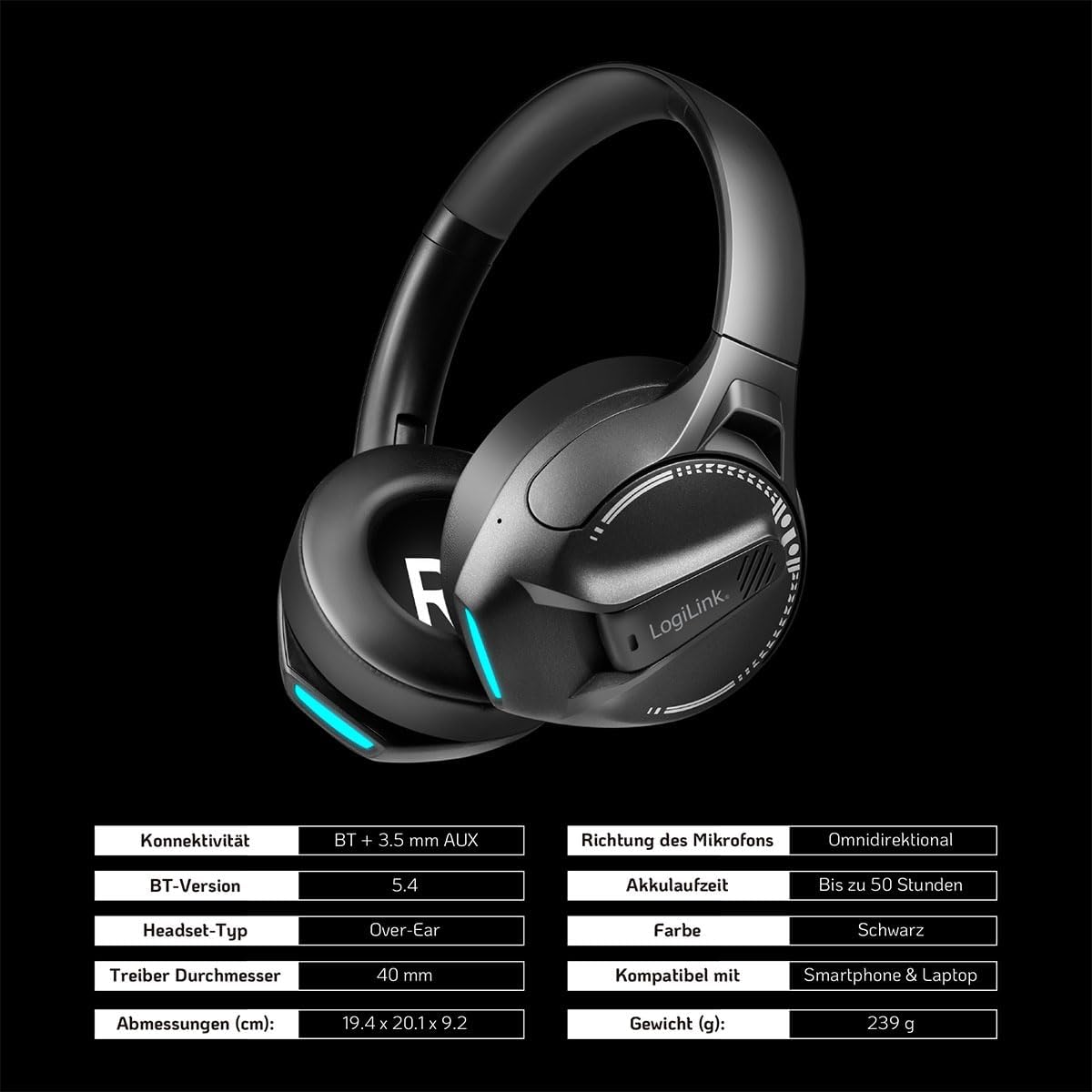
Irudia: Visual representation of key specifications for the LogiLink BT0070 headset, including connectivity, battery life, and dimensions. Note: The image lists Bluetooth version 5.4, while the product title specifies 6.0.
Bermea eta Laguntza
LogiLink products are designed and manufactured to the highest quality standards. For warranty information and technical support, please refer to the warranty card included with your product or visit the official LogiLink webgunea.
Mesedez, gorde zure erosketa-froga berme-erreklamazioetarako.


