Sarrera
The JBL GRIP is a compact, portable Bluetooth speaker designed to deliver powerful JBL Pro Sound. It features AI Sound Boost technology for optimized audio output with minimal distortion. With its durable, dustproof, and waterproof design, the JBL GRIP is suitable for various environments and activities. This manual provides essential information for the proper use and maintenance of your speaker.

Image: The JBL GRIP speaker lineup in different colors, highlighting its portability.
Kutxan dagoena
Upon unboxing your JBL GRIP speaker, please ensure all components are present:
- JBL GRIP Portable Bluetooth Speaker
- Hasierako gida azkarra
- USB-C Charging Cable (Note: USB charging cable is not included in some regions, please check packaging)

Image: A purple JBL GRIP speaker, representing the main product.
Produktua amaituview
Familiarize yourself with the key features and components of your JBL GRIP speaker.
Kontrolak eta Portuak
- Pizteko botoia: Goiko panelean kokatuta.
- Bluetooth parekatzeko botoia: Located on the top panel, for connecting to devices.
- Erreproduzitu/Pausatu botoia: Goiko panelean kokatuta.
- Bolumena igo / jaitsi botoiak: Goiko panelean kokatuta.
- USB-C kargatzeko ataka: Located on the side panel, protected by a cover.
- Giro-argia: Integrated on the side panel, offering customizable lighting effects.

Irudia: Goian view of the JBL GRIP speaker, highlighting the control buttons.
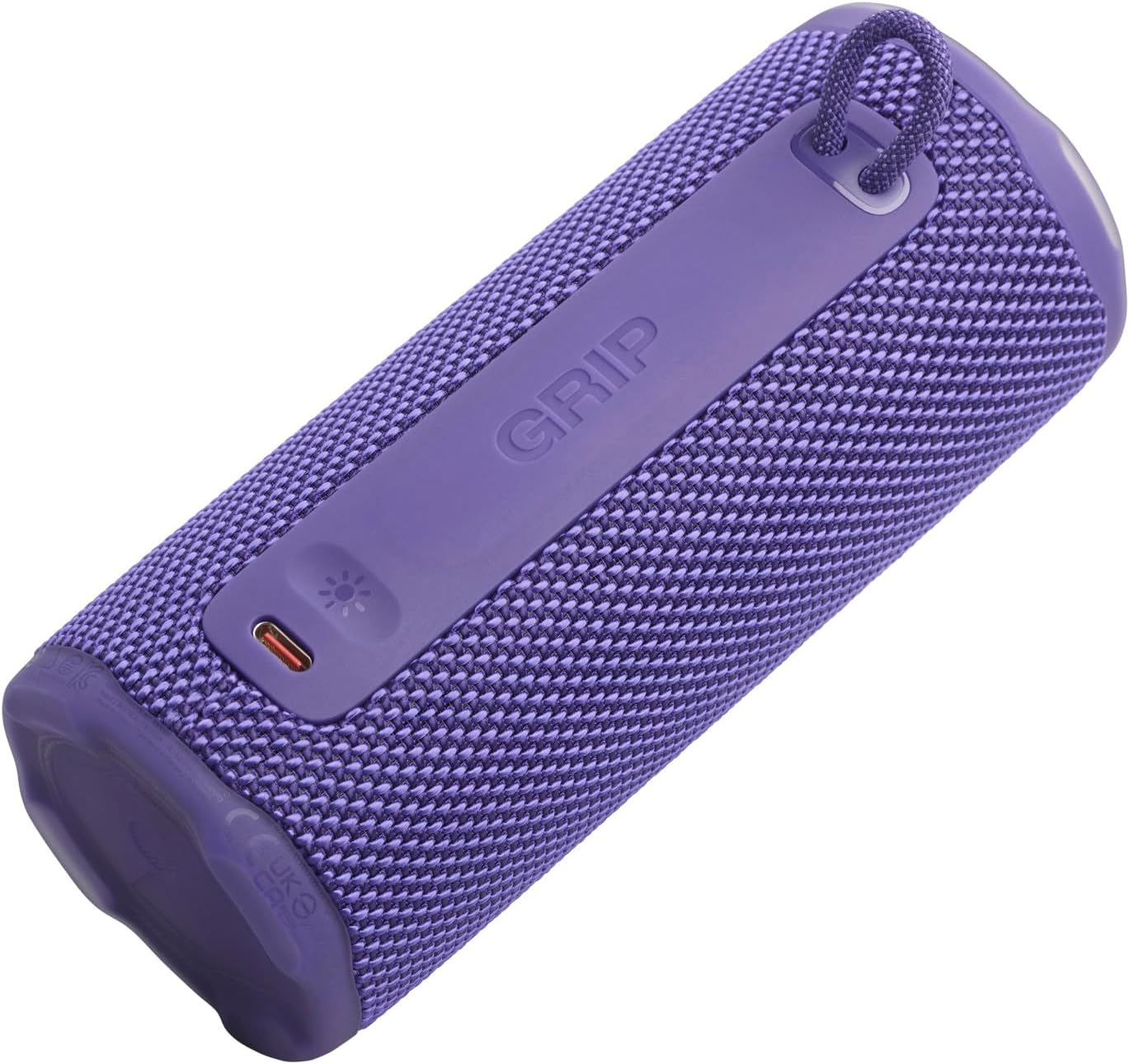
Irudia: Albokoa view of the JBL GRIP speaker, showing the USB-C charging port and the ambient light strip.
Ezaugarri nagusiak
- AI soinuaren hobekuntza: Real-time music analysis algorithm optimizes output and suppresses distortion for enhanced sound quality.
- IP68 hautsaren eta iragazgaitzaren aurkakoa: Designed to withstand immersion in water and protect against dust ingress.
- Giro-argia: Customizable LED light on the speaker's rear panel to set the mood.
- Erreprodukzio denbora luzea: Up to 12 hours of continuous playback, extendable by an additional 2 hours with Playtime Boost.
- Aura Cast Multi-Speaker Connection: Connect multiple JBL GRIP speakers for a wider sound experience.
- JBL Portable App Compatibility: Control settings, customize ambient light, and manage features via the dedicated app.

Image: An internal diagram of the JBL GRIP speaker, illustrating the AI Sound Boost chip and dual passive radiators for enhanced bass.
Konfigurazioa
Hizlaria kargatzen
- Locate the USB-C charging port on the side of the speaker.
- Open the protective cover of the USB-C port.
- Connect one end of the USB-C charging cable to the speaker and the other end to a compatible USB power adapter (not included).
- LED adierazleak kargatze-egoera erakutsiko du. Karga oso batek 3 ordu inguru behar ditu.
- Behin guztiz kargatuta, deskonektatu kablea eta itxi babes-estalkia ondo itxita IP68 sailkapena mantentzeko.
Bluetooth parekatzea
- Power on the JBL GRIP speaker by pressing the Power button.
- Press the Bluetooth button on the top panel. The LED indicator will flash, indicating pairing mode.
- On your device (smartphone, tablet, etc.), go to Bluetooth settings and select "JBL GRIP" from the list of available devices.
- Once connected, the LED indicator on the speaker will turn solid.
Funtzionamendu-argibideak
Oinarrizko erreprodukzioa
- Erreproduzitu/Pausatu: Sakatu Erreproduzitu/Pausatu botoia behin.
- Bolumen kontrola: Erabili Bolumena igotzeko (+) eta Bolumena jaitsi (-) botoiak.
- Saltatu pista: Double-press the Play/Pause button for next track. Triple-press for previous track.
Giroko Argiaren Kontrola
The JBL GRIP features an ambient light that can be customized to match your mood.
- Default Modes: Cycle through pre-set light themes by pressing the dedicated light button (if available, otherwise use app).
- Pertsonalizazioa: For advanced customization of brightness and color, download and use the JBL Portable app.

Image: A JBL GRIP speaker displaying its customizable ambient light feature.
Aura Cast Multi-Speaker Connection
Aura Cast allows you to connect multiple JBL GRIP speakers for a synchronized audio experience.
- Ensure all JBL GRIP speakers are powered on and in pairing mode.
- Follow the instructions in the JBL Portable app to initiate Aura Cast pairing.
- Once connected, audio will play simultaneously across all linked speakers.

Image: A visual representation of multiple JBL speakers connected using Aura Cast for multi-room audio.
JBL aplikazio eramangarria
Download the JBL Portable app from your device's app store to unlock additional features and control options for your JBL GRIP speaker. The app allows you to:
- Egokitu berdintzailearen ezarpenak.
- Customize ambient light themes and brightness.
- Manage Aura Cast connections.
- Eguneratu bozgorailuen firmwarea.

Image: A screenshot of the JBL Portable app interface, showing customization options for sound and lighting.
Mantentzea
Iragazgaitza eta hautsaren aurkakoa (IP68)
The JBL GRIP speaker is rated IP68, meaning it is dust-tight and protected against continuous immersion in water up to 1.5 meters for up to 30 minutes. To maintain this rating:
- Ensure the USB-C port cover is securely closed before exposing the speaker to water or dust.
- Do not expose the speaker to salt water or other chemicals. If exposed, rinse with fresh water and dry thoroughly.
- Avoid using the speaker in extreme temperatures.

Image: A JBL GRIP speaker in water, demonstrating its IP68 waterproof capability.
Garbiketa
Bozgorailua garbitzeko, erabili zapi leun eta lehorra.amp oihal. Ez erabili garbitzaile edo disolbatzaile urratzailerik.
Arazoak konpontzea
| Arazoa | Irtenbide posiblea |
|---|---|
| Bozgorailuak ez du pizten. | Ziurtatu bateria kargatuta dagoela. Konektatu bozgorailua energia-iturri batera USB-C kablea erabiliz. |
| Ezin da Bluetooth bidez parekatu. |
|
| Soinurik ez edo bolumen baxua. |
|
| Ambient light not working. | Check settings in the JBL Portable app. Ensure the speaker is powered on. |
Zehaztapenak
| Ezaugarri | Xehetasuna |
|---|---|
| Ereduaren izena | JBL GRIP |
| Produktuaren eredu-zenbakia | JBLGRIPPUR |
| Hizlari mota | Hizlari eramangarria |
| Haririk gabeko Teknologia | Bluetootha |
| Maiztasun Banda | 2400MHz - 2483.5MHz |
| Maiztasun Erantzuna | 20 KHz |
| Irteera potentzia maximoa | 16 W |
| Energia iturria | Bateria (litio ioia) |
| Bateriaren iraupena | Up to 12 hours (extendable by 2 hours with Playtime Boost) |
| Kargatzeko Denbora | 3 ordu gutxi gorabehera |
| Iragazgaitza/Hautsaren aurkako balorazioa | IP68 |
| Produktuaren neurriak (L x W x H) | 6.5 x 6.4 x 15.3 cm |
| Produktuaren pisua | 385 gramo |
| Kontrol-metodoa | Aplikazioa |
| Dakarten osagaiak | Hasierako gida azkarra |

Image: A diagram illustrating the dimensions and weight of the JBL GRIP speaker.
Bermea eta Laguntza
The JBL GRIP speaker comes with a limited warranty. Please refer to the included Quick Start Guide or visit the official JBL webwebgunea bermearen informazio zehatza eta laguntza-harremanetarako informazioa lortzeko.
For technical assistance, troubleshooting, or to register your product, please visit www.jbl.com/laguntza.