1. Sarrera
Thank you for choosing the EWEADN V102 Wired Gaming Keyboard. This manual provides essential information for setting up, operating, and maintaining your new keyboard. Please read it thoroughly to ensure optimal performance and longevity of your device.

Figure 1: EWEADN V102 Wired Gaming Keyboard
2. Paketearen edukia
Ziurtatu elementu guztiak paketean daudela:
- EWEADN V102 Wired Gaming Keyboard
- USB motako kablea
- Erabiltzailearen eskuliburua (dokumentu hau)
3. Konfiguratzeko argibideak
3.1 Teklatua konektatzea
- Bilatu USB motako C ataka teklatuan.
- Konektatu emandako USB C motako kablearen mutur bat teklatura.
- Connect the other end of the USB Type-C cable to an available USB port on your computer or compatible device.
- Teklatua plug-and-play da eta zure sistema eragileak automatikoki ezagutu beharko luke.

Figure 2: Wired Type-C Connectivity
4. Funtzionamendu-argibideak
4.1 Multi-Function Control Knob
The smart rotary knob provides quick control over various functions:
- Prentsa bakarra: Toggles between backlight modes.
- Biratu: Adjusts backlight brightness.
- Hold FN + Rotate Knob: Switches to multimedia mode for volume control (rotate) and mute (press).

Figure 3: Multi-Function Control Knob
Video 1: Demonstration of the EWEADN V102 Keyboard's multi-function knob and lighting effects.
4.2 Bistaratzeko pantaila
The integrated display screen shows real-time status indicators without requiring additional software:
- Caps Lock status
- Num Lock status
- Win Lock status
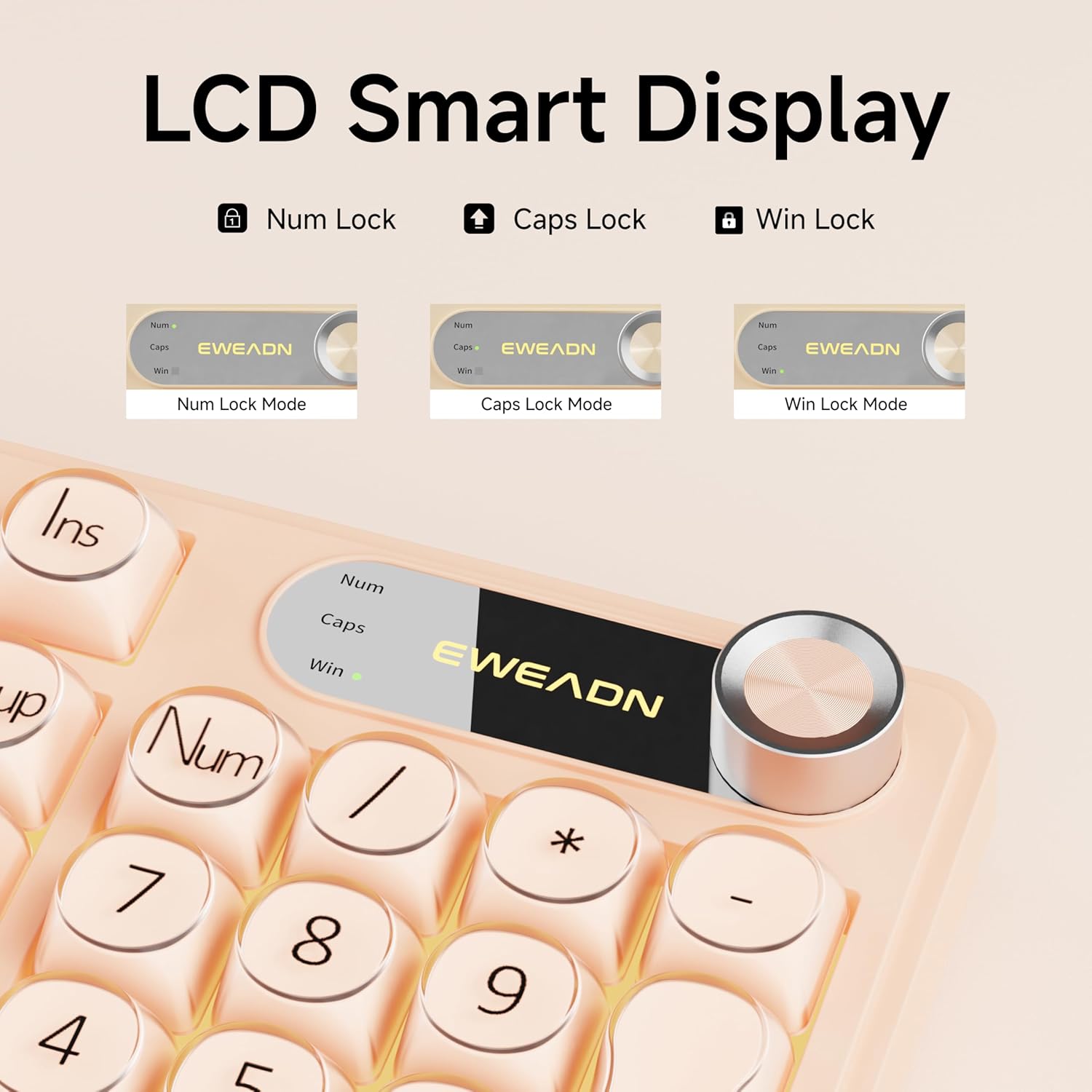
Figure 4: LCD Smart Display
4.3 RGB atzeko argia
Customize your typing experience with dynamic RGB lighting:
- FN + INS: Switches between 12 stunning RGB lighting effects.
- FN + PGUP/PGDN: Adjusts backlight brightness (5 levels).
- FN + "_" or "+": Adjusts lighting speed (5 levels).
- FN + Atzera tekla: Toggles backlight on/off.

Figure 5: RGB Backlight Control Functions
Video 2: Demonstration of various RGB lighting effects on the keyboard.
4.4 Dual-System Compatibility
The V102 keyboard is designed for broad compatibility across multiple operating systems and devices:
- Leihoak
- Mac (FN + S for Mac layout)
- Android
- iOS
- Xbox
- PS4
- PS5

Figure 6: Dual-System Connection for Windows and Mac
4.5 Diseinu ergonomikoa
The keyboard features a streamlined layout and adjustable typing angles for enhanced comfort during extended use. It includes a numeric keypad for efficient data entry.

Figure 7: 98-Key Layout and Adjustable Feet
4.6 Funtzionamendu isila
The membrane keyboard design is engineered to reduce typing sound, providing a quieter experience suitable for various environments.

Figure 8: Silent Computer Keyboard Design
4.7 Spill-Resistant Design
The keyboard features a spill-resistant design to protect against accidental liquid spills. In case of a spill, promptly disconnect the keyboard and allow it to dry completely before reconnecting.

Figure 9: Spill-Resistant Design
5. Mantentzea
To ensure the longevity and optimal performance of your EWEADN V102 keyboard, follow these maintenance guidelines:
- Garbiketa: Use a soft, lint-free cloth to wipe the surface of the keyboard. For deeper cleaning, use a can of compressed air to remove dust and debris from between the keys. Avoid using harsh chemicals or abrasive materials.
- Biltegiratzea: Gorde teklatua leku fresko eta lehor batean, eguzki-argitik eta muturreko tenperaturetatik babestuta.
- Manipulazioa: Saihestu teklatua erortzea edo gehiegizko indar baten eraginpean jartzea, barneko osagaiak kaltetu baititzake.
6. Arazoak
Teklatuarekin arazoak badituzu, jo ezazu ohiko irtenbide hauetara:
- Teklatuak ez du erantzuten: Ensure the USB Type-C cable is securely connected to both the keyboard and your device. Try connecting to a different USB port or a different device to rule out port or device issues.
- Atzeko argia ez dabil: Check if the backlight is turned off using the FN + Backspace shortcut. Adjust brightness using FN + PGUP/PGDN.
- Giltzak ez dira erregistratzen: Ensure no debris is lodged under the keys. If the issue persists, contact customer support.
- Incorrect layout (Mac users): Press FN + S to switch to the Mac layout.
Laguntza gehiago behar baduzu, jo ezazu Bermea eta Laguntza atalera.
7. Zehaztapenak
| Eredua | V102 |
| Diseinua | 98-Key Compact Layout with Number Pad |
| Konektibitatea | USB C motako kable bidezkoa |
| Atzeko argiztapena | Dynamic RGB (12 effects, 5 brightness levels, 5 speed levels) |
| Ezaugarri bereziak | Multi-Function Control Knob, Display Screen, Silent Membrane Keys, Spill-Resistant Design, Adjustable Typing Angles |
| Gailu bateragarriak | Laptop, PC, Gaming Console (Windows, Mac, Android, iOS, Xbox, PS4, PS5) |
| Materiala | Polibutileno tereftalatoa |
| Elementuaren pisua | 2.4 kilo |
| Paketearen neurriak | 17.68 x 7.05 x 1.97 hazbete |
8. Bermea eta Laguntza
Your EWEADN V102 Wired Gaming Keyboard is backed by a standard warranty. For specific warranty details, please refer to the product packaging or contact your retailer.
Bezeroarentzako Arreta
For technical assistance, troubleshooting, or any product-related inquiries, please contact EWEADN customer support:
- Posta elektronikoko laguntza: eweadnkeyboard@outlook.com
- Lineako laguntza: Bisitatu EWEADN Store on Amazon and click 'Ask a question' to contact the seller.