1. Produktua amaitu daview
The FOSSIBOT F110 Pro is a rugged smartphone designed for durability and high performance. It features a powerful processor, a large battery, advanced camera capabilities, and robust protection against environmental elements.
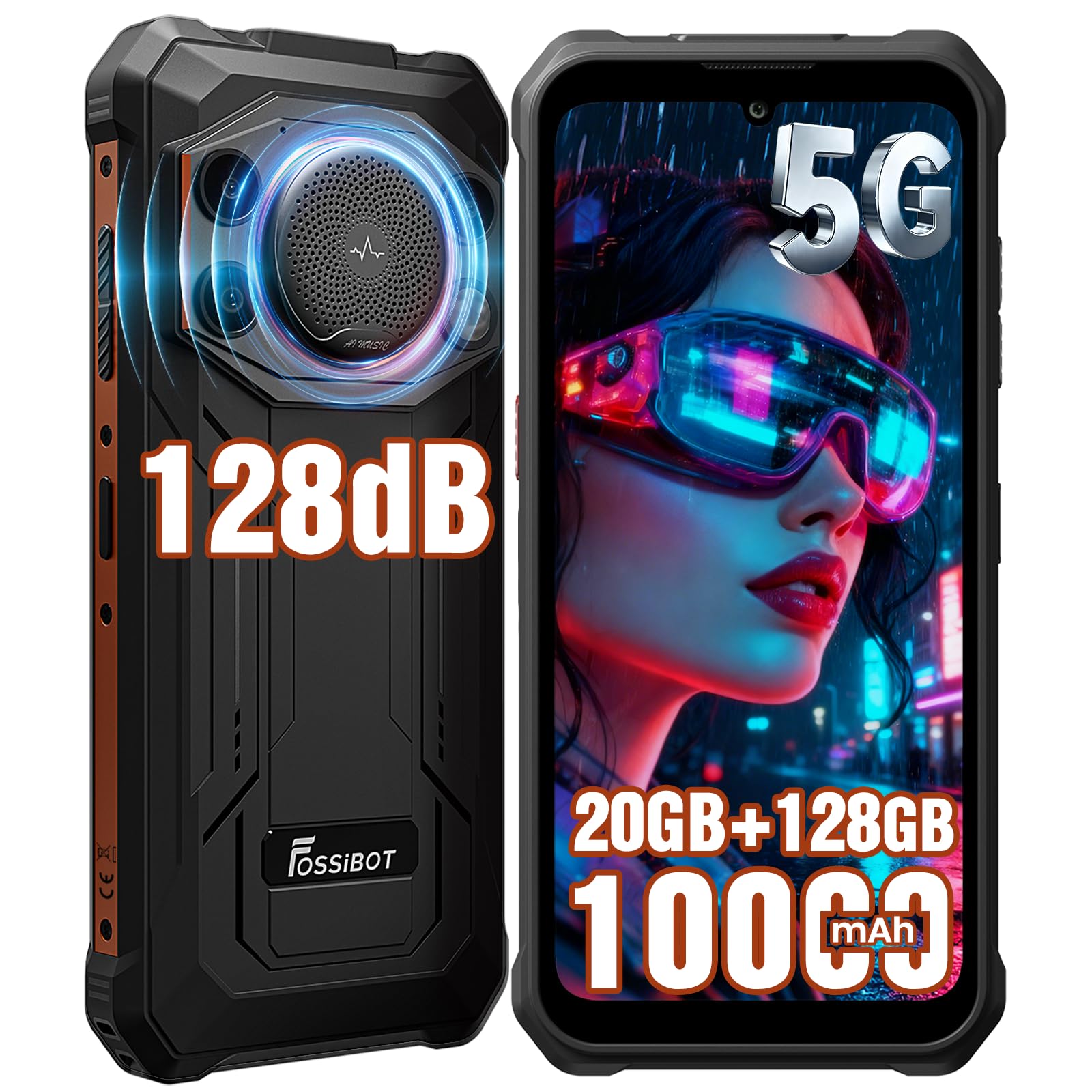
Image: FOSSIBOT F110 Pro Rugged Smartphone, front and back view.
2. Paketearen edukia
Konfigurazioarekin jarraitu aurretik, egiaztatu elementu guztiak paketean daudela.

Image: Contents of the FOSSIBOT F110 Pro standard package, including the smartphone, charger, USB cable, screen protector, SIM ejector, user manual, and packaging box.
- FOSSIBOT F110 Pro Rugged Smartphone x1
- Kargagailua x1
- Micro USB kablea x1
- TP Screen Protector (Pre-applied) x1
- SIM Card Ejector x1
- Erabiltzailearen eskuliburua x1
- Enbalatzeko kutxa x1
3. Konfigurazio gida
3.1. SIM txartelaren eta TF txartelaren instalazioa
The FOSSIBOT F110 Pro supports either two Nano SIM cards or one Nano SIM card and one TF (MicroSD) card for expanded storage.
- Bilatu SIM txartelaren erretilua gailuaren alboan.
- Sartu SIM txartela ateratzeko tresna erretiluaren ondoko zulo txikian eta sakatu astiro erretilua atera arte.
- Place your Nano SIM card(s) and/or TF card into the designated slots on the tray. Ensure the cards are correctly oriented.
- Kontu handiz sartu erretilua telefonoan berriro, bere lekuan klik egin arte.

Image: Diagram showing the installation of Nano SIM cards and a MicroSD card into the FOSSIBOT F110 Pro's tray.
3.2. Hasierako kargatzea
Before first use, it is recommended to fully charge the device. Use the provided charger and USB cable.
- Connect the USB cable to the charging port on the phone.
- Entxufatu kargagailua korronte-hartune batera.
- The charging indicator will appear on the screen. The device supports 18W fast charging.
3.3. Piztu/Itzaltzea
- Pizteko: Press and hold the Power button until the FOSSIBOT logo appears.
- Itzaltzeko: Sakatu eta eutsi pizteko botoiari, eta ondoren hautatu "Itzali" pantailan agertzen diren aukeren artean.
3.4. Hasierako gailuaren konfigurazioa
Lehen aldiz piztean, jarraitu pantailan agertzen diren argibideei hasierako konfigurazioa osatzeko, besteak beste:
- Hizkuntza hautatzea
- Wi-Fi sareko konexioa
- Google account setup
- Fingerprint and Face Recognition setup (optional)
4. Funtzionamendu-argibideak
4.1. Pantaila eta nabigazioa
The F110 Pro features a 6.745-inch HD+ display with a resolution of 720x1600 pixels and 480cd/m² peak brightness. It offers scratch resistance, high transparency, anti-fingerprint properties, and responsive touch sensitivity.

Image: Visual representation of the FOSSIBOT F110 Pro's 6.745-inch HD+ display highlighting its resolution, brightness, scratch resistance, transparency, anti-fingerprint, and touch sensitivity features.
4.2. Errendimendua eta sistema eragilea
Powered by a 5G Dimensity 6300 Octa-core processor (6nm process technology, 2.4GHz max clock speed), the F110 Pro delivers efficient performance. It runs on Android 15 OS, offering optimized performance, enhanced privacy, improved interaction experience, and system stability.

Image: Diagram illustrating the 5G Dimensity 6300 Processor with details on RAM (20GB: 8GB physical + 12GB virtual), ROM (128GB, expandable to 2TB via TF card), 6nm process, 2.4GHz clock speed, and octa-core architecture.

Image: Visual representation of the Android 15 OS interface on the FOSSIBOT F110 Pro, highlighting performance optimization, privacy & security, interaction experience, and system stability.
4.3. Audio Ezaugarriak
The F110 Pro is equipped with a 128dB loudest speaker, providing powerful and clear audio. This feature is beneficial for:
- Noisy Environments: Ensures clear calls and audio in construction sites or workshops.
- Kanpoko festak: Provides powerful sound for entertainment.
- SOS Speaker: Loud enough to send help signals in emergencies.
- Hearing-Impaired Users: High volume for clear sound.

Image: Illustration of the FOSSIBOT F110 Pro's 128dB speaker, emphasizing larger clarity and improved visual experience, with a scene of people watching a movie with powerful sound.
4.4. Kamera sistema
Capture moments with the F110 Pro's versatile camera system:
- 50MP-ko AI kamera nagusia: For stunning clarity and detail in various scenarios (Video, Picture, Beauty, Mono, Bokeh, AI Recognition, Underwater Camera, Night Scene, Macro, Scan Code).
- 8MP-ko aurrealdeko kamera: Selfie eta bideo-dei garbietarako.
- 5MP makro kamera: Xehetasun handiko plano hurbilak lortzeko.

Irudia: Gainetikview of the FOSSIBOT F110 Pro's camera system, detailing the 50MP AI Main Camera, 8MP Front Camera, and 5MP Macro Camera, with exampargazkiak.
Underwater Camera Mode
Utilize the dedicated Underwater Camera Mode to capture photos and videos while submerged. Ensure all ports are securely sealed before using the phone in water.

Image: A person using the FOSSIBOT F110 Pro in Underwater Camera Mode to photograph a sea turtle.
4.5. Bateria eta kargatzea
The F110 Pro is equipped with a 10000mAh long-lasting battery, providing extended usage times. It supports 18W fast charging and OTG (On-The-Go) reverse charging, allowing you to use your phone as a power bank for other devices.
- Usage Estimates: Up to 150H Music, 18H Video, 70H Calling, 135H Standby, 135H Gaming, 21H Flashlight, 16H GPS.
- Kargatzeko denbora: Approximately 3 hours to reach 80%, and 4 hours 15 minutes to reach 100%.

Image: Visual of the FOSSIBOT F110 Pro's 10000mAh battery capacity, showing 18W fast charging and OTG reverse charging capabilities, along with charging time estimates.

Image: Illustration of the FOSSIBOT F110 Pro functioning as an OTG power bank, charging various devices like Bluetooth earphones, tablets, USB mini fans, smartwatches, portable speakers, and action cameras.
4.6. Konexioa eta nabigazioa
The F110 Pro supports 5G connectivity and a wide range of global network bands (GSM, 3G, 4G, 5G NR). It also includes Full-Scenario NFC for contactless payments and data transfer, and precise navigation with GPS, Galileo, Glonass, and Beidou.

Image: Diagram showing the FOSSIBOT F110 Pro's support for various global network bands (GSM, 3G, 4G, 5G NR) and its Full-Scenario NFC capability for mobile payments.
4.7. Segurtasun Ezaugarriak
The device offers multiple security options for unlocking and protecting your data:
- Alboko hatz-markaren bidezko desblokeoa: A fingerprint sensor integrated into the side button for quick and secure access.
- Aurpegi-aitorpena: Unlock your phone using facial scanning technology.

Image: Close-up of the FOSSIBOT F110 Pro's side-mounted fingerprint sensor.

Image: A person using face recognition to unlock the FOSSIBOT F110 Pro.
4.8. Software Toolbox and Custom Button
The F110 Pro includes a software toolbox with various utility apps and a customizable button for quick access to frequently used functions.
- Software Toolbox: Compass, SoundMeter, Pic Hanging, StepCount, Gradlenter, HeightMeasure, Magnifier, Flashlight, Warning, Plumb Bob, Protractor.
- Botoi pertsonalizatua: A programmable button that can be set for single press, double press, or long press to launch specific apps or functions, enhancing usability and efficiency.

Image: Display of the FOSSIBOT F110 Pro's software toolbox applications and an explanation of the customizable button for quick access to functions like flashlight, camera, or SOS.
5. Mantentze-lanak eta iraunkortasuna
The FOSSIBOT F110 Pro is built to withstand harsh environments, featuring IP68/IP69K waterproof and dustproof ratings, and MIL-STD-810H drop resistance.

Image: Visual representation of the FOSSIBOT F110 Pro's ruggedness, highlighting IP68 (1.5m depth, 30 minutes immersion), IP69K (high-temperature, high-pressure wash resistant), and MIL-STD-810H (1.5 meter drop resistance) certifications.
5.1. Water and Dust Resistance (IP68 & IP69K)
- IP68: The device is protected against dust ingress and can withstand immersion in water up to 1.5 meters for 30 minutes.
- IP69K: Provides protection against close-range high-pressure, high-temperature spray downs.
- Garrantzitsua: Ensure all port covers are securely closed before exposing the device to water or dust. Do not intentionally submerge the device in corrosive liquids or saltwater.
5.2. Drop Resistance (MIL-STD-810H)
The F110 Pro meets MIL-STD-810H standards for drop resistance, capable of withstanding drops from up to 1.5 meters onto hard surfaces.
5.3. Garbiketa eta Zainketa
- Gailua garbitzeko, garbitu leun batekin, damp oihal. Saihestu produktu kimiko gogorrak edo material urratzaileak erabiltzea.
- If the device has been exposed to water, ensure it is completely dry before charging or opening any ports.
- Avoid extreme temperatures and direct sunlight for prolonged periods to maintain battery health.
6. Arazoak
This section addresses common issues you might encounter with your FOSSIBOT F110 Pro.
| Arazoa | Irtenbide posiblea |
|---|---|
| Gailua ez da pizten | Ziurtatu bateria kargatuta dagoela. Konektatu kargagailua eta itxaron minutu batzuk berriro pizten saiatu aurretik. |
| Errendimendu motela edo izoztea | Close unnecessary background applications. Restart the device. Clear cache from apps or perform a factory reset if the issue persists (back up data first). |
| Fingerprint sensor not working reliably | Ensure your finger and the sensor are clean and dry. Re-register your fingerprints in the settings. Try using face recognition or pattern/PIN unlock. |
| Ez dago sareko seinalerik | Check if the SIM card is correctly inserted. Ensure mobile data is enabled in settings. Try restarting the device. Contact your carrier to verify service. |
| Bateria azkar agortzen da | Reduce screen brightness. Close power-intensive apps. Disable unused features like Wi-Fi, Bluetooth, GPS. Check battery usage in settings to identify problematic apps. |
| Speaker audio is distorted or too low | Ensure the speaker grille is not obstructed or dirty. Adjust volume settings. Restart the device. |
If issues persist, please contact FOSSIBOT customer support for further assistance.
7. Zehaztapenak
| Ezaugarri | Xehetasuna |
|---|---|
| Modelo zenbakia | F110Pro |
| Prozesadorea | 5G Dimensity 6300 Octa-core (6nm, 2.4GHz Max Clock Speed) |
| Sistema eragilea | Android 15 |
| RAM | 20 GB (8GB Physical + 12GB Virtual) |
| Barne biltegiratzea (ROM) | 128 GB |
| Biltegiratze zabalgarria | Up to 2 TB via TF Card |
| Bistaratzea | 6.745 Inches HD+ (720x1600), 480cd/m² Peak Brightness |
| Atzeko kamera | 50 MP AI Main Camera, 5 MP Macro Camera |
| Aurrealdeko kamera | 8 MP |
| Bateria Edukiera | 10000 mAh |
| Kargatzen | 18W-ko karga azkarra, OTG alderantzizko karga |
| Iraunkortasun Balorazioak | IP68, IP69K Waterproof & Dustproof, MIL-STD-810H Drop Resistance |
| Hizlaria | 128dB Loud Speaker |
| Konektibitatea | 5G, NFC, SIM bikoitza |
| Nabigazioa | GPS, Galileo, Glonass, Beidou |
| Segurtasuna | Side Fingerprint Unlock, Face Recognition |
| Elementuaren pisua | 1.43 kilo (gutxi gorabehera 648 gramo) |
| Paketearen neurriak | 5.91 x 2.95 x 1.18 hazbete |
| Haririk gabeko garraiolaria | T-Mobile (bateragarria) |
8. Bermea eta Laguntza
For warranty information and customer support, please refer to the warranty card included in your product package or visit the official FOSSIBOT website. You can also contact FOSSIBOT customer service through their official channels for technical assistance or inquiries.
Bisitatu FOSSIBOT Store produktu eta informazio gehiago lortzeko.


