1. Sarrera
Thank you for choosing the BestGod Walking Pad with Incline, Model 480A-B. This compact and portable treadmill is designed for home use, offering a convenient way to incorporate walking or light jogging into your daily routine. It features a 2.5 HP motor, a 5% manual incline, and a remote control for easy operation. Please read this manual thoroughly before use to ensure safe and effective operation.
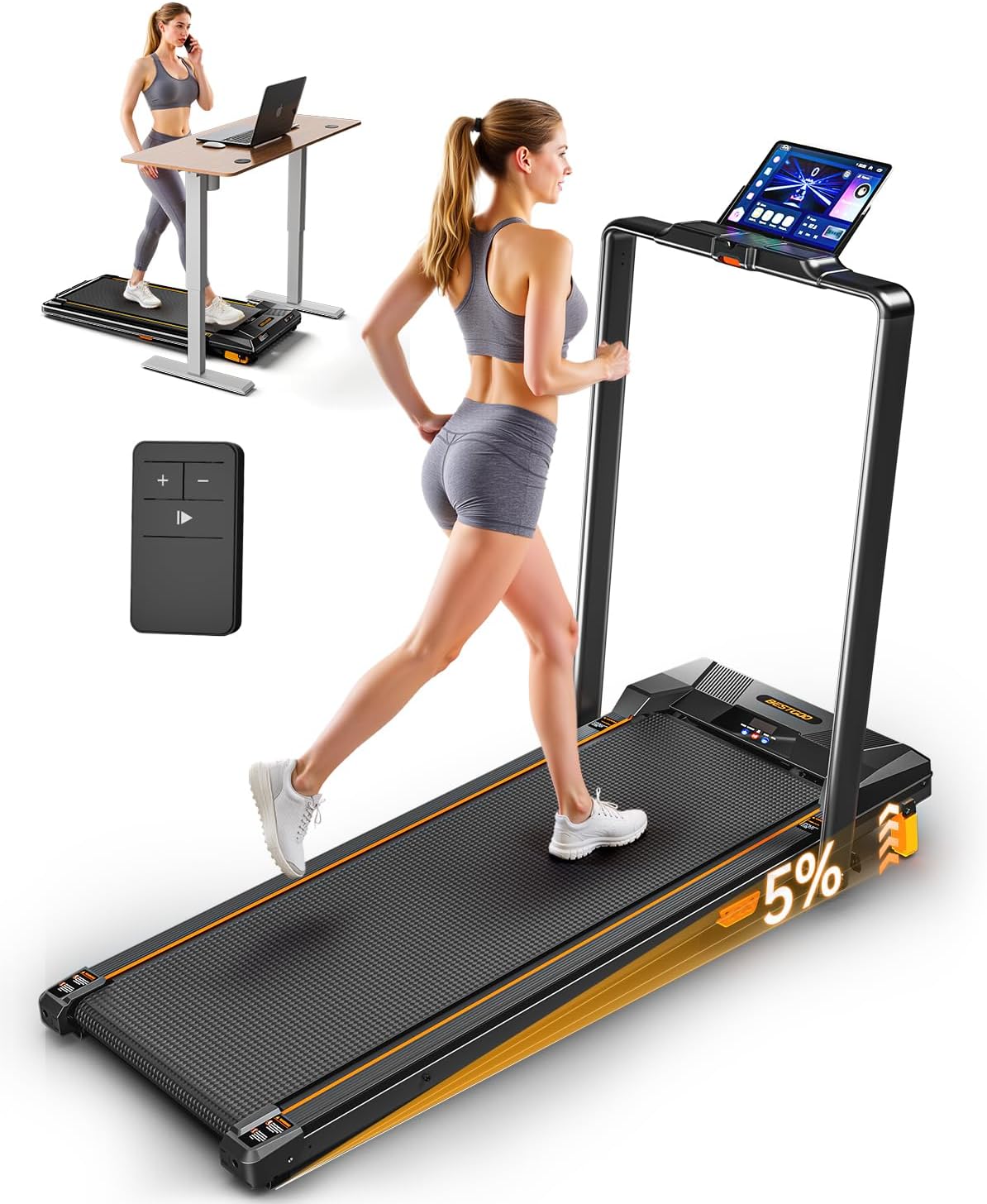
Image 1.1: The BestGod Walking Pad with Incline, featuring a handrail and remote control. It can be used as a traditional treadmill or placed under a desk for walking while working.
2. Segurtasun-argibideak
To prevent injury and ensure proper operation, please adhere to the following safety guidelines:
- Ariketa programa berri bat hasi aurretik, kontsultatu beti mediku batekin.
- Place the walking pad on a flat, stable surface with adequate clearance around it (at least 2 feet from walls or furniture).
- Ensure the power cord is not pinched or damaged and is connected to a grounded outlet.
- Do not allow children or pets near the walking pad while it is in operation.
- Wear appropriate athletic footwear. Do not use the walking pad barefoot or in socks.
- Hold onto the handrail for stability, especially when starting or stopping the machine, or when adjusting speed.
- Zorabioak, zorabiadura edo mina sentitzen baduzu, utzi ariketa fisikoa berehala.
- The maximum user weight capacity for this device is 330 pounds. Exceeding this limit may result in damage to the unit or personal injury.
- Unplug the walking pad from the power outlet when not in use or before cleaning and maintenance.
3. Paketearen edukia
Egiaztatu osagai guztiak paketean daudela:
- BestGod Walking Pad with Incline (Main Unit)
- Handrail (Pre-attached or requiring minimal assembly)
- Urruneko Kontrola
- Elikatze kablea
- Erabiltzailearen eskuliburua (dokumentu hau)
- Lubricant for Belt Maintenance
- Assembly Tool (if required for handrail)
4. Konfigurazioa
The BestGod Walking Pad is designed for minimal assembly. Follow these steps for initial setup:
- Despaketatzea: Carefully remove the walking pad from its packaging. It is recommended to have two people for lifting due to its weight (approximately 42 pounds).
- Kokalekua: Place the walking pad on a firm, level surface. Ensure there is ampUnitatearen inguruan segurtasunez funtzionatzeko espazioa utzi.
- Handrail Installation (if not pre-attached): If the handrail is not already in the upright position, carefully raise it and secure it according to the specific instructions provided in the included quick-start guide or on the unit itself. Some models may require attaching small support legs using the provided tool.
- Potentzia-konexioa: Plug the power cord into the walking pad's power input, then plug the other end into a standard grounded electrical outlet.
- Hasierako lubrifikazioa: Before first use, it is recommended to apply lubricant to the running belt as instructed in the maintenance section or the separate lubrication guide.

Image 4.1: The walking pad in use, demonstrating the 5% manual incline feature. The display shows metrics such as time, distance, calories, and speed.
5. Funtzionamendu-argibideak
Familiarize yourself with the controls and functions of your BestGod Walking Pad.
5.1 Piztu/Itzaltzea
- Piztu: Locate the main power switch, usually at the front or rear of the unit, and flip it to the 'ON' position. The LED display will illuminate.
- Itzali: Flip the main power switch to the 'OFF' position. It is recommended to unplug the unit when not in use for extended periods.
5.2 Urruneko agintea erabiltzea
The remote control allows you to start, stop, and adjust the speed of the walking pad.
- Hasi: Press the 'Start' button on the remote. The belt will begin moving at a low speed.
- Gelditu: Press the 'Stop' button to halt the belt instantly.
- Abiadura doitzea: Use the '+' button to increase speed and the '-' button to decrease speed. Speed adjusts in increments of 0.2 MPH.
5.3 LED pantaila ulertzea
The integrated LED monitor tracks your workout progress in real-time.
- Ordua: Zure entrenamenduaren iraupena erakusten du.
- Abiadura: Shows the current speed of the walking belt in miles per hour (MPH).
- Distantzia: Indicates the total distance covered during your session.
- Kaloriak: Estimates the number of calories burned.

Image 5.1: The LED display panel, showing real-time workout data including time, calories, speed, and distance.
5.4 Adjusting Incline
The walking pad features a 5% manual incline adjustment. To adjust the incline, you will need to manually raise or lower the rear of the unit. Refer to the specific instructions in your quick-start guide for the exact mechanism, as this typically involves adjusting support feet or a lever at the rear of the machine. Always ensure the unit is stable after adjusting the incline.
5.5 entrenamendu moduak
The walking pad offers various modes to suit different fitness goals:
- Ibiltzeko modua: Speeds from 0 to 3.0 MPH, ideal for casual walking or under-desk use.
- Korrika egiteko modua: Speeds from 3.0 to 5.0 MPH, suitable for light jogging.
Additionally, the unit may feature pre-programmed modes such as Warm-up, Recovery, Cardio, Endurance, Power Walk, and Sprint. Consult your quick-start guide for details on selecting and utilizing these specific programs.

Image 5.2: Illustration of the Walking Mode (0-3.0 MPH) and Running Mode (3.0-5.0 MPH) available on the BestGod Walking Pad.

Image 5.3: Visual representation of various workout modes, including Recovery, Warm-up, Cardio, Endurance, Power Walk, and Sprint.
5.6 Dual Functionality (Massage Side)
Some BestGod Walking Pad models feature a dual-sided design, with a textured surface on the underside that can be used for foot massage. To utilize this feature, carefully flip the unit over when it is powered off and unplugged. Ensure the unit is stable before placing your feet on the massage surface.
6. Mantentzea
Regular maintenance ensures the longevity and optimal performance of your walking pad.
6.1 Lubrifikazioa
The running belt requires periodic lubrication to reduce friction and wear. A small tube of lubricant is included with your walking pad. Refer to the separate lubrication instructions provided with your unit for the correct application method and frequency. Typically, lubrication is recommended every few months depending on usage.
6.2 Garbiketa
- Always unplug the walking pad before cleaning.
- Garbitu unitatea zapi leun batekin,amp oihal. Saihestu garbitzaile edo disolbatzaile urratzaileak erabiltzea.
- Regularly vacuum around and under the walking pad to prevent dust and debris from accumulating.
6.3 Biltegiratzea
The BestGod Walking Pad features a foldable design for convenient storage.
- Ensure the unit is powered off and unplugged.
- Carefully fold the handrail down.
- The built-in transport wheels allow for easy movement. You can roll the unit to a desired storage location, such as under a bed or upright against a wall.

Image 6.1: The BestGod Walking Pad folded flat, illustrating its compact design for easy storage under furniture.

Image 6.2: A visual guide demonstrating the folding mechanism of the BestGod Walking Pad for space-saving storage.
7. Arazoak
If you encounter issues with your BestGod Walking Pad, refer to the following common problems and solutions:
| Arazoa | Kausa posiblea | Irtenbidea |
|---|---|---|
| Ibiltzeko alfonbra ez da pizten. | Power cord not properly connected; Main power switch is off; Outlet malfunction. | Ensure power cord is securely plugged into both the unit and a working outlet. Flip the main power switch to 'ON'. Test the outlet with another device. |
| Urruneko kontrolak ez du erantzuten. | Remote battery is dead or incorrectly inserted; Remote is too far from the unit. | Replace the remote control battery (a spare may be included). Ensure the battery is inserted with correct polarity. Operate the remote within close range of the walking pad. |
| Belt slips or hesitates during use. | Belt requires lubrication; Belt tension is incorrect. | Apply lubricant to the running belt as per maintenance instructions. If the issue persists, contact customer support for belt tension adjustment guidance. |
| Unitateko ezohiko zarata. | Loose components; Debris under the belt; Motor issue. | Inspect the unit for any loose parts. Clean around and under the belt. If the noise persists, discontinue use and contact customer support. |
| Errore kodea bistaratu da. | Barneko matxura. | Note the error code and refer to the specific troubleshooting section in your quick-start guide. If not listed, power cycle the unit (turn off, unplug, wait 1 minute, plug in, turn on). If the error persists, contact customer support. |
Important Note on Weight Capacity:
While the product specifications state a maximum weight recommendation of 330 pounds, some user manuals included with the product may indicate a lower capacity of 265 pounds. Please adhere to the lower weight limit if specified on your physical product manual to ensure safety and product longevity. If you have concerns, contact customer support.
8. Zehaztapenak
| Ezaugarri | Xehetasuna |
|---|---|
| Marka | BestGod |
| Ereduaren izena | 480A-B |
| Kolorea | Black-Handrail |
| Produktuaren neurriak (LxWxH) | 49" L x 4" W x 22" H |
| Materiala | Akrilonitrilo Butadieno Estirenoa (ABS) |
| Gehienezko Abiadura | 5 Mila orduko |
| Ezaugarri bereziak | Foldable, Wheeled, Handrail, Remote Control, LED Display, 5% Manual Incline |
| Gehienezko zaldi potentzia | 2.5 zaldi potentzia |
| Gehienezko pisuaren gomendioa | 330 Pounds (Refer to troubleshooting for important note) |
| Paketearen pisua | 42 kilo |

8.1 irudia: Barnekoa view highlighting the 2.5 HP brushless motor, designed for quiet operation (below 45 dB) and supporting speeds up to 5 MPH.

Image 8.2: Detail of the multi-layer running belt and shock absorption system, designed for knee and ankle protection, supporting a maximum weight of 330 lbs.
9. Bermea
The BestGod Walking Pad (Model 480A-B) comes with a 1 urteko bermea from the date of purchase. This warranty covers manufacturing defects and malfunctions under normal use. Please retain your proof of purchase for warranty claims. The warranty does not cover damage caused by misuse, accidents, unauthorized modifications, or failure to perform recommended maintenance.
10. Bezeroarentzako arreta
For any questions, concerns, or assistance with your BestGod Walking Pad, please do not hesitate to contact our customer support team. We are available to assist with replacement parts, user manual inquiries, or any other product-related support.
- Kontaktu metodoa: Please email us directly. Our team aims to reply within 24 hours.
- Eskuragarritasuna: Support is available before and after your order.

Image 10.1: Visual representation of BestGod's customer support, emphasizing email contact for inquiries.


