1. Sarrera
This manual provides essential information for the safe and efficient use of your Fossibot F107 Pro 5G Rugged Smartphone. Please read it thoroughly before operating your device.
Kutxan dagoena
- Fossibot F107 Pro 5G Smartphone
- USB motako kablea
- Elikadura egokitzailea (66W)
- SIM kanporatzeko tresna
- Erabiltzailearen eskuliburua
- Berme Txartela
2. Produktuaren ezaugarriak
The Fossibot F107 Pro is engineered for durability and high performance, offering a range of advanced features:
- Massive 28000mAh Battery with 66W Fast Charge: Experience extended usage with a large battery and rapid charging capabilities. The OTG function allows charging of other devices.
- Kamera Sistema Aurreratua: Features a 200MP AI main camera for detailed photos, a 2MP Night Vision Camera for clear low-light imaging, and a 50MP front camera for high-quality selfies. Supports 4K video recording and various modes including underwater, HDR, and 360° panorama.
- Robust Performance and Storage: Equipped with 12GB RAM (expandable up to 18GB virtual RAM for a total of 30GB) and 512GB internal storage, utilizing DDR5 technology for faster performance and lower power consumption.
- Immersive 6.95" FHD+ Display: A 2.4K display with 2400x1080 resolution and a 120Hz Smart Dynamic Refresh Rate provides smooth visuals and responsive interaction.
- 5G Network Connectivity: Supports 5G networks (T-Mobile compatible; Verizon and AT&T are not supported). Please verify local frequency band compatibility before purchase.
- Diseinu malkartsua: Built to MIL-STD-810H standards, with IP68 and IP69K ratings for water, dust, and drop resistance.
- Linterna integratua: A powerful flashlight with a 50-meter beam distance for outdoor activities and emergencies.
- Segurtasuna eta erosotasuna: Includes NFC for contactless payments, Face ID, and Fingerprint unlock for secure and quick access.

Irudia: Gainetikview of Fossibot F107 Pro's main features, highlighting its large battery, memory, camera, and rugged certifications.
3. Gailuaren diseinua
Familiarize yourself with the physical components of your Fossibot F107 Pro.

Irudia: Aurrealdea eta atzealdea view of the Fossibot F107 Pro, showcasing its rugged design and camera module.

Irudia: Alboko profesionalafile of the Fossibot F107 Pro, indicating the location of the power button, volume rocker, and SIM/TF card slot.
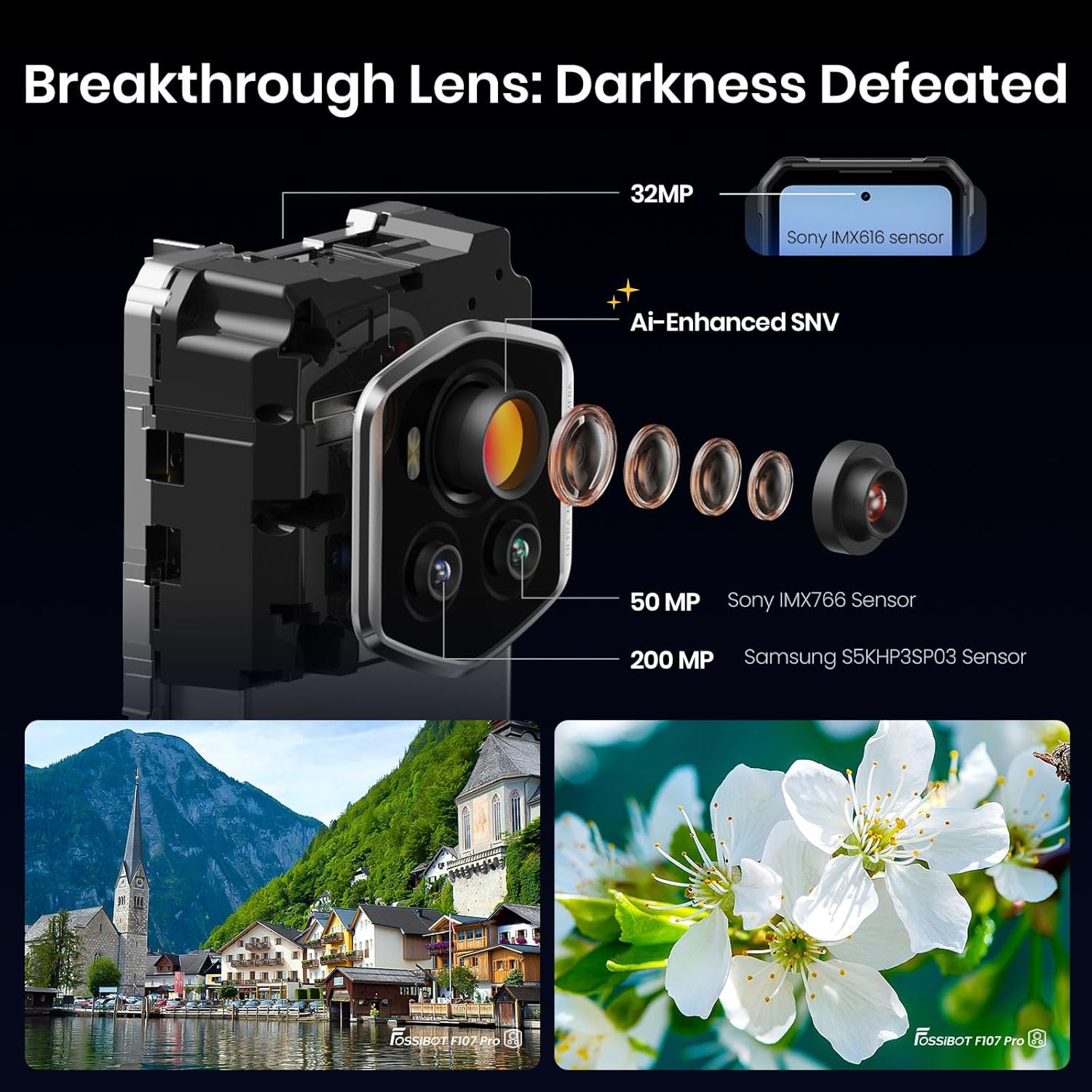
Irudia: Xehetasun handikoa view of the Fossibot F107 Pro's multi-lens camera system, including the 200MP main sensor and night vision lens.
4. Konfigurazioa
4.1 SIM txartelaren eta TF txartelaren instalazioa
- Bilatu SIM/TF txartelaren erretilua gailuaren alboan.
- Sartu SIM txartela ateratzeko tresna erretiluaren ondoko zulo txikian eta bultzatu astiro erretilua atera arte.
- Place your Nano-SIM card(s) and/or TF card (microSD) into the designated slots on the tray. Ensure the gold contacts face downwards.
- Kontu handiz sartu erretilua telefonoan berriro, bere lekuan klik egin arte.
4.2 Hasierako karga
Before first use, fully charge your device. Use the provided 66W power adapter and USB Type-C cable for optimal charging speed.
- Konektatu USB C motako kablea telefonoaren beheko aldean dagoen kargatzeko atakara.
- Konektatu kablearen beste muturra korronte-egokigailura.
- Entxufatu korronte-egokigailua hormako entxufe batera.
- Kargatzeko adierazlea pantailan agertuko da.
4.3 Piztu/Itzaltzea
- Pizteko: Press and hold the Power button (located on the side) until the Fossibot logo appears.
- Itzaltzeko: Sakatu eta eutsi pizteko botoiari, eta ondoren hautatu "Itzali" pantailan agertzen diren aukeren artean.
- Berrabiarazteko: Sakatu eta eutsi pizteko botoiari, eta ondoren hautatu "Berrabiarazi" pantailan agertzen diren aukeren artean.
4.4 Hasierako konfigurazioa
Upon first power-on, follow the on-screen prompts to configure your device, including language, Wi-Fi connection, Google account, and security settings.
5. Funtzionamendu-argibideak
5.1 Oinarrizko nabigazioa (Android 15)
Your Fossibot F107 Pro runs on Android 15. Navigate using gestures or the traditional three-button navigation bar (configurable in Settings).
- Hasierako pantaila: Swipe left/right to access app pages.
- Aplikazioen tiradera: Pasatu hatza gora pantailaren behealdera arte view instalatutako aplikazio guztiak.
- Jakinarazpenak eta ezarpen azkarrak: Irristatu hatza pantailaren goialdetik behera jakinarazpenak eta ezarpen azkarrak atzitzeko.
5.2 Kameraren erabilera
The Fossibot F107 Pro features a versatile camera system.
- Ireki Kamera aplikazioa.
- Select your desired mode (Photo, Video, Night Vision, Portrait, etc.).
- Sakatu obturadorearen botoia argazki bat ateratzeko edo bideo grabaketa hasteko/gelditzeko.

Irudia: Lehertua view of the camera module, showing the 200MP Samsung S5KHP3SP03 sensor, 50MP Sony IMX766 sensor, and 32MP Sony IMX616 sensor.

Image: Demonstrates the difference between Starlight Night Vision (full-color) and traditional Infrared Night Vision (black and white).
5.3 Linternaren funtzionamendua
The powerful integrated flashlight can be accessed via Quick Settings or a dedicated button (if configured).

Image: The Fossibot F107 Pro's flashlight illuminating a path, highlighting its 50-meter beam distance.
5.4 OTG funtzionaltasuna
The On-The-Go (OTG) feature allows your phone to act as a power bank to charge other devices or connect USB accessories.
- Connect an OTG adapter (not included) to your phone's USB-C port.
- Connect the device you wish to charge or the USB accessory to the OTG adapter.
- Ensure OTG is enabled in your phone's settings if it doesn't activate automatically.
5.5 Segurtasun Ezaugarriak (Aurpegi IDa, Hatz-marka)
Set up Face ID or Fingerprint unlock for convenient and secure access to your device.
- Joan zaitez Ezarpenak > Segurtasuna eta pribatutasuna > Gailuaren desblokeoa.
- Follow the on-screen instructions to register your face or fingerprint.
5.6 Pantailaren ezarpenak
Customize your display experience, including the 120Hz refresh rate.

Image: Visual representation of the Fossibot F107 Pro's display specifications, including resolution, refresh rate, and brightness.
6. Mantentzea
To ensure the longevity and optimal performance of your Fossibot F107 Pro, follow these maintenance guidelines:
- Uraren eta hautsaren erresistentzia: The device is IP68/IP69K rated. Ensure all port covers are securely closed before exposing the phone to water or dust. Do not intentionally submerge the phone in corrosive liquids or extreme temperatures.
- Garbiketa: Erabili biguna, damp telefonoaren gainazala garbitzeko zapi bat. Saihestu produktu kimiko gogorrak edo material urratzaileak.
- Bateria zaintzea: Avoid extreme temperatures. Do not fully discharge the battery regularly. Use the original charger for optimal battery health.
- Pantailaren babesa: While the screen is durable, consider using a screen protector for added scratch resistance.
- Tenperatura: Erabili gailua gomendatutako tenperatura-tarteetan (normalean 0 °C eta 35 °C artean).
7. Arazoak
If you encounter issues with your Fossibot F107 Pro, refer to the following common solutions:
7.1 Telefonoa ez da pizten
- Ziurtatu bateria kargatuta dagoela. Konektatu telefonoa kargagailura gutxienez 30 minutuz.
- Berrabiarazteko, sakatu eta eutsi pizteko botoia 10-15 segundoz.
7.2 Kargatzeko arazoak
- Egiaztatu kargatzeko kablea eta egokitzailea ondo konektatuta daudela eta kalterik gabe daudela.
- Try using a different compatible charger and cable.
- Clean the charging port gently with a dry, soft brush to remove any debris.
7.3 Sarearen konexio arazoak
- Egiaztatu zure SIM txartela behar bezala sartuta dagoen.
- Ensure mobile data is enabled in Settings.
- Berrabiarazi telefonoa.
- Verify that your carrier (T-Mobile) has coverage in your area. Remember, Verizon and AT&T are not supported.
7.4 Camera Not Working
- Restart the Camera app or the phone.
- Check app permissions for the Camera app in Settings.
- Ziurtatu kameraren lenteetan oztopo fisikorik ez dagoela.
7.5 Errendimendu motela
- Itxi behar ez diren atzeko planoko aplikazioak.
- Garbitu maiz erabiltzen diren aplikazioen cache datuak.
- Ziurtatu biltegiratze leku nahikoa dagoela eskuragarri.
- Kontuan hartu fabrika berrezarpena azken aukera gisa (egin zure datuen babeskopia lehenik).
8. Zehaztapenak
| Ezaugarri | Zehaztapena |
|---|---|
| Marka | FOSSIBOT |
| Ereduaren izena | fossibot f107 pro |
| Sistema eragilea | Android 15 |
| Pantailaren tamaina | 6.95 hazbete |
| Ebazpena | 2400 x 1080 |
| Freskatze tasa | 120 Hz |
| RAM memoria instalatuaren tamaina | 12 GB (expandable to 30GB virtual RAM) |
| Memoria Biltegiratzeko Ahalmena | 512 GB |
| Bateria Edukiera | 28000 milioiamp Orduak |
| Konektibitate Teknologiak | 5G, NFC, OTG, GPS |
| Haririk gabeko operadoreen laguntza | T-Mobile (Verizon and AT&T not supported) |
| Malkartasuna | MIL-STD-810H, IP68, IP69K |
| Elementuaren pisua | 3.04 kilo |
| Paketearen neurriak | 9.25 x 8.19 x 2.4 hazbete |
| Eskuragarri dagoen lehen data | 17ko irailaren 2025a |
9. Bermea eta Laguntza
Your Fossibot F107 Pro comes with a standard manufacturer's warranty. For detailed warranty information, please refer to the warranty card included in your product packaging or visit the official FOSSIBOT webgunea.
For technical support, troubleshooting assistance, or service inquiries, please contact FOSSIBOT customer support through their official channels. Keep your purchase receipt and product serial number handy when contacting support.
10. Produktuaren bideoaview
Bideoa: Amaiera batview of the Fossibot F107 Pro, showcasing its features, ruggedness, and battery life in various usage scenarios.