1. Sarrera
The BLUETTI Elite 10 Mini Portable Power Station is a compact and versatile power solution designed for various applications, including camping, travel, and emergency backup. Featuring a 128Wh LiFePO4 battery and a 200W AC outlet, it provides reliable power for small electronic devices. Its lightweight and airline-friendly design makes it an ideal companion for on-the-go power needs.

Figure 1: BLUETTI Elite 10 Mini Portable Power Station, showcasing its compact design and front panel.
2. Segurtasun-argibideak
Please read and understand all safety instructions before operating the BLUETTI Elite 10. Failure to follow these instructions may result in electric shock, fire, or serious injury.
- Ez desmuntatu, konpondu edo aldatu unitatea.
- Mantendu unitatea sutik, uretatik eta muturreko tenperaturetatik urrun.
- Saihestu unitatea erortzea edo kolpe gogorren eraginpean jartzea.
- Erabili onartutako osagarriak eta kargatzeko kableak soilik.
- Ziurtatu aireztapen egokia erabiltzen eta kargatzen ari den bitartean.
- Mantendu haurren eskura.
3. Produktuaren ezaugarriak
- Potentzia-irteera polifazetikoa: Equipped with a 200W AC outlet, 100W USB-C fast charging, and multiple DC ports to power various devices.
- Trinkoa eta eramangarria: Weighs approximately 4.0 lbs (1.8 kg) with an ergonomic handle, making it easy to carry.
- Airline-Friendly Capacity: 128Wh battery capacity falls within the 100–160Wh range, allowing it to be carried on most major airlines with prior approval (limit 2 per passenger).
- Etenik gabeko elikadura hornidura (UPS): Features a built-in 10ms UPS and 350W bypass output for seamless power during outages.
- Hainbat kargatzeko aukera: Supports 150W AC charging (full in 70 mins), 100W solar charging, and 100W car charging.
- Aplikazio adimenduna kontrola: Connect via Bluetooth to customize charging modes, adjust lighting, and monitor power status in real time.
- LED argiztapen integratua: Offers 3 lighting modes (warm/cool light, SOS) for up to 50 hours of illumination.
4. Hasteko urratsak eta konfigurazioa
4.1. Kutxa irekitzea eta paketearen edukia
Paketea irekitzean, ziurtatu osagai guztiak daudela:
- BLUETTI Elite 10 Mini Power Station
- AC kargatzeko kablea
- Autoak kargatzeko kablea
- Erabiltzailearen eskuliburua

Figure 2: Contents of the BLUETTI Elite 10 package.
4.2. Hasierako kargatzea
Before first use, fully charge the BLUETTI Elite 10. Connect the AC charging cable to the AC input port on the unit and then to a wall outlet. The display will indicate charging status. A full charge via AC takes approximately 70 minutes.
5. Produktua amaitu daview
5.1. Aurreko panela
The front panel features the main display, control buttons, and various output ports:
- DC irteera (12V/5A): For compatible DC devices.
- Bistaratzeko pantaila: Sarrera/irteera erakusten dutage, bateria ehunekotage, eta gainerako exekuzio-denbora.
- DC botoia: Activates DC output ports.
- Pizteko botoia: Unitatea piztu / itzali egiten du.
- AC botoia: Activates the AC output outlet.
- USB-C 100W Output: For fast charging compatible USB-C devices.
- USB-A 15W Outputs (x2): Standard USB-A ports for charging.
- USB-C 15W Output: Additional USB-C port.
Figure 3: Front panel layout of the BLUETTI Elite 10.
5.2. Side and Rear Panels
The side and rear panels house additional input/output ports and the LED light:
- DC/PV Input (12-28V/8A, 100W Max): For solar or car charging.
- AC Output (120V/200W): Standard wall outlet for AC-powered devices.
- AC sarrera: For charging the unit via wall outlet.
- LED argia: Multi-mode light for illumination.

Figure 4: Rear panel showing AC output and LED light.
5.3. Neurriak eta Pisua
The Elite 10 is designed for portability:
- Neurriak: Approximately 7.8"L x 5.7"W x 4.3"H (19.8cm x 14.5cm x 11cm)
- Pisua: Gutxi gorabehera 4.0 lb (1.8 kg)

Figure 5: Visual representation of the Elite 10's compact size.
6. Funtzionamendu-argibideak
6.1. Piztu/Itzaltzea
Press and hold the main power button on the front panel to turn the unit on or off. The display will illuminate upon activation.
6.2. Using AC Outlets
To use the AC outlet, press the 'AC' button on the front panel. The AC icon on the display will light up. Plug your AC-powered device into the AC output port on the rear panel. Ensure your device's power consumption does not exceed 200W.
6.3. Using DC Outputs
To use the DC output ports (USB-C, USB-A, 12V/5A), press the 'DC' button on the front panel. The DC icon on the display will light up. Connect your devices to the appropriate USB or 12V DC output ports.
6.4. Charging the Elite 10
The Elite 10 supports three charging methods:
- AC kargatzea: Connect the AC charging cable to the AC input port and a wall outlet. Max 150W, full charge in approximately 70 minutes.
- Eguzki-karga: Connect a compatible solar panel (e.g., BLUETTI PV60L/PV60F/PV100) to the DC/PV input port. Max 100W.
- Autoa kargatzea: Connect the car charging cable to the DC/PV input port and your vehicle's cigarette lighter socket. Max 100W.

Figure 6: Various charging methods for the Elite 10.
6.5. Etenik gabeko Elikatze Hornidura (UPS) Funtzioa
When the Elite 10 is connected to an AC wall outlet and has devices plugged into its AC output, it can function as a UPS. In case of a power outage, the unit will automatically switch to battery power within 10 milliseconds, providing continuous power to connected devices up to 350W bypass output.
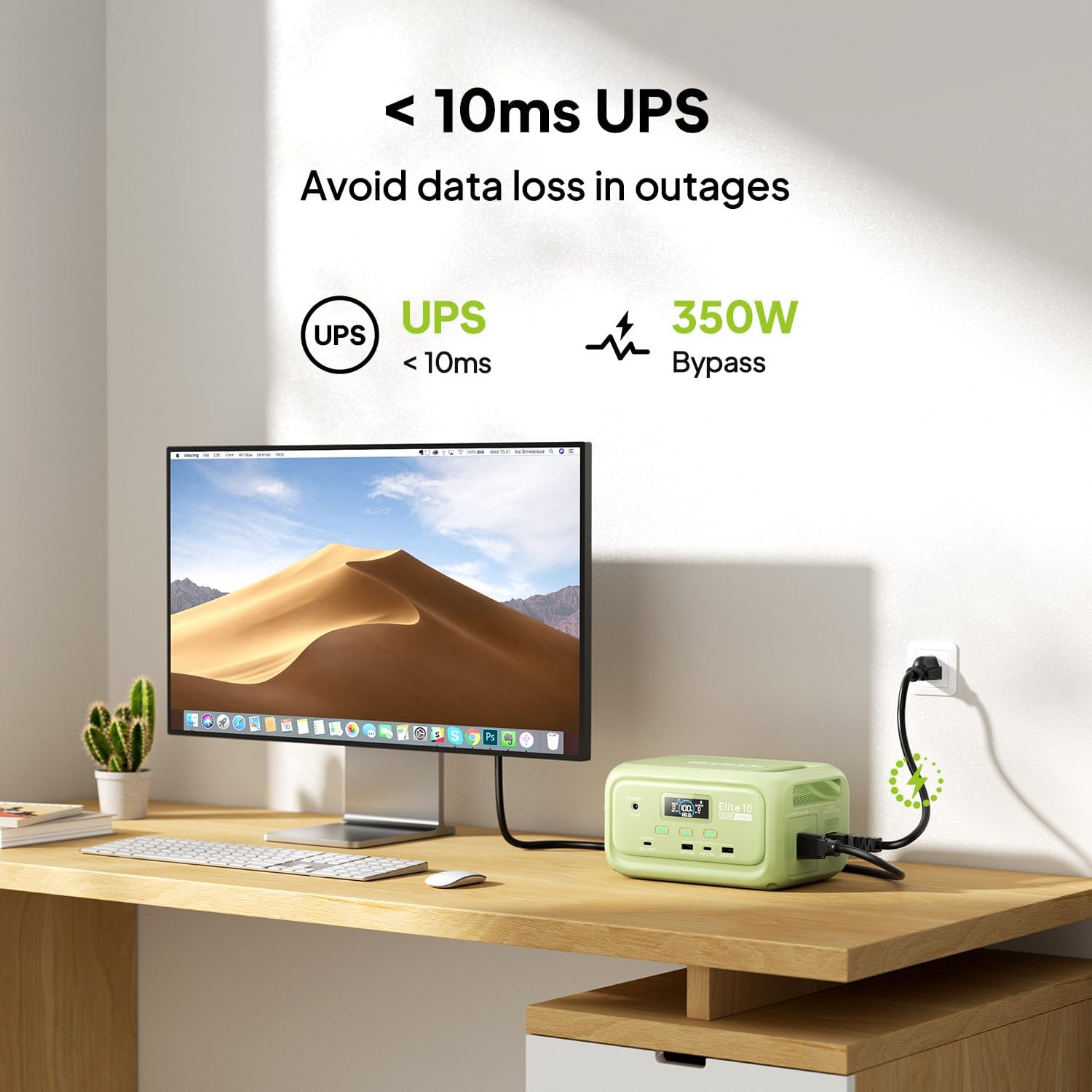
Figure 7: Illustration of the Elite 10's UPS capability.
6.6. LED Argiztapena
The LED light on the rear panel offers three modes: warm light, cool light, and SOS. Press the dedicated light button to cycle through modes or turn it off. The light can provide up to 50 hours of illumination.
6.7. Aplikazio adimendunen kontrola
Download the BLUETTI app and connect to your Elite 10 via Bluetooth. The app allows you to monitor power status, customize charging modes, and adjust lighting settings remotely.

Figure 8: Managing the Elite 10 via the BLUETTI mobile application.
7. Mantentzea eta biltegiratzea
- Garbiketa: Erabili zapi lehor eta leun bat unitatea garbitzeko. Ez erabili garbitzaile edo disolbatzaile urratzailerik.
- Tenperatura: Store and operate the unit within the recommended temperature range (typically 0°C to 40°C or 32°F to 104°F).
- Epe luzeko biltegiratzea: If storing for extended periods, charge the unit to 50-80% every 3-6 months to prolong battery life. Store in a cool, dry place.
8. Arazoak
If you encounter issues with your BLUETTI Elite 10, refer to the following common solutions:
- Unitatea ez pizten: Ziurtatu bateria kargatuta dagoela. Kargatuta ez badago, konektatu korronte alternoko entxufe batera kargatzeko.
- Portuetatik irteerarik ez: Verify that the respective DC or AC output buttons are pressed and their indicators are lit. Check if the device connected requires more power than the unit can provide.
- Karga motela: Ensure you are using the original BLUETTI charging cables. Check the power source for adequate output.
- Gainkarga babesa: If the unit shuts down, it may be due to an overload. Disconnect some devices and restart the unit.
For persistent issues, contact BLUETTI customer support.
9. Zehaztapenak
| Ezaugarri | Xehetasuna |
|---|---|
| Eredua | Elite 10 |
| Bateria Edukiera | 128Wh LiFePO4 |
| AC Irteera | 120V/200W (Pure Sine Wave) |
| USB-C irteera | 1 x 100 W, 1 x 15 W |
| USB-A irteera | 2 x 15W |
| DC irteera | 12V/5A |
| DC/PV Sarrera | 12-28V/8A, 100W gehienez |
| AC kargatzeko denbora | Approx. 70 minutes (150W Max) |
| UPS funtzioa | 10ms switchover, 350W bypass |
| Neurriak (L x W x H) | 7.8" x 5.7" x 4.3" (19.8 cm x 14.5 cm x 11 cm) |
| Pisua | 4.0 lb (1.8 kg) |
10. Bermea eta Laguntza
The BLUETTI Elite 10 Mini Portable Power Station comes with a standard manufacturer's warranty. Please refer to the warranty card included in your package or visit the official BLUETTI webwebgunean bermearen baldintza zehatzak ikusteko.
For technical support, troubleshooting assistance, or any product-related inquiries, please contact BLUETTI customer service through their official channels.


