1. Produktua amaitu daview
The OnePlus 15 is an advanced Android smartphone designed for high performance and extended usage. It features a powerful Snapdragon 8 Elite Gen 5 processor, a large 7,300mAh battery, and a vibrant 6.78-inch 165 Hz AMOLED display. The device is equipped with a triple 50 MP camera system for detailed photography and offers robust durability with IP66/IP68/IP69 and IP19K ratings for dust and water resistance.
Ezaugarri nagusiak:
- 7,300 mAh-ko bateria erraldoia: Provides extended power for all-day use and beyond.
- Tri-Chip System: Integrates the Snapdragon 8 Elite Gen 5, a dedicated Wi-Fi chip, and a CPU scheduler for optimized performance, connectivity, and efficiency.
- Triple 50 MP Camera System: Captures high-quality images with wide, ultra-wide, and telephoto capabilities.
- Diseinu iraunkorra: Built to resist dust and water, with IP66/IP68/IP69 and IP19K ratings for enhanced protection.
- 6.78-inch 165 Hz AMOLED Display: Delivers vivid colors, smooth motion, and exceptional clarity.
2. Zer dago kutxan
Egiaztatu elementu guztiak zure produktuaren ontzian daudela:
- OnePlus 15 Smartphone x1
- Kargagailua x1
- USB datu-kablea x1
- SIM Ejector Tool x1
- Gida azkarra x1
- Safety Guide x1

Image: Contents of the OnePlus 15 retail box, showing the smartphone, charger, USB data cable, SIM ejector tool, quick guide, and safety guide.
3. Konfigurazioa
3.1 SIM txartelaren instalazioa
- Locate the SIM card tray on the side of your OnePlus 15.
- Sartu SIM txartela ateratzeko tresna SIM erretiluko zulo txikian. Sakatu ondo erretilua atera arte.
- Place your Nano-SIM card(s) into the tray with the gold contacts facing down. Ensure they are correctly oriented according to the tray's outline.
- Carefully push the SIM tray back into the phone until it is flush with the device.
3.2 Hasierako piztea eta konfigurazioa
- Press and hold the Power button (located on the right side of the device) until the OnePlus logo appears.
- Jarraitu pantailan agertzen diren argibideei zure hizkuntza hautatzeko, Wi-Fi sare batera konektatzeko eta zure Google kontua konfiguratzeko.
- You may be prompted to transfer data from an old device. Follow the instructions or skip this step to set up as a new device.
- Configure security settings such as fingerprint unlock, face unlock, or a PIN/pattern.

Irudia: Aurrealdea view of the OnePlus 15 smartphone, showcasinbere pantaila eta aurreko kamera.
4. Zure gailua funtzionatzea
4.1 Pantaila eta nabigazioa
The OnePlus 15 features a 6.78-inch 165 Hz AMOLED display. Navigate the interface using touch gestures:
- Sakatu: Select an item or activate a function.
- Pasatu hatza: Pantailetan edo zerrendetan zehar joan.
- Pixka bat: Irudiak handitu edo txikitu eta web orrialdeak.
- Prentsa luzea: Sartu testuinguru-menuetara edo mugitu ikonoak.
4.2 Botoiak eta atakak
Familiarize yourself with the physical controls and connections:
- Pizteko botoia: Located on the right side. Press to wake/sleep the screen, long press to power off or restart.
- Bolumen-botoiak: Located on the left side. Adjust media volume, ringtone volume, and alarm volume.
- USB C motako ataka: Located at the bottom. Used for charging, data transfer, and connecting Type-C headphones.
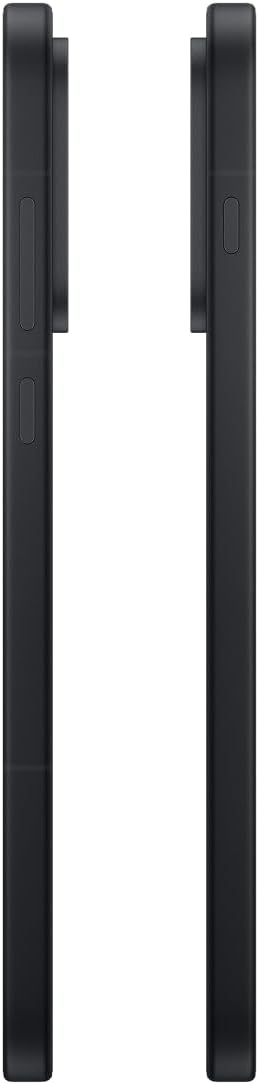
Irudia: Albokoa view of the OnePlus 15, showing the placement of the power and volume buttons.
4.3 Kameraren erabilera
The OnePlus 15 features a versatile triple 50 MP camera system. To open the camera app, tap the camera icon on your home screen or lock screen.
- Aldatu moduak: Swipe left or right on the screen to switch between Photo, Video, Portrait, and other modes.
- Zooma: Pinch in or out on the viewfinder, or tap the zoom icons (e.g., 0.6x, 1x, 2x) to adjust magnification.
- Harrapatzea: Sakatu obturadorearen botoia argazki bat ateratzeko edo bideo grabaketa hasteko/gelditzeko.
- Ezarpenak: Access camera settings for features like flash, timer, aspect ratio, and more.

Irudia: Atzealdea view of the OnePlus 15, highlighting the triple 50 MP camera system.
4.4 Bateriaren kudeaketa
Your OnePlus 15 is equipped with a 7,300 mAh battery. To optimize battery life:
- Adjust screen brightness and set a shorter screen timeout.
- Desgaitu Wi-Fi, Bluetooth eta GPSa erabiltzen ez dituzunean.
- Close background apps that are consuming power.
- Utilize Battery Saver mode when your battery is low.
- Use the provided charger and USB cable for optimal fast charging.
5. Mantentzea
5.1 Gailua garbitzea
To clean your OnePlus 15:
- Erabili zapi leun eta lihorik gabeko bat pantaila eta atzeko panela garbitzeko.
- Orban egoskorretarako, apur bat dampGarbitu oihal bat urarekin edo pantaila-garbitzaile batekin.
- Saihestu produktu kimiko gogorrak, material urratzaileak edo aire konprimitua erabiltzea.
5.2 Software eguneraketak
Software eguneratze erregularrek funtzio berriak, segurtasun hobekuntzak eta akatsak zuzentzen dituzte. Eguneratzeak egiaztatzeko:
- Joan zaitez Ezarpenak > Gailuari buruz > OxygenOS version.
- Sakatu Egiaztatu eguneratzeak.
- If an update is available, follow the on-screen instructions to download and install it. Ensure your device has sufficient battery and is connected to Wi-Fi before updating.
6. Arazoak
If you encounter issues with your OnePlus 15, try the following common troubleshooting steps:
- Gailuak ez du erantzuten: Berrabiarazteko, sakatu eta eutsi pizteko botoia 10 segundo inguru.
- Aplikazioak huts egiten ari dira: Garbitu arazoa sortzen duen aplikazioaren cachea eta datuak hemen: Ezarpenak > Aplikazioak > [Aplikazioaren izena] > Biltegiratzea eta cachea.
- Bateria azkar agortzen da: Review bateriaren erabilera hemen Ezarpenak > Bateria to identify power-hungry apps. Adjust settings as described in Section 4.4.
- Sareko konexio arazoak: Toggle Airplane Mode on and off, restart your device, or reset network settings in Ezarpenak > Sistemaren ezarpenak > Babeskopia egin eta berrezarri > Berrezarri telefonoa > Berrezarri Wi-Fi, mugikorra eta Bluetootha.
- Screen protector installation: For assistance with screen protector installation, refer to the following video guide:
Video: Installation guide for a screen protector on the OnePlus 15 5G. This video demonstrates the steps to correctly apply a screen protector to your device.
7. Zehaztapenak
| Ereduaren izena | OnePlus 15 |
| Elementuaren eredu-zenbakia | CPH2749 |
| Produktuaren neurriak | 6.36 x 3.02 x 0.33 hazbete |
| Elementuaren pisua | 1.29 kilo |
| Sistema eragilea | Android 16 |
| CPU eredua | Snapdragon 8 Elite Gen 5 |
| CPU Abiadura | 4.61 GHz |
| RAM memoria instalatuaren tamaina | 12 GB |
| Memoria Biltegiratzeko Ahalmena | 256 GB |
| Pantailaren tamaina | 6.78 hazbete |
| Ebazpena | 2772*1272 |
| Freskatze tasa | 165 Hz |
| Bateria Edukiera | 7300 milioiamp Orduak |
| Telefonoz hitz egiteko denbora | 68.7 ordu |
| Konektibitate Teknologiak | Bluetooth, Infrared, NFC, USB, Wi-Fi |
| Ezaugarri bereziak | Dual SIM, Wireless Charging |
| Fabrikatzailea | OnePlus |
8. Segurtasun informazio garrantzitsua
Please read all safety information before using your device to ensure safe and proper use. Improper use may cause damage to the device or personal injury.
- Ez jarri gailua tenperatura altuen edo eguzki-argiaren eraginpean denbora luzez.
- Erabili onartutako kargagailuak, bateriak eta osagarriak soilik.
- Saihestu gailua erortzea edo kolpe gogorren eraginpean jartzea.
- Keep the device away from water and liquids, despite its water resistance ratings, to prevent potential damage.
- Ez saiatu gailua desmuntatzen edo aldatzen.
9. Bermea eta Laguntza
Your OnePlus 15 is covered by a manufacturer's warranty. For detailed warranty information, technical support, or service inquiries, please visit the official OnePlus webwebgunean edo jarri harremanetan bezeroarentzako zerbitzuarekin.
Laguntza gehigarria eta produktuaren informazioa aurki dezakezu hemen: OnePlus Store.


