1. Sarrera
Thank you for choosing the Jocoevol C-1665 Corner Display Cabinet. This manual provides detailed instructions for assembly, operation, maintenance, and troubleshooting to ensure safe and optimal use of your new display cabinet. Please read this manual thoroughly before assembly and retain it for future reference.
The Jocoevol C-1665 is a 4-tier corner display cabinet designed for showcasing collectibles. It features push-to-open tempered glass doors, integrated RGB LED lighting with app control, and a smart human body sensor for automatic light activation.
2. Segurtasun informazio garrantzitsua
OHARRA: Segurtasun-argibide hauek ez betetzeak lesioak edo produktua kaltetu dezake.
- Always use caution when handling heavy objects to prevent injury.
- This cabinet requires assembly. Follow the instructions carefully to avoid accidents.
- Be aware of the glass doors and shelves, which can shatter if not handled improperly.
- Always use appropriate safety gear (e.g., gloves) when assembling or disassembling the cabinet.
- Ziurtatu armairua gainazal egonkor eta mailakatu batean jartzen dela, iraultzea saihesteko.
- Do not overload shelves. Refer to specifications for weight limits.
- Keep electrical components (LED lights, sensor) away from water and moisture.
- Ensure all connections are secure before plugging in the power adapter.
- Mantendu pieza txikiak haurrengandik urrun muntatzean.
- Install the anti-tipping device as instructed to prevent serious injury from tipping furniture.
3. Paketearen edukia
Muntaketa hasi aurretik, egiaztatu pieza guztiak daudela eta kalterik gabe daudela. Pieza bat falta bada edo kaltetuta badago, ez jarraitu muntaketarekin eta jarri harremanetan bezeroarentzako arreta-zerbitzuarekin.
Refer to the assembly diagram for a complete list of parts and hardware.

Figure 3.1: Cabinet dimensions and key components. Dimensions are 33.4 inches (W) x 22.4 inches (D) x 67.1 inches (H). Shows glass, acrylic, wood, and controller components.
4. Konfigurazioa eta Muntaketa
Assembly typically requires two people and takes approximately 40 minutes. Follow the numbered steps carefully.
4.1. Step-by-Step Assembly Guide
- Prestatu oinarria: Assemble the base frame using the provided screws and connectors. Ensure all connections are tight.
- Alboko panelak erantsi: Secure the side panels to the base frame.
- Instalatu beheko apala: Place the bottom shelf into position and secure it. Ensure the LED strip is correctly positioned and connected.
- Assemble Middle Section: Repeat the process for the middle section, ensuring the LED strip is installed on the underside of the middle shelf.
- Kristalezko ateak instalatzea: Carefully install the tempered glass doors. The push-to-open mechanism requires precise alignment.
- Install Removable Shelves: Insert the removable shelves into the desired positions. These shelves can be adjusted to accommodate items of various heights.
- Konektatu kableatzea: Connect all LED light plugs to the central control unit. Ensure all connections are secure.
- Iraultzearen aurkako gailua instalatu: Secure the anti-tipping device to the top rear of the cabinet and to a wall stud using appropriate hardware. This is a critical safety step.
4.2. Visual Assembly Aid
The following video provides a visual guide for the assembly process:
Video 4.1: Step-by-step assembly guide for the Jocoevol Corner Display Cabinet. This video demonstrates the complete assembly process from unboxing to final setup.
5. Funtzionamendu-argibideak
5.1. Push-to-Open Glass Doors
The cabinet features a handle-free push-to-open mechanism. To open a door, gently press on the center of the door panel. The magnetic latch will release, allowing the door to swing open. To close, push the door firmly until the magnetic latch engages.
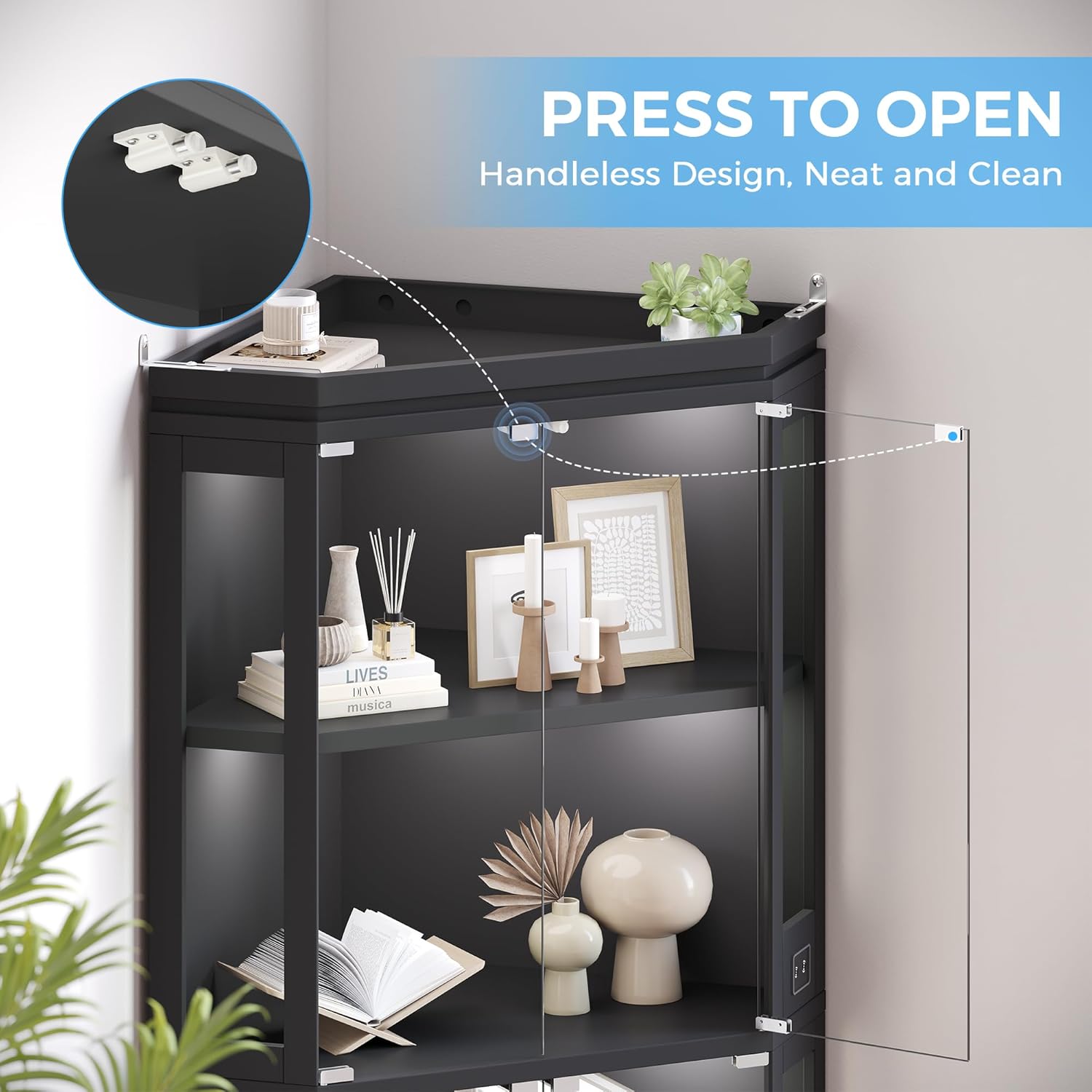
Figure 5.1: Illustration of the push-to-open door mechanism for easy access.
5.2. RGB LED Lighting and App Control
Each tier of the cabinet is equipped with RGB LED strips. These lights can be controlled via a mobile application through Bluetooth.
- Deskargatu aplikazioa: Scan the QR code provided in the product packaging or search for "Lotus Lamp X" in your mobile app store (Google Play or Apple App Store).
- Bluetooth bidez konektatu: Ensure Bluetooth is enabled on your mobile device. Open the "Lotus Lamp X" app and follow the on-screen instructions to connect to your cabinet's LED lights.
- Customize Lighting:
- Select from 16 million colors.
- Adjust brightness levels (0% to 100%).
- Choose from various lighting modes.
- Utilize the built-in microphone feature to sync lights with ambient music.

Figure 5.2: Demonstrates the customizable RGB lighting options and brightness control.
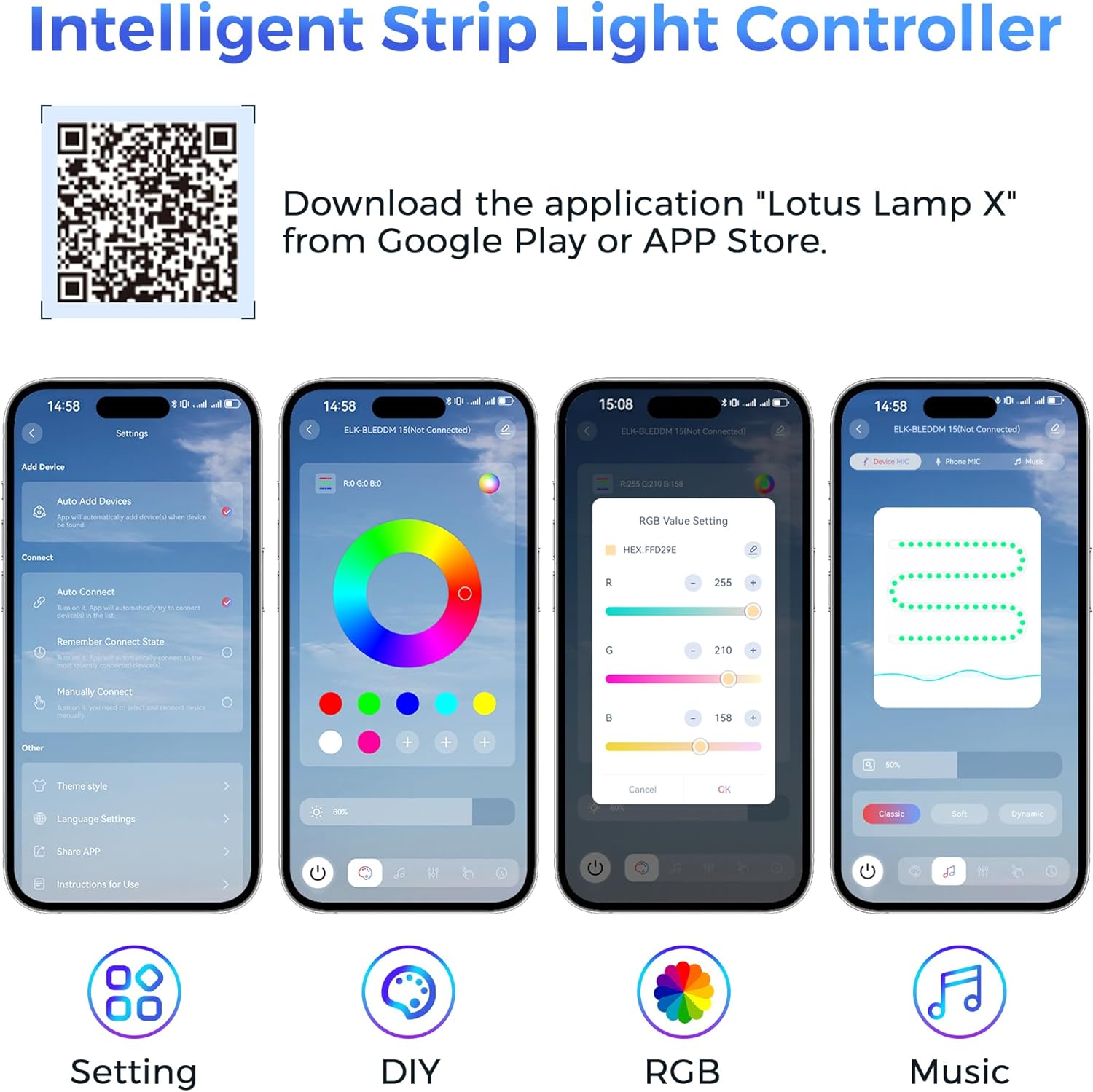
Figure 5.3: Mobile app interface for controlling the RGB LED lights. Download the app from http://www.easytrack.net.cn/download_pro/169DONGGUANYIHONG.
5.3. Giza Gorputzaren Sentsore Adimenduna
The cabinet includes an intelligent human body sensing system. To activate this feature, locate the function switch on the right control panel and turn it on. The lights will automatically illuminate when a person approaches within 2–3 meters (approximately 6.5–10 feet) and will turn off automatically one minute after the person walks away.

Figure 5.4: Demonstration of the smart human sensor activating the cabinet lights upon approach.
6. Mantentzea
- Garbiketa: Erabili biguna, damp cloth to wipe down the cabinet surfaces and glass doors. Avoid abrasive cleaners or harsh chemicals that could damage the finish or glass.
- Beira zaintzea: For glass surfaces, use a glass cleaner and a microfiber cloth to prevent streaks.
- Hautsa botatzea: Regularly dust the interior and exterior of the cabinet to maintain its appearance and prevent dust buildup on collectibles.
- Osagai elektrikoak: Ensure all electrical connections remain secure. Do not attempt to repair or modify the LED lighting system yourself. Contact qualified personnel if issues arise.
- Hardwarearen egiaztapena: Aldian-aldian egiaztatu torloju eta lotura guztiak ondo estututa daudela ziurtatzeko. Beharrezkoa bada, berriro estutu.
7. Arazoak
| Arazoa | Kausa posiblea | Irtenbidea |
|---|---|---|
| Argiak ez dira pizten. |
|
|
| Lights do not respond to app control. |
|
|
| Human body sensor not working. |
|
|
| Kabinetea ezegonkorra iruditzen da. |
|
|
8. Zehaztapenak
| Ezaugarri | Xehetasuna |
|---|---|
| Marka | Jokoebol |
| Modelo zenbakia | C-1665 |
| Produktuaren neurriak | 33.5"Z x 22.4"S x 67"A |
| Kolorea | Beltza |
| Materiala | Tempered Glass, Wood, Acrylic |
| Geruza/apal kopurua | 4 |
| Argiztapena | RGB LED Strips (App Control, 16 Million Colors, Brightness Adjustment, Music Sync) |
| Sentsore mota | Human Body Sensor (2-3 meter detection range) |
| Ate Estiloa | Push-to-Open Tempered Glass Doors |
| Muntaia Beharrezkoa | Bai |
| Elementuaren pisua | 98 kilo |
9. Bermea eta Laguntza
For warranty information, please refer to the documentation included with your purchase or contact Jocoevol customer support directly. If you have any questions about your Jocoevol C-1665 Corner Display Cabinet, require assistance with assembly, or need troubleshooting help, please contact our customer service team.
Bezeroarentzako laguntza: Refer to your purchase receipt or the Jocoevol official webharremanetarako datuak lortzeko gunea.


