1. Sarrera
This manual provides essential information for the safe and efficient operation of your Thomson 43FT2S15 FHD LED Smart TV. Please read this manual thoroughly before using the television and retain it for future reference.
2. Segurtasun informazioa
Beti jarraitu oinarrizko segurtasun neurriak produktu hau erabiltzean sute, deskarga elektriko eta lesio arriskua murrizteko.
- Ez jarri telebista euri edo hezetasunera.
- Ez blokeatu aireztapen baoak.
- Ziurtatu elikatze-kablearen lurreratze egokia dagoela.
- Ez jarri telebista orgak, euskarri, tripode, euskarri edo mahai ezegonkor baten gainean.
- Deskonektatu telebista tximista-ekaitzetan edo denbora luzez erabili gabe dagoenean.
- Jarri zerbitzu-zerbitzu guztiak zerbitzu-pertsonal kualifikatuari.
3. Paketearen edukia
Egiaztatu behean zerrendatutako elementu guztiak zure paketean sartuta daudela:
- Thomson 43FT2S15 FHD LED Smart TV
- Elikatze-moldagailua
- Urruneko Kontrola
- Erabiltzailearen eskuliburua (dokumentu hau)
- Berme Txartela

Irudia: Aurrealdea view of the Thomson 43FT2S15 Smart TV.
4. Konfigurazioa
4.1 Instalazio fisikoa
The Thomson 43FT2S15 TV is designed for table mounting. Ensure the TV is placed on a stable, flat surface.

Image: Diagram showing the dimensions of the Thomson 43FT2S15 Smart TV. The screen size is 109 cm (43 inches) diagonally, with a width of 95 cm and height of 60 cm (including stand). The depth is 6 cm.
Neurriak (W x H x D): 95 cm x 60 cm x 6 cm (without stand, depth is 6 cm). The screen diagonal is 109 cm (43 inches).
4.2 Gailuak konektatzea
Connect your external devices to the appropriate ports on the TV. Refer to the diagram below for port locations.
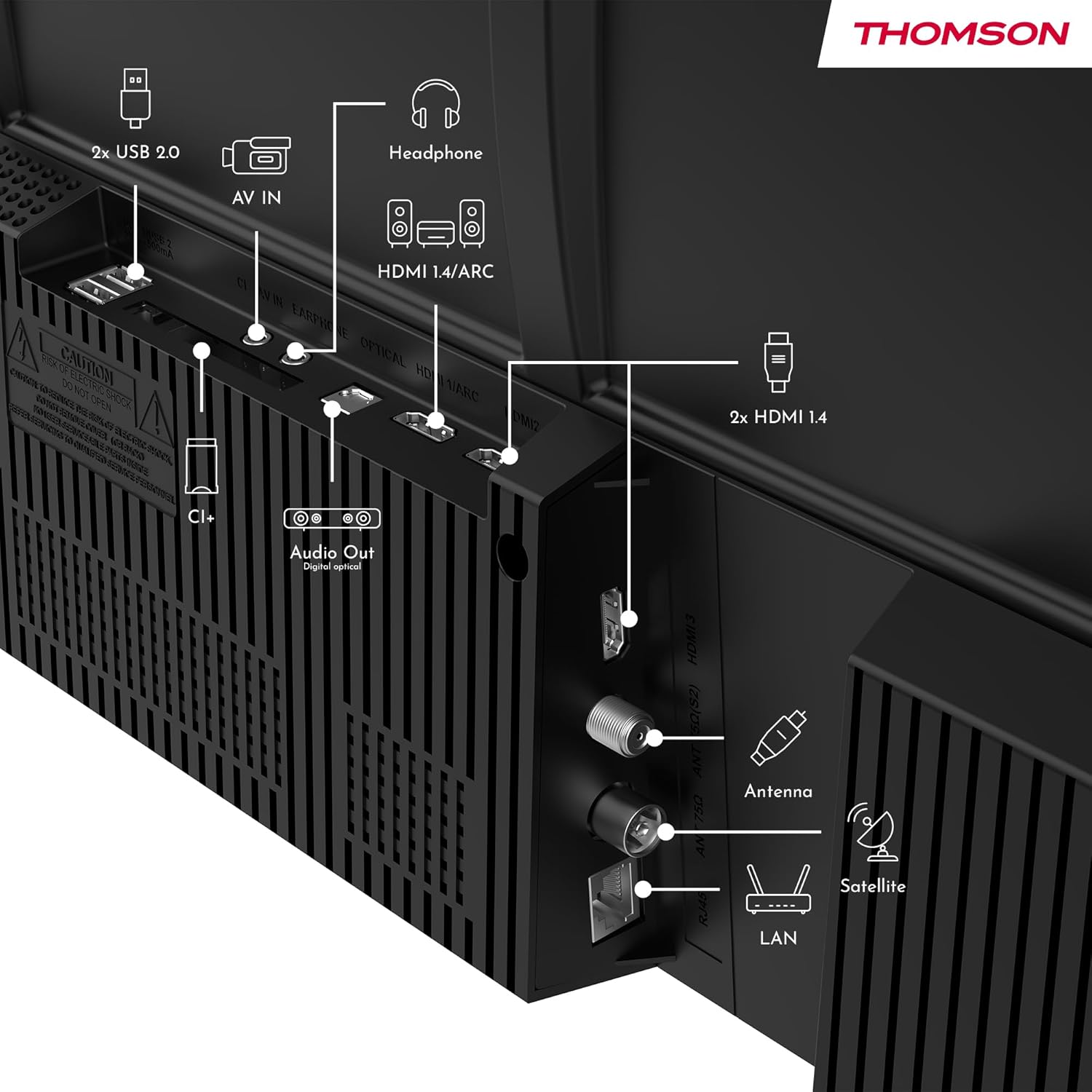
Irudia: Atzealdea view of the Thomson 43FT2S15 Smart TV showing various connection ports. These include 2x USB 2.0, AV IN, Headphone out, HDMI 1.4/ARC, Optical Audio Out, CI+, Antenna (DVB-T2/C), Satellite (DVB-S2), and LAN (Ethernet).
- HDMI: Connect external devices like Blu-ray players, game consoles, or set-top boxes. The TV has 2 HDMI 1.4 ports, one with ARC support.
- USBa: For connecting USB storage devices. The TV has 2 USB 2.0 ports.
- Antena/Satelitea: Connect your terrestrial or satellite antenna for live TV.
- LAN (Ethernet): Interneteko kable bidezko konexio baterako.
- Wi-Fi: Haririk gabeko internet konexiorako.
- Bluetootha: Haririk gabeko osagarri bateragarriak konektatzeko.
- Audio irteera (optikoa): For connecting to an external sound system.
- Entzungailuak: Entzungailuak konektatzeko.
- CI+ zirrikitua: For inserting a Conditional Access Module (CAM) for encrypted channels.
5. Funtzionamendu-argibideak
5.1 Piztu/Itzali
Connect the power adapter to the TV and a power outlet. Press the power button on the remote control to turn the TV on or off.
5.2 TiVo OS and Smart Features
Your Thomson Smart TV is powered by TiVo OS, which integrates live TV, streaming applications, and on-demand services into a single, intuitive interface. Personalized recommendations help you discover new content.

Image: The Thomson Smart TV displaying the TiVo OS interface with various streaming apps like Netflix, Canal+, Prime Video, YouTube, and Disney+.
5.3 Ahots kontrola
Use the TiVo Voice Control feature to navigate channels, open applications, or search for content across different platforms using voice commands. The remote control includes a microphone for this function.

Image: The Thomson Smart TV remote control highlighting the voice control microphone, backlit buttons, and direct access buttons for streaming services.
5.4 Wireless Display
Mirror content from your smartphone, tablet, or laptop to the TV screen using the Wireless Display function. This allows for easy sharing of videos, photos, and applications.
5.5 Audio eta bideo hobekuntzak
- Dolby Audio: Experience enhanced sound quality with Dolby Audio, providing clear dialogue and immersive, multi-dimensional effects.

Image: A Thomson Smart TV displaying content with visual representations of sound waves, indicating the Dolby Audio feature.
- HDR10: Enjoy sharper contrast and lifelike colors with HDR10 technology, revealing details in both bright highlights and deep shadows.

Image: A split-screen comparison showing the difference between SDR (Standard Dynamic Range) and HDR10 (High Dynamic Range) image quality on a Thomson Smart TV, demonstrating improved contrast and color.
5.6 Urruneko kontrola
The ergonomic remote control features backlit buttons for easy navigation in low light conditions. It also includes direct access buttons for popular streaming services such as Netflix, YouTube, Prime Video, Disney+, and Canal+.
6. Mantentzea
Telebistaren iraupena eta errendimendu optimoa bermatzeko, jarraitu mantentze-jarraibide hauek:
- Pantaila garbitzea: Garbitu pantaila astiro-astiro zapi leun eta pelusik gabeko batekin. Orban egoskorrak lortzeko, erabili telebistetarako bereziki diseinatutako pantaila-garbitzaile bat, zapiari aplikatuz, ez zuzenean pantailari.
- Armairua garbitzea: Erabili zapi leun eta lehor bat telebistaren armairua garbitzeko. Ez erabili garbitzaile edo disolbatzaile urratzailerik.
- Aireztapena: Ziurtatu telebistaren atzealdeko aireztapen-irekidurak ez daudela blokeatuta, gehiegi berotzea saihesteko.
- Elikatze kablea: Aldian-aldian egiaztatu kable elektrikoa kaltetuta badago. Kaltetuta badago, jarri harremanetan zerbitzu-langile kualifikatuekin ordezkatzeko.
7. Arazoak
Telebistarekin arazoak badituzu, jarraitu arazoak konpontzeko ohiko urrats hauek:
- Potentziarik gabe:
- Check if the power cord is securely connected to the TV and the power outlet.
- Ensure the power outlet is functioning by plugging in another device.
- Saiatu telebistako pizteko botoia sakatzen, ez urrutiko agintea bakarrik.
- Irudi/soinurik ez:
- Egiaztatu sarrera-iturri zuzena hautatuta dagoela (adibidez, HDMI 1, Antena).
- Egiaztatu telebistaren eta kanpoko gailuen arteko kable-konexio guztiak.
- Adjust the volume and ensure the TV is not muted.
- Urruneko kontrola ez dabil:
- Ordeztu bateriak urrutiko agintean.
- Ziurtatu urrutiko agintearen eta telebistaren IR sentsorearen artean oztoporik ez dagoela.
- Smart TV Features Not Working (Wi-Fi/Apps):
- Check your internet connection. Restart your router if necessary.
- Go to the TV's network settings to ensure it's connected to Wi-Fi or Ethernet.
- Saiatu telebista berrabiarazten.
For more complex issues, please contact customer support or refer to the manufacturer's webgunea.
8. Zehaztapenak
Key technical specifications for the Thomson 43FT2S15 FHD LED Smart TV:
| Ezaugarri | Zehaztapena |
|---|---|
| Marka | Thomson |
| Eredua | 43FT2S15 |
| Pantailaren tamaina | 43 hazbete (109 cm) |
| Bistaratzeko Teknologia | LED |
| Ebazpena | 1920 x 1080 (FHD) |
| Freskatze tasa | 60 Hz |
| Aspektu-erlazioa | 16:9 |
| Sistema eragilea | TiVo OS |
| Audio Teknologia | Dolby Audio (Dolby Atmos encoding) |
| HDR euskarria | HDR10 |
| Konektibitatea | Wi-Fi, Ethernet, Bluetooth, 2x HDMI 1.4 (1x ARC), 2x USB 2.0, Optical Audio Out, AV In, Headphone, CI+ |
| Sintonizatzaileak | DVB-T2/C/S2 (Triple Tuner) |
| Onartutako Interneteko zerbitzuak | Netflix, YouTube, Prime Video, Disney+, Canal+, Browser |
| Neurriak (produktua) | 6 x 95 x 60 cm; 6.5 kg |
| Energia Eraginkortasun Klasea | E |

Image: Energy efficiency label for the Thomson 43FT2S15 Smart TV, showing an energy class of E and energy consumption of 42 kWh/1000h (SDR) and 46 kWh/1000h (HDR).
Produktuari buruzko informazio zehatza lortzeko, jo EPREL datu-basera: https://eprel.ec.europa.eu/qr/1969521
9. Bermea eta Laguntza
Your Thomson 43FT2S15 TV comes with a warranty. Please refer to the included Warranty Card for specific terms and conditions.
For technical support or service inquiries, please contact the manufacturer:
- Fabrikatzailea: Errekaview GmbH
- Webgunea: www.korronteaview.com
- Posta elektronikoa: kontaktua@jarioaview.com
- Telefonoa: +4318900066
Please have your model number (43FT2S15) and purchase information ready when contacting support.


