1. Sarrera
The Havit MS966SE is a high-performance tri-mode gaming mouse designed for versatility, precision, and comfort. It features a PixArt PMW3325 optical sensor, offering exceptional tracking accuracy and adjustable DPI settings up to 10,000. With its tri-mode connectivity, you can seamlessly switch between 2.4GHz wireless, Bluetooth 5.3, and USB-C wired modes to suit your gaming or work environment. The lightweight and ergonomic design ensures comfortable use during extended sessions, complemented by dynamic RGB lighting for a personalized aesthetic.

Figure 1: Havit MS966SE Gaming Mouse with USB-C cable.
2. Konfigurazioa
2.1 Paketatzea
Carefully remove the mouse and all accessories from the packaging. Ensure all components are present:
- Havit MS966SE Gaming Mouse
- USB-C USB-A kablea
- 2.4 GHz USB hargailua
- Erabiltzailearen eskuliburua (dokumentu hau)
2.2 Sagua konektatzea
The MS966SE offers three connectivity options:
2.2.1 2.4GHz Haririk gabeko Modua
- Insert the 2.4GHz USB receiver into an available USB-A port on your computer.
- Locate the mode switch on the bottom of the mouse and slide it to the 2.4G posizioa.
- Sagua automatikoki konektatuko da zure ordenagailura.
2.2.2 Bluetooth 5.3 modua
- Locate the mode switch on the bottom of the mouse and slide it to the BT posizioa.
- On your computer or mobile device, open Bluetooth settings and search for new devices.
- Select "Havit MS966SE" from the list of available devices to pair.
2.2.3 USB-C kable bidezko modua
- Connect one end of the provided USB-C cable to the mouse and the other end to an available USB-A port on your computer.
- Sagua automatikoki kable bidezko modura aldatuko da eta kargatzen hasiko da.
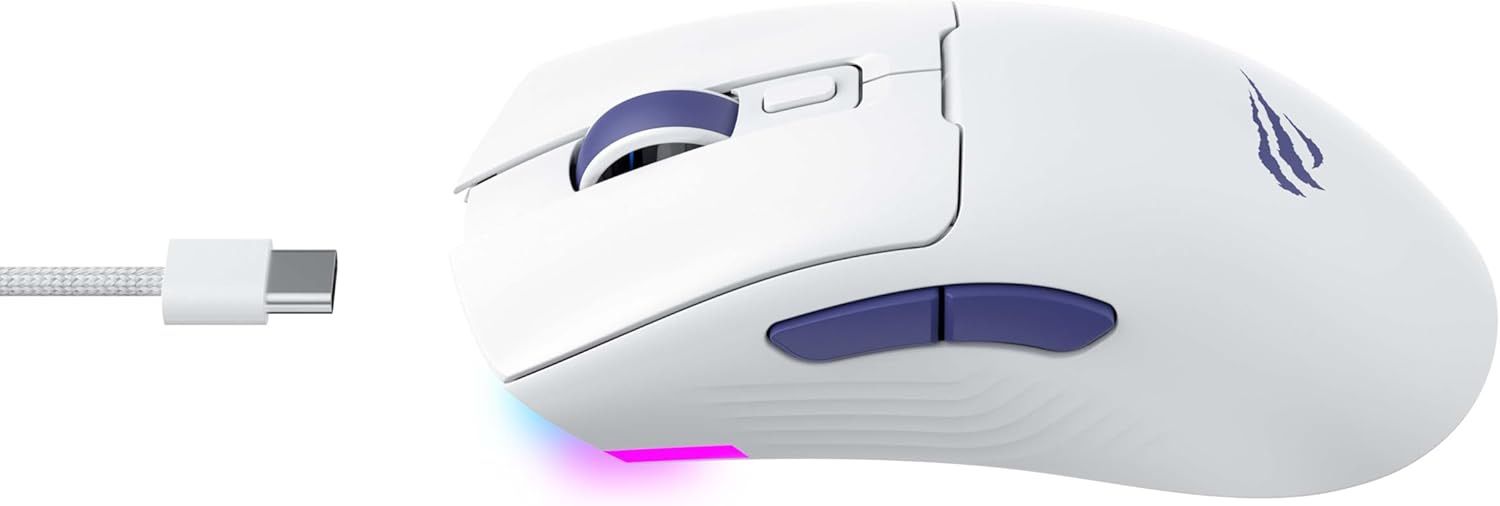
2. irudia: Aldea view of the mouse, highlighting the USB-C port.
2.3 Sagua kargatzea
To charge the mouse, connect it to your computer using the USB-C cable. The mouse can be used in wired mode while charging. An indicator light on the mouse will show the charging status (refer to the manufacturer's website or product packaging for specific light behaviors).
3. Funtzionamendu-argibideak
3.1 Botoien funtzioak
The Havit MS966SE features several programmable buttons for enhanced control:
- Ezkerreko klik botoia: Klik egiteko funtzio nagusia.
- Eskuineko botoiarekin klik egiteko: Bigarren mailako klik funtzio estandarra.
- Korritzeko gurpila: Gora/behera mugitzen da eta erdiko botoiaren klik egiteko botoia bezala funtzionatzen du.
- DPI Zikloaren Botoia: Located behind the scroll wheel, this button cycles through preset DPI sensitivity levels.
- Alboko botoiak (Aurrera/Atzera): Normalean nabigaziorako erabiltzen da web browsers or can be programmed for in-game actions.

Figure 3: Side buttons and ergonomic design.
3.2 DPI doikuntza
The PixArt PMW3325 sensor allows for adjustable DPI settings up to 10,000. Press the DPI cycle button (located behind the scroll wheel) to switch between different sensitivity levels. Each press will cycle to the next preset DPI, allowing you to quickly adapt to various tasks or game scenarios.
3.3 Connectivity Mode Switching
To switch between 2.4GHz wireless, Bluetooth, and wired modes, use the physical switch located on the bottom of the mouse. Ensure the correct mode is selected based on your connection preference.
3.4 RGB argiztapena
The mouse features dynamic RGB lighting. Specific controls for RGB lighting effects, colors, and brightness may be available through dedicated software provided by Havit. Please visit the official Havit website for software downloads and further customization options.
4. Mantentzea
4.1 Garbiketa
- Deskonektatu sagua ordenagailutik garbitu aurretik.
- Erabili zapi leun, lehor eta lihorik gabeko bat saguaren gainazala garbitzeko.
- Zikinkeria egoskorrerako, apur bat lehortuampGarbitu zapi bat urarekin edo garbiketa-soluzio leun batekin. Saihestu produktu kimiko gogorrak.
- Use a cotton swab or compressed air to clean around buttons and the scroll wheel.
- Ez murgildu sagua uretan edo beste likido batean.
4.2 Biltegiratzea
When not in use for extended periods, store the mouse in a cool, dry place away from direct sunlight and extreme temperatures. If storing for a long time, ensure the mouse is fully charged to maintain battery health.
5. Arazoak
5.1 Saguak ez du erantzuten
- Egiaztatu potentzia: Ziurtatu sagua piztuta dagoela eta bateria nahikoa kargatuta duela.
- Egiaztatu konexioa:
- Kable modua: Ziurtatu USB-C kablea ondo konektatuta dagoela saguari eta ordenagailura. Saiatu beste USB ataka bat erabiltzen.
- 2.4 GHz-ko haririk gabekoa: Ensure the USB receiver is properly inserted and the mouse is set to 2.4G mode. Try a different USB port for the receiver.
- Bluetooth modua: Ensure Bluetooth is enabled on your device and the mouse is paired. Try unpairing and re-pairing the mouse.
- Berrabiarazi: Restart your computer and the mouse.
5.2 DPI-a ez da aldatzen
- Ensure you are pressing the correct DPI cycle button.
- If using custom software, check the DPI settings within the software.
5.3 Lag or Disconnections in Wireless Mode
- Interferentzia: Move the mouse closer to the receiver/device. Avoid obstacles between the mouse and receiver.
- Bateria maila: Bateria baxuak haririk gabeko errendimendua eragin dezake. Kargatu sagua.
- USB ataka: Try connecting the 2.4GHz receiver to a different USB port, preferably a USB 2.0 port if available, as some USB 3.0 ports can cause interference.
6. Zehaztapenak
| Marka | Havit |
| Eredua | MS966SE |
| Konektibitate Teknologia | Tri-Mode: 2.4GHz Wireless, Bluetooth 5.3, USB-C Wired |
| Sensor Teknologia | Optical (PixArt PMW3325) |
| DPI mailak | 10,000 DPI erregulagarri arte |
| Ezaugarri bereziak | Ergonomic Design, Dynamic RGB Lighting |
| Sistema eragile bateragarriak | Windows, macOS, Linux |
| Gailu bateragarriak | Notebook, Personal Computer, Tablet, Smartphone |
| Saguaren pisua | 68 gramo gutxi gorabehera |
| Bateria mota | Litio-ioi |
7. Bermea eta Laguntza
7.1 Bermearen informazioa
This Havit MS966SE Gaming Mouse comes with a 1 urteko fabrikatzailearen bermeaGorde erosketaren egiaztagiria bermearen erreklamazioetarako. Bermeak materialen eta fabrikazioaren akatsak estaltzen ditu erabilera normalaren pean.
7.2 Bezeroarentzako laguntza
For technical assistance, troubleshooting beyond this manual, or warranty inquiries, please contact Havit customer service directly. You can find the most up-to-date contact information and support resources on the official Havit webgunea (www.havit.com).