Sarrera
Thank you for choosing the Nequga Wireless Earbuds, Model A1. These earbuds are designed to provide a superior audio experience with advanced features and comfortable wear. This manual will guide you through the setup, operation, and maintenance of your new earbuds.
Key features include 50 hours of total playtime with the charging case, Bluetooth 5.3 for stable connectivity, HD stereo sound with deep bass, IPX7 waterproofing, and intuitive touch controls.
Kutxan dagoena
- Wireless Earbuds (Left & Right)
- Charging Case with LED Digital Display
- USB-C kargatzeko kablea
- Silikonazko belarri-puntak (txikiak, ertainak, handiak)
- Erabiltzailearen eskuliburua
Produktua amaituview

Figure 1: Nequga A1 Wireless Earbuds and Charging Case.

Figure 2: The charging case features an LED digital display showing the battery percentagKasuaren e eta banakako entzungailuak.

Figure 3: Ergonomic design of the earbuds for comfortable wear, shown with various silicone eartip sizes.
Konfigurazioa
1. Entzungailuak eta zorroa kargatzea
Before first use, fully charge the earbuds and charging case. Connect the provided USB-C cable to the charging port on the case and to a 5V power adapter (not included). The LED digital display on the case will show the charging progress. Ensure the earbuds are properly seated in the case for them to charge.

Figure 4: Connect the charging case to a 5V Type-C adapter for optimal charging. The LED display indicates battery levels.
2. Zure gailuarekin parekatzea
- Ireki kargatzeko zorroa. Aurikularrak automatikoki piztuko dira eta parekatze moduan sartuko dira.
- Zure gailuan (telefono adimenduna, tableta, ordenagailua), gaitu Bluetooth-a.
- Bilatu "A1" in the list of available Bluetooth devices and select it to connect.
- Once connected, the earbuds will automatically pair with your last device when taken out of the case.

Figure 5: One-step auto-pairing with Bluetooth 5.3 for quick and stable connection.
3. Entzungailuak janztea
Choose the silicone eartips that provide the best fit and seal for your ears. Insert the earbuds into your ears and gently twist to ensure a secure and comfortable fit. A proper seal enhances sound quality and bass performance.

Figure 6: Instructions for selecting the correct eartip size and properly inserting the earbuds for a secure fit.
Funtzionamendu-argibideak
Ukitu Kontrolak
The Nequga A1 earbuds feature intuitive touch controls for easy management of music and calls.

7 Irudia: Gainetikview of smart touch controls for various functions.
- Erreproduzitu/Pausatu: Sakatu bakar batean entzungailu batean.
- Hurrengo ibilbidea: Sakatu birritan eskuineko entzungailuan.
- Aurreko pista: Sakatu bi aldiz ezkerreko entzungailuan.
- Bolumena igo: Sakatu eta eutsi eskuineko entzungailuari.
- Bolumena jaitsi: Sakatu eta eutsi ezkerreko entzungailuari.
- Deia erantzun/amaitu: Sakatu bakar batean entzungailu batean.
- Deia baztertu: Sakatu eta eutsi entzungailuetako edozeinetan.
- Aktibatu ahots-laguntzailea (Siri): Sakatu hiru aldiz entzungailuetako edozeinetan.
Audioaren kalitatea
Equipped with custom 14.5mm titanium drivers, these earbuds deliver sparkling highs and punchy bass, providing a rich and immersive audio experience. Advanced audio codec support ensures minimal signal compression for studio-quality sound.

8. Irudia: Lehertuta view of an earbud highlighting the 14.5mm titanium driver for enhanced sound.
Call Clarity
The integrated microphone ensures crystal-clear call clarity, making your conversations smooth and uninterrupted.

Figure 9: Clear call functionality with voice assistant support.
Mantentzea
Garbiketa
Regular cleaning helps maintain optimal sound quality and charging efficiency. Use a soft, dry cloth to wipe the earbuds and charging case. For stubborn dirt or earwax, gently clean the charging contacts and ear tip meshes with an alcohol pad.
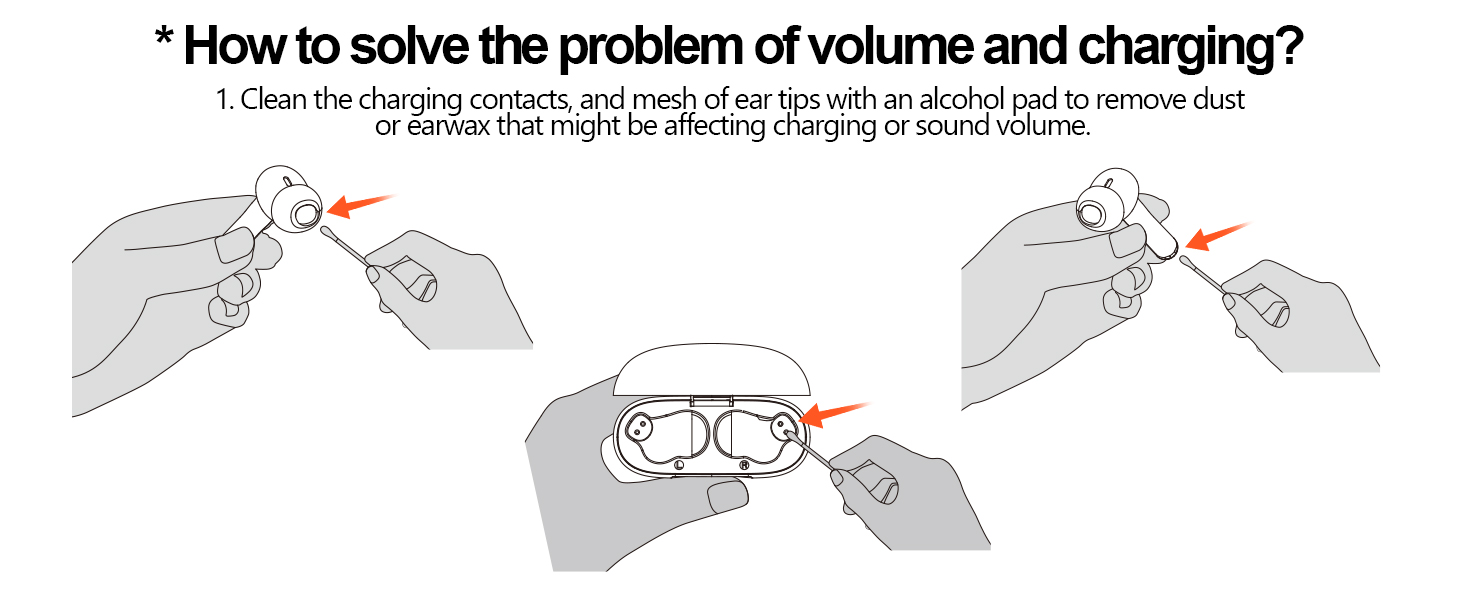
Figure 10: Instructions for cleaning earbud charging contacts and mesh to prevent issues with volume or charging.
Uraren Erresistentzia
The earbuds are IPX7 waterproof, making them resistant to sweat and splashes. However, they are not designed for swimming or prolonged submersion in water. Ensure the earbuds are dry before placing them back in the charging case.

Figure 11: IPX7 waterproof rating allows for use during workouts and in various weather conditions.
Arazoak konpontzea
If you encounter any issues with your Nequga A1 earbuds, please refer to the following common solutions:
- Soinurik ez/Bolumen baxua: Ensure earbuds are charged, connected to your device, and volume is adjusted on both the earbuds and your device. Clean earbud meshes for any blockages.
- Parekatzeko arazoak: Make sure Bluetooth is enabled on your device and the earbuds are in pairing mode. Try forgetting the device on your phone and re-pairing.
- Entzungailuak ez dira kargatzen: Check if the charging cable is securely connected and the charging contacts on both the earbuds and case are clean.
- Konexio ezegonkorra: Ensure your device is within the 49 ft (15m) Bluetooth range. Avoid significant obstacles between the earbuds and your device.
For further assistance, please contact Nequga customer support.
Zehaztapenak
| Ezaugarri | Zehaztapena |
|---|---|
| Ereduaren izena | A1 |
| Konektibitate Teknologia | Haririk gabekoa (Bluetooth 5.3) |
| Bateriaren iraupena | Gehienez 50 ordu (kargatzeko zorroarekin) |
| Uraren Erresistentzia Maila | IPX7 Iragazgaitza |
| Kontrol-metodoa | Ukitu |
| Audio kontrolatzaile mota | Gidari dinamikoa (14.5 mm) |
| Bluetooth barrutia | Gehienez 49 oin (15 metro) |
| Entzungailuaren forma | Belarri barnean |
| Elementuaren pisua | 2.89 ontza |
| Produktuaren neurriak | 3.4 x 0.67 x 3.6 hazbete |
Produktuaren bideo ofiziala
Video 1: Official Nequga A1 Wireless Earbuds Product Overview. This video highlights the key features and design of the earbuds, including the digital display, playtime, comfort, and sound quality.
Bermea eta Laguntza
Your Nequga A1 Wireless Earbuds come with a standard manufacturer's warranty. For detailed warranty information, product registration, or technical support, please visit the official Nequga website or contact their customer service team. Contact information can typically be found on the product packaging or the brand's Amazon store page.