1. Sarrera
This manual provides essential information for the safe and efficient use of your DOOGEE Note56 Android 16 smartphone. Please read it thoroughly before using your device.

Irudia: Aurrealdea eta atzealdea view of the DOOGEE Note56 smartphone, showcasing its design and key specifications like 6150mAh battery, Android 16, 6.56-inch display, and 90Hz refresh rate.
2. Konfigurazioa
2.1. Paketearen edukia
Egiaztatu zure paketeak elementu hauek dituela:
- DOOGEE Note56 Smartphone
- Elikatze-moldagailua
- USB kablea
- SIM kanporatzeko tresna
- Babes-zorroa
- Hasierako gida azkarra (eskuliburu hau)
2.2. SIM txartelaren eta TF txartelaren instalazioa
The DOOGEE Note56 supports dual SIM cards and a TF (microSD) card for expandable storage.
- Bilatu SIM txartelaren erretilua gailuaren alboan.
- Sartu SIM txartela ateratzeko tresna erretiluaren ondoko zulo txikian eta sakatu astiro erretilua atera arte.
- Place your Nano-SIM cards and/or TF card into the designated slots on the tray. Ensure the gold contacts face downwards.
- Kontu handiz sartu erretilua telefonoan berriro, bere lekuan klik egin arte.
2.3. Hasierako piztea eta oinarrizko konfigurazioa
- Sakatu eta eutsi pizteko botoiari DOOGEE logotipoa agertu arte.
- Jarraitu pantailan agertzen diren argibideei zure hizkuntza hautatzeko, Wi-Fi sare batera konektatzeko eta zure Google kontua konfiguratzeko.
- Configure security settings such as screen lock (PIN, pattern, password) and face recognition.
2.4. Gailua kargatzea
Connect the USB cable to the power adapter and then to the phone's charging port. Plug the adapter into a power outlet. The battery indicator will show charging status. For optimal battery life, use the provided charger.
3. Funtzionamendu-argibideak
3.1. Android 16 sistema eragilea
The DOOGEE Note56 runs on the latest Android 16 system, offering an optimized and intuitive user experience. It features improved application launch speeds, enhanced responsiveness, and a refined user interface. A new Privacy Space function allows for hiding sensitive data and applications, ensuring secure usage.

Irudia: Gainetikview of the Android 16 operating system interface, displaying various applications, settings menus, and system information.
3.2. Pantailaren ezaugarriak
The device is equipped with a 6.56-inch IPS waterdrop display, providing a smooth visual experience with a 90Hz high refresh rate. The 720x1612 HD+ resolution and 90% screen-to-body ratio enhance viewing of movies and videos. Two eye-friendly modes are included to reduce eye strain during prolonged use.

Irudia: Gertutik view of the DOOGEE Note56's 6.56-inch IPS display, illustrating its vibrant colors and the smooth 90Hz refresh rate.
3.3. Kameraren funtzioak
Capture vivid and beautiful photos with the 8MP main camera and take clear selfies with the 5MP front camera. The device utilizes AI functions for enhanced photography, including:
- AI Eszena Ezagutza: Automatically detects and optimizes settings for 12 different scenes.
- Gaueko modua: Argazkien kalitatea hobetzen du argi gutxiko baldintzetan.
- Erretratu modua: Creates professional-looking photos with blurred backgrounds.
- HDR: Enhances dynamic range for balanced exposure.
- Pro modua: Offers manual control over camera settings.
- Irribarrearen harrapaketa: Automatically takes a photo when a smile is detected.
- Panorama: Captures wide-angle scenic shots.
- Etengabeko filmaketa: Hainbat argazki bata bestearen atzetik ateratzen ditu.
- Fun Filters: Apply various creative effects to your photos.

Image: Diagram illustrating the 8MP rear camera and 5MP front camera specifications, along with icons representing various AI scene recognition modes.

Image: The camera interface of the DOOGEE Note56, highlighting features like HDR, Pro Mode, Smile Capture, Panorama, Continuous Shooting, Night Mode, and Fun Filters, with a sample photo.

Image: The 5MP front camera's capabilities for selfies, demonstrating Beauty Mode and Portrait Effect for bright, natural, and shareable self-portraits.
3.4. Memoria eta Biltegiratzea
The DOOGEE Note56 is equipped with 24GB RAM (3GB physical RAM + 21GB extended RAM) and 64GB of internal storage (ROM). It supports TF card expansion up to 2TB, providing ample space for photos, videos, and applications. This powerful memory configuration ensures smooth multitasking and minimizes lag during gaming or heavy app usage.

Irudia: Barneko bat view diagram highlighting the 64GB ROM and 24GB RAM (composed of 3GB physical and 21GB extended RAM) for seamless performance.
3.5. Konexioa eta nabigazioa
The device supports Bluetooth 4.2 for stable wireless connections and 4G Dual SIM for broad network compatibility both domestically and internationally. For navigation, it integrates three major positioning systems: GPS, GLONASS, and Galileo, ensuring accurate location services from urban areas to remote locations.
3.6. Beste Ezaugarri Adimendun Batzuk
- Instant Face Recognition: Unlock your device quickly and securely using your face.
- FM irratia: Enjoy local radio stations without an internet connection.
- 3.5 mm aurikularretarako konektua: Connect your wired headphones for audio playback and calls.
- Smart Body Sensor: (Specific functionality not detailed, refers to general smart sensor capabilities).
- Sistema bikoitzeko modua: Allows for separate user environments.
- Super arbela: Arbelaren funtzionalitate hobetua.
- Screen Optimization & Color Customization: Adjust display settings for personal preference.

Image: Visual representation of instant face recognition, accurate GPS navigation, and the FM radio interface on the DOOGEE Note56.

Irudia: Collage erakusketa batasing various smart OS features of the DOOGEE Note56, including smart body sensor, dual system mode, super clipboard, RAM expansion, screen optimization, and screen color customization.
4. Mantentzea
4.1. Baterien kudeaketa
The DOOGEE Note56 features a 6150mAh large capacity battery, designed for extended use. It supports approximately 1000 charge/discharge cycles and offers up to 4 years of durable battery life. The device also supports 5W reverse charging, allowing it to act as a power bank for other devices.
- Bateriaren iraupena maximizatzeko, saihestu tenperatura altuenak.
- Ez deskargatu bateria guztiz aldizka.
- Use the original charger for optimal charging performance.
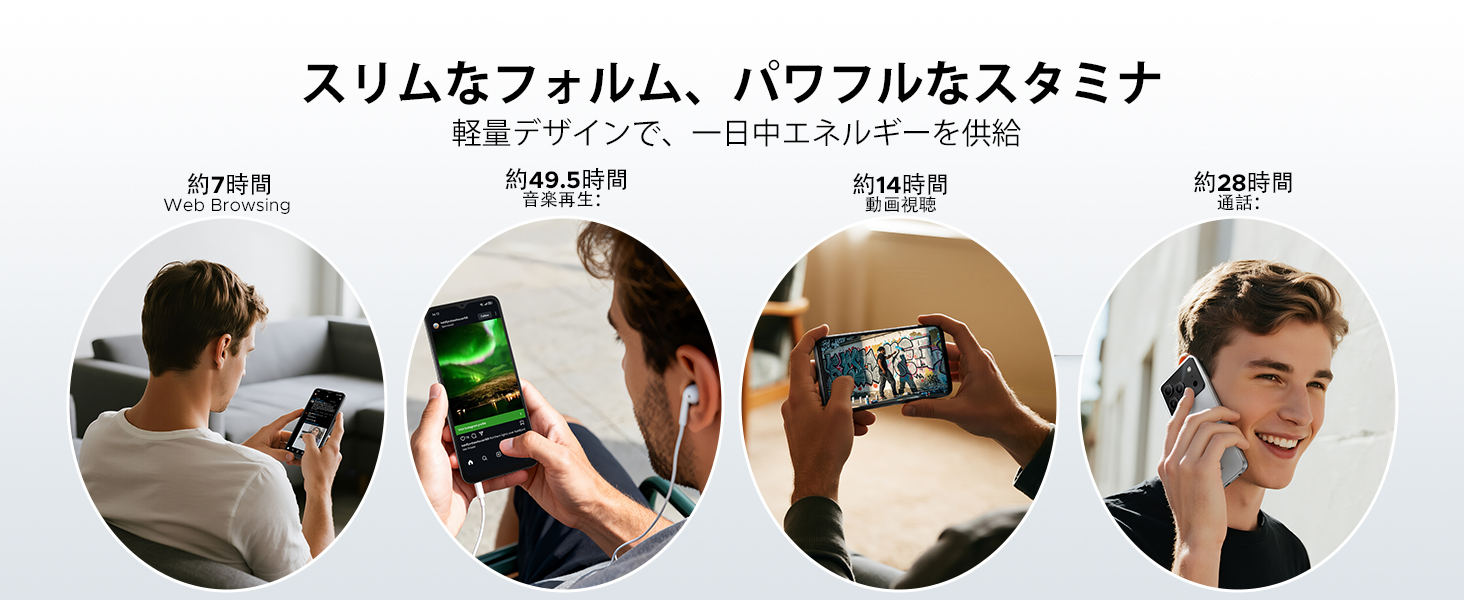
Image: Diagram illustrating the 6150mAh silicon-carbon battery, highlighting its features such as 1000 charge cycles, 4 years of durability, 20% smaller size, and 5W reverse charging capability.

Image: Infographic showing estimated battery life for different activities on the DOOGEE Note56: approximately 7 hours for web browsing, 49.5 hours for music playback, 14 hours for video watching, and 28 hours for calls.
4.2. Garbiketa eta Zainketa
- Erabili lipurrik gabeko zapi leun bat gailuaren pantaila eta gorputza garbitzeko.
- Saihestu produktu kimiko gogorrak edo material urratzaileak erabiltzea.
- Keep the device away from excessive dust and moisture.
4.3. Software eguneraketak
Regularly check for and install software updates to ensure your device has the latest features, security patches, and performance improvements. You can usually find this option in the device's settings under 'System' or 'About phone'.
5. Arazoak
If you encounter issues with your DOOGEE Note56, refer to the following common troubleshooting steps:
- Gailua ez da pizten: Ziurtatu bateria kargatuta dagoela. Berrabiarazteko, sakatu eta eutsi pizteko botoia gutxienez 10-15 segundoz.
- Aplikazioak huts egiten edo blokeatzen: Close and reopen the app. Clear the app's cache and data in Settings > Apps. If the issue persists, uninstall and reinstall the app.
- Sareko konexio arazoak: Check if Airplane Mode is off. Restart the device. Verify your SIM card is correctly inserted and your mobile data plan is active. For Wi-Fi, try forgetting the network and reconnecting.
- Kargatzeko arazoak: Ensure the charging cable and adapter are securely connected and undamaged. Try a different outlet or charger. Clean the charging port gently.
- Errendimendu motela: Itxi beharrezkoak ez diren atzeko planoan dauden aplikazioak. Garbitu cachea aldizka. Kontuan hartu biltegiratze espazioa askatzea.
Arazo konplexuagoetarako, jo ezazu laguntza atalera.
6. Zehaztapenak
| Ezaugarri | Zehaztapena |
|---|---|
| Pantailaren tamaina | 6.56 hazbetekoa |
| Bateria Edukiera | 6150 mAh |
| Kolorea | Black (other variants available) |
| Marka Izena | DOOGEE |
| Fabrikatzailea | DOOGEE |
| Estreinaldi urtea | 2025 |
| Dakarten osagaiak | Elikatze-moldagailua |
| OS bateragarria | Android 16 |
| Beste Ezaugarri batzuk | SIM-free |
| Ereduaren izena | OHARRA56 |
| Bistaratzeko mota | IPS |
| Paketearen neurriak | 19.3 x 10.5 x 5.1 cm; 410 g |
| Fabrikatzailearen Erreferentzia | OHARRA56 |
| Instalatutako RAM tamaina | 24 GB |
| Memoria Biltegiratzeko Ahalmena | 64 GB |
7. Bermea eta Laguntza
7.1. Bermearen informazioa
The DOOGEE Note56 comes with a 1 urteko bermea from the date of purchase, ensuring peace of mind for your usage. This warranty covers manufacturing defects under normal use conditions.
7.2. How to Contact Support
In the unlikely event of a product defect or if you require technical assistance, please contact our support team through the following methods:
- Via Amazon Purchase History: Navigate to your Amazon purchase history and contact our store directly regarding your order.
- Via Product Page: On the product page, click on the store name located below the 'Add to Cart' button. Then, click the 'Ask a Question' button displayed in the upper right corner to send us an inquiry.


