Sarrera
This manual provides detailed instructions for the AGPTEK A55PL USB C MP3 Player. It covers setup, operation, maintenance, and troubleshooting to ensure optimal use of your device. The A55PL is a versatile music player featuring USB-C connectivity, 64GB storage, FM radio, and voice recording capabilities, powered by a replaceable AAA battery.
Paketearen edukia
Egiaztatu behean zerrendatutako elementu guztiak zure paketean sartuta daudela:
- AGPTEK A55PL MP3 Player
- 64GB TF Card (pre-installed)
- C motako USBra kargatzeko kablea
- Erabiltzailearen eskuliburua

Image: Contents of the AGPTEK A55PL MP3 Player package, showing the player, USB-C cable, 64GB TF card, and user manual.
Produktua amaituview eta Ezaugarriak
The AGPTEK A55PL MP3 Player is designed for portability and ease of use, offering multiple functionalities in a compact form factor.
Ezaugarri nagusiak:
- Direct Type-C & Universal USB Connectivity: Connects directly to Type-C phones for file transfer or to laptops/PCs using the included adapter/cable.
- Swappable AAA Batteries: Operates on a single AAA battery (not included), allowing for instant power replacement without needing charging outlets.
- Massive 64GB Storage: Comes with a pre-loaded 64GB TF card, supporting over 13,000 songs and high-fidelity formats like FLAC, APE, and WAV. Functions as a U disk for data transfer.
- Crisp LED Display: Features an energy-efficient LED screen for clear navigation and song title display.
- Voice Recorder & FM Radio: Built-in voice recorder for capturing audio and an FM radio (requires wired headset as antenna) for broadcasts.

Irudia: Gehiagoview of the AGPTEK A55PL MP3 Player's capabilities, including its Type-C port, music playback, recording, FM radio, and 64GB TF card storage.
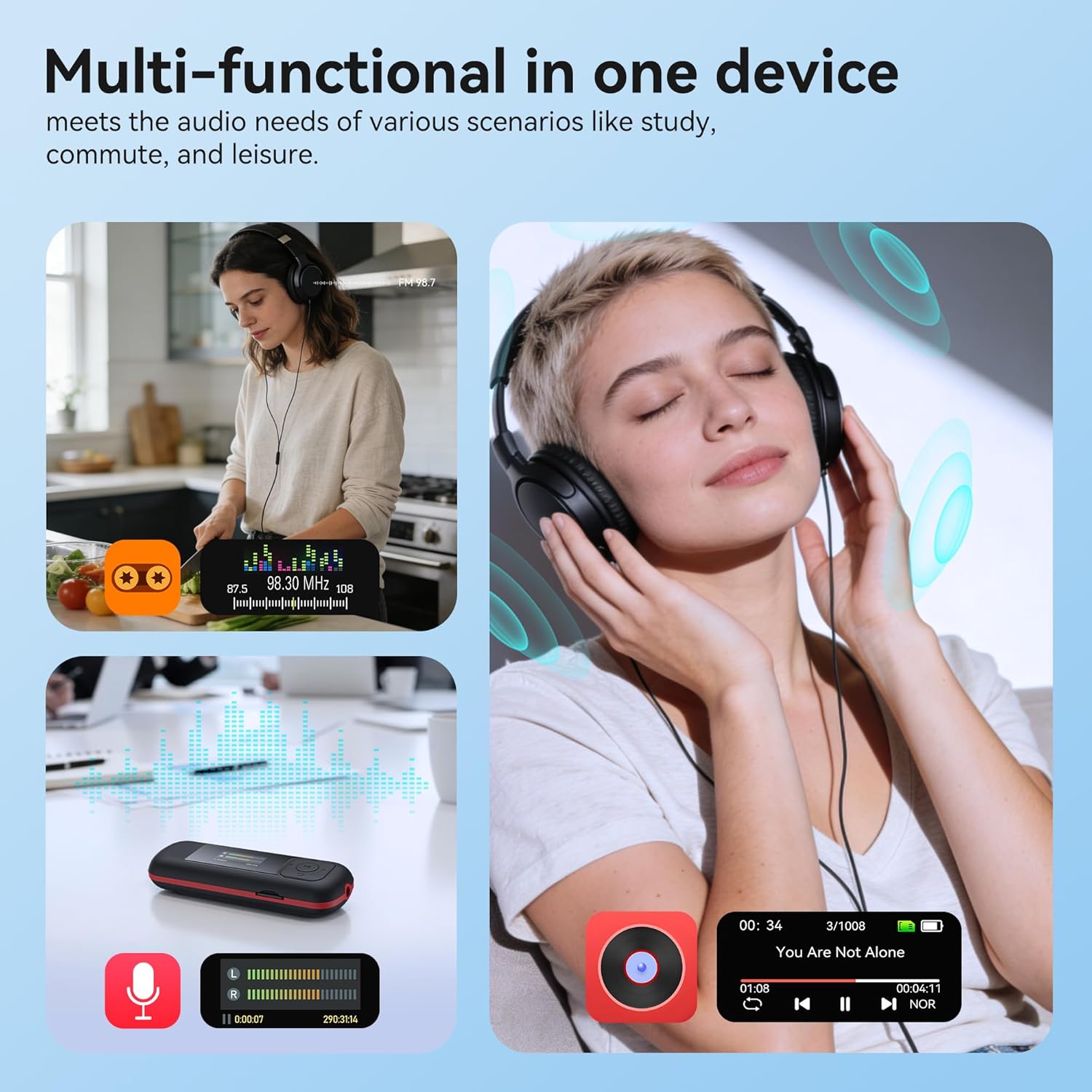
Image: The AGPTEK A55PL MP3 Player showcasing its multi-functional capabilities, including FM radio, voice recording, and music playback, suitable for various scenarios.
Konfigurazioa
1. Bateriaren instalazioa
The AGPTEK A55PL uses one AAA battery (not included). Ensure correct polarity when inserting the battery.
- Bilatu bateriaren konpartimentuaren estalkia gailuaren atzealdean.
- Press the center of the cover and slide it forward to unlock and remove.
- Insert one AAA battery, matching the positive (+) and negative (-) terminals with the indicators inside the compartment.
- Lerratu estalkia berriro tokira, ongi klik egin arte.

Image: Step-by-step guide for removing the USB cap and installing the AAA battery into the AGPTEK A55PL MP3 Player.
Oharra: USB charging is not supported. The device relies solely on AAA battery power. The battery display on the screen is based on voltage changes at the battery terminal.
2. Initial Connection and File Transferentzia
You can transfer music and other files to your MP3 player from a computer or a Type-C smartphone.
- Ordenagailuetarako: Use the included Type-C to USB cable. Connect the Type-C end to the player and the USB-A end to your computer's USB port. The player will appear as a removable disk.
- For Type-C Phones: Plug the player's Type-C connector directly into your phone's Type-C port. The player will be recognized as external storage. (For iPhones, a Lightning-to-Type-C OTG adapter is needed, not included).

Image: Demonstrates connecting the AGPTEK A55PL MP3 Player to a computer via USB cable and directly to a Type-C smartphone for file transferentzia.
Funtzionamendu-argibideak
Oinarrizko Kontrolak
The player features a simple interface with dedicated buttons for easy navigation.
- Pizteko botoia: Eduki sakatuta pizteko/desaktibatzeko.
- Erreproduzitu/Pausatu botoia: Sakatu musika erreproduzitzeko edo eteteko.
- Nabigazio botoiak (Gora/Behera/Ezkerra/Eskuina): Menuetan nabigatzeko eta ezarpenak doitzeko erabiltzen da.
- Bolumen botoiak (+/-): Dedicated buttons on the side to adjust playback volume.
- Menu botoia (M): Testuinguruaren araberako menuetara sartzen da.
- Atzera/Itzuli botoia: Aurreko pantailara edo menura itzultzen da.
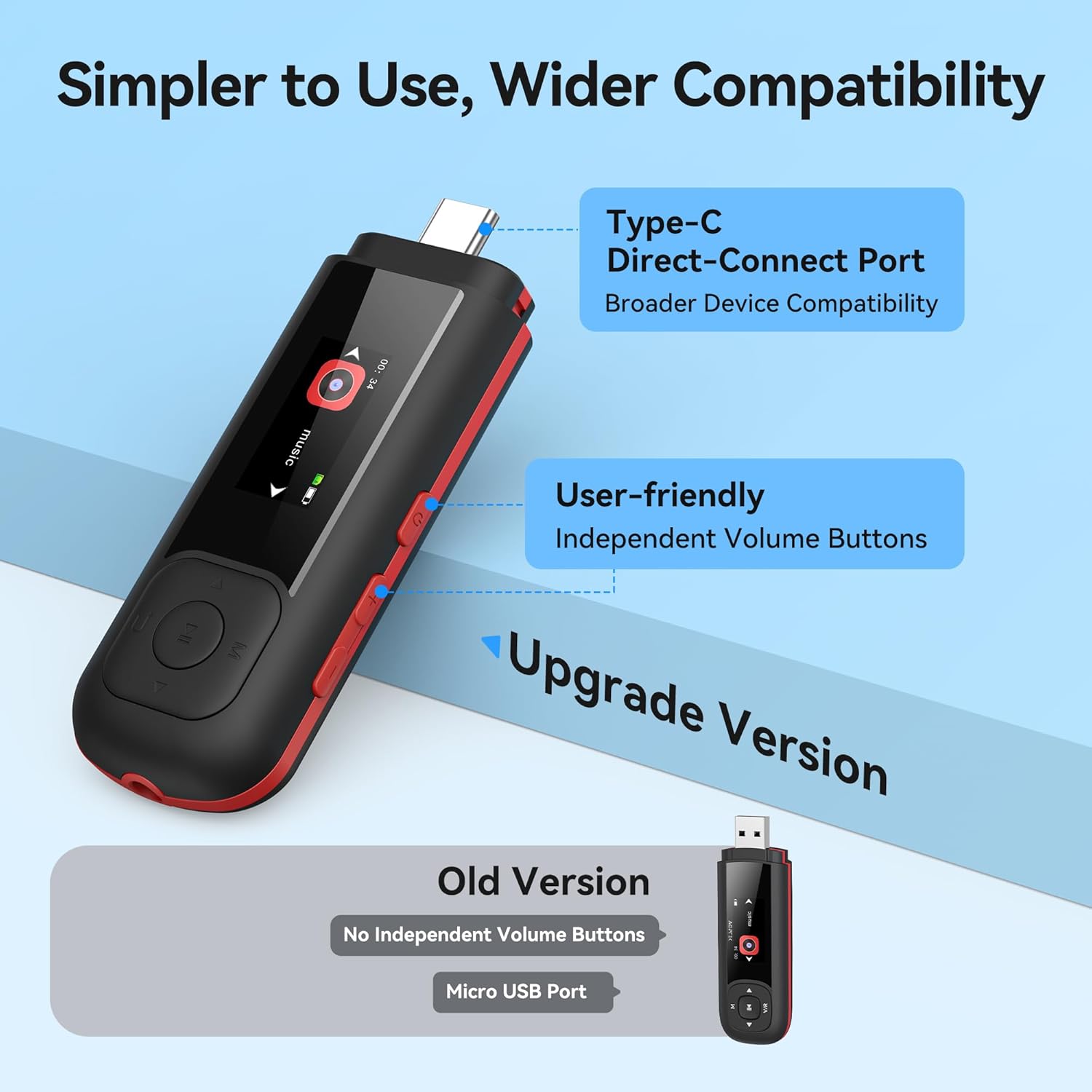
Image: Close-up of the AGPTEK A55PL MP3 Player, showing the Type-C direct-connect port and the independent volume buttons for user-friendly operation.
Musika erreproduzitzea
The player supports various audio formats including MP3, WMA, APE, FLAC, and WAV.
- Connect wired headphones to the 3.5mm audio jack.
- Navigate to the "Music" option on the main menu.
- Browse through your music library by artist, album, or folder.
- Hautatu abesti bat erreprodukzioa hasteko.
- Use the Play/Pause button to control playback and the volume buttons to adjust sound levels.

Image: A person enjoying music through headphones, highlighting the AGPTEK A55PL MP3 Player's support for multi-format lossless audio quality.

Image: Illustrates the different playback modes available on the AGPTEK A55PL MP3 Player, including Folder Mode and Music Mode with options like repeat, shuffle, and play in order.
FM Irratia
To use the FM radio function, a wired headset must be connected as it acts as the antenna.
- Connect your wired headphones.
- Navigate to the "FM Radio" option from the main menu.
- Erabili nabigazio botoiak irrati-kateak bilatzeko edo maiztasun bat eskuz sintonizatzeko.

Image: A user enjoying FM radio on the AGPTEK A55PL MP3 Player, emphasizing that wired headphones are required to function as an antenna.
Ahots grabagailua
The built-in voice recorder allows you to capture audio on the go.
- Navigate to the "Recorder" option from the main menu.
- Hautatu "Hasi grabazioa" hasteko.
- Press the Play/Pause button to stop and save the recording.
- Recordings can be accessed and played back from the "Recordings" list.

Image: The AGPTEK A55PL MP3 Player showing its portable recorder function, ready for effortless on-the-go audio capture.
Custom Playlists
You can create and manage custom playlists by connecting the player to a computer.
- Connect the MP3 player to your computer using the Type-C to USB cable.
- Access the player's storage as a removable disk.
- Antolatu zure musika files into folders or create M3U playlist filezuzenean gailuan.
- The player supports up to 3 built-in customizable playlists.

Image: Demonstrates how to create and edit custom playlists by connecting the AGPTEK A55PL MP3 Player to a computer via USB.
Mantentzea
- Garbiketa: Use a soft, dry cloth to clean the device. Avoid liquid cleaners or solvents.
- Biltegiratzea: Gorde erreproduzitzailea leku fresko eta lehor batean, eguzki-argitik eta muturreko tenperaturetatik babestuta.
- Bateria zaintzea: Remove the AAA battery if the device will not be used for an extended period to prevent leakage.
- Datuen babeskopia: Egin aldian-aldian babeskopia garrantzitsua files from the player to a computer to prevent data loss.
Arazoak konpontzea
Gailua ez da Pizten
- Ensure the AAA battery is inserted correctly with the correct polarity.
- Ordeztu AAA bateria berri batekin.
- Eduki sakatuta pizteko botoia segundo batzuetan.
Ezin da transferitu Files
- Verify the Type-C to USB cable is securely connected to both the player and the computer/phone.
- Probatu beste USB ataka bat zure ordenagailuan.
- Ensure your computer's operating system recognizes external storage devices.
- For phones, ensure the phone supports OTG (On-The-Go) functionality for external storage.
Erreprodukzioan ez dago soinurik
- Check if wired headphones are properly plugged into the 3.5mm audio jack.
- Ziurtatu bolumena ez dagoela minimoan edo isilarazita.
- Test with a different pair of headphones to rule out headphone issues.
- Egiaztatu audioa. files are not corrupted and are in a supported format (MP3, WMA, APE, FLAC, WAV).
FM irratia ez dabil
- Confirm that wired headphones are connected, as they serve as the antenna.
- Try scanning for stations again in an open area.
Zehaztapenak
| Ezaugarri | Xehetasuna |
|---|---|
| Ereduaren izena | A55PL |
| Marka | AGPTEK |
| Memoria Biltegiratzeko Ahalmena | 64 GB (via TF Card) |
| Konektibitate Teknologia | USB Type-C, Aux (3.5mm) |
| Ezaugarri bereziak | FM Radio, Voice Recorder, Replaceable AAA Battery |
| Kolorea | Beltza |
| Pantailaren tamaina | 0.96 Inches (LED) |
| Gailu bateragarriak | Headphones, Computers, Type-C Smartphones |
| Media mota | Mikro SD |
| Elementuaren pisua | 3.87 ontza |
| Paketearen neurriak | 6.57 x 5.12 x 0.94 hazbete |
Bermea eta Laguntza
For warranty information and technical support, please refer to the official AGPTEK webwebgunera edo jarri harremanetan bezeroarentzako arreta-zerbitzura. Gorde erosketa-agiria erosketaren frogagiri gisa berme-erreklamazioetarako.
Lineako laguntza: Bisitatu AGPTEK denda Amazonen produktuari buruzko informazioa eta laguntza-baliabideak lortzeko.


