📘 Studio manuals • Free online PDFs
Studio logo

Estudioko eskuliburuak eta erabiltzaile gidak

Studio encompasses a diverse range of professional equipment, including advanced Dante audio interfaces, DMX LED lighting panels, and modular studio furnishings.

Aholkua: bat etortze hoberena lortzeko, sartu zure Studio etiketa duen modelo-zenbaki osoa.

About Studio manuals on Manuals.plus

Studio is a versatile brand category representing a wide array of professional and consumer equipment. The product lineup features high-quality audio and media networking tools from manufacturers like Studio Teknologiak, which produces industry-leading Dante audio interfaces, intercom engines, and line outputs.

In addition to professional audio equipment, the Studio brand covers high-performance LED lighting panels equipped with advanced DMX controls, multi-platform wireless headsets, and modular wall unit systems tailored for functional workspace organization. Whether outfitting a broadcast facility, designing a creative workspace, or setting up a recording environment, you can find the essential installation and operating instructions here.

Estudioko eskuliburuak

Azken eskuliburuak hemendik: manuals+ marka honetarako prestatua.

Studio 543D IFB Interfazearen Erabiltzailearen Gida

20ko martxoaren 2024a
Studio 543D IFB Interfazea Produktuaren informazioaren zehaztapenak: Eredua: 543D IFB Interfazea Dante audio-over-Ethernet teknologia onartzen du Sample Rate: 48 kHz Bit Depth: 16, 24, or 32 Four 5-segment LED audio meters…

Studio 374A Intercom Beltpack Erabiltzailearen Gida

26ko abenduaren 2023a
Studio 374A Intercom Beltpack Product Information Specifications Serial Numbers: M374A-04001 to 04500 Application Firmware: 2.1 and later Power Requirement: Power-over-Ethernet (PoE) Operating Parameters: Configurable using the STcontroller software application Audio…

STUDIO zoru laminatuak erabiltzailearen eskuliburua

12ko urtarrilaren 2023a
STUDIO Laminate Floors Care and Maintenance Quick-Step Studio laminate floors, like other fine furnishings in your home, require proper care to keep them looking their best. When you follow our…

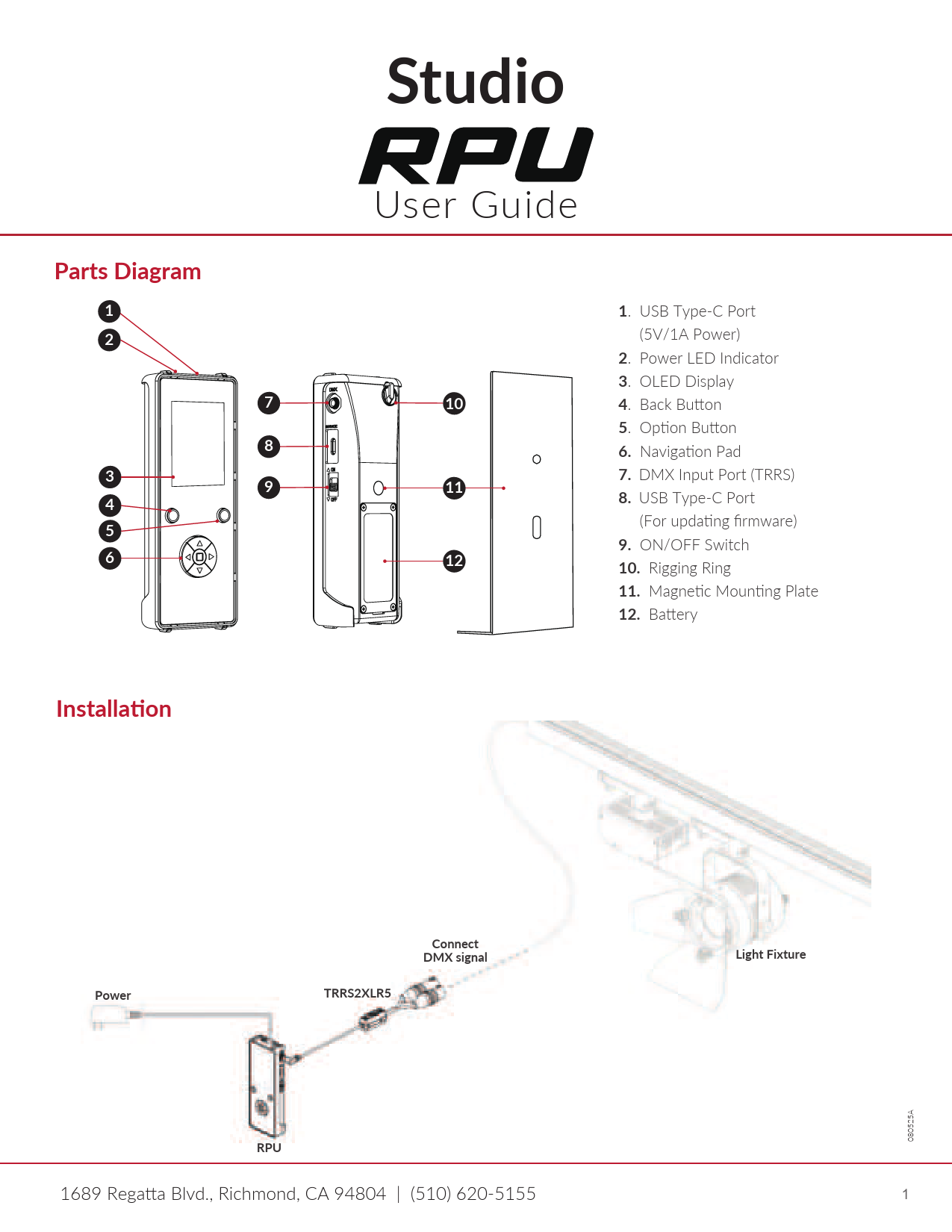
Studio RPU User Guide

erabiltzailearen gidaliburua
User guide for the Studio RPU, covering installation, button functions, DMX control (Manual Mode and Scenes Mode), firmware updates, DMX testing, fixture testing, RPU settings, and troubleshooting.

Studio manuals from online retailers

Mont Blanc to Everest Instruction Manual

B0000CJD1J • January 13, 2026
Instruction manual for the book Mont Blanc to Everest by Gaston REBUFFAT, covering its content, author, specifications, and care guidelines.

Asia: 2 Instruction Manual

0670137960 • 2025eko uztailaren 27a
An instruction manual for the book 'Asia: 2' by Martin Hurlimann, published by Studio. This guide covers overview, usage, maintenance, troubleshooting, and specifications for the hardcover edition.

Studio support FAQ

Marka honen eskuliburuei, erregistroari eta laguntzari buruzko ohiko galderak.

  • Where can I find the DMX configuration for my Studio LED panel?

    The DMX channel modes and addressing instructions are detailed in the specific LED panel's user manual under the DMX control menu map.

  • How do I assign Dante channels on my Studio audio interface?

    Dante-compliant Studio devices use the Dante Controller software application to route audio signals, configure sample rates, and assign Dante flows.

  • Do Studio modular wall units require assembly?

    Many Studio modular wall units come pre-assembled and only require securing the keyhole mounts to wall screws according to the manual's installation guide.

  • How can I update the firmware on my Studio Dante equipment?

    Firmware updates for Studio Dante interfaces (like ones using the UltimoX integrated circuit) can be applied via your local network's Ethernet connection using the designated update utility.