Sarrera
The Claber Aquauno Logica Digital Computer is an advanced device designed to automate your irrigation system. Its robust and weather-resistant plastic casing ensures durability, while its compact design allows for easy integration into various outdoor spaces. This timer is specifically engineered to control watering cycles efficiently, helping to conserve water and maintain healthy plants.
This manual provides comprehensive instructions for the setup, operation, maintenance, and winter protection of your Claber Aquauno Logica Digital Computer.

Image: The Claber Aquauno Logica Digital Computer, featuring its black and orange casing with a prominent rotary dial for program selection and a protective cover.
Konfigurazioa
1. Bateriaren instalazioa
The Claber Aquauno Logica Digital Computer requires one 9-volt alkaline battery for operation. It is recommended to install a new battery at the beginning of each watering season to ensure reliable performance.
- Press the two side buttons on the timer unit to open the battery compartment cover.
- Connect a new 9-volt alkaline battery to the battery connector inside the compartment.
- Carefully place the battery into its designated pocket.
- Close the battery compartment cover by pressing it firmly until it clicks into place.
For a visual guide on battery installation, please refer to the official product video below.
2. Timer Installation
The timer is designed for easy attachment to any standard 3/4-inch threaded faucet. No special tools are required for installation.
- Screw the timer directly onto your outdoor water tap.
- Hand-tighten the ring nut securely to ensure a watertight seal. Avoid over-tightening.
- Connect your garden hose to the fitting at the bottom of the timer.
- Ensure the water tap is fully open to allow proper water flow to the timer.
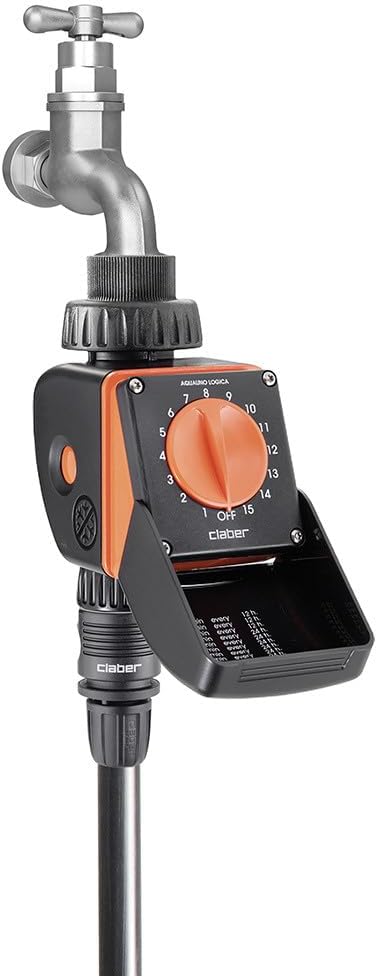
Image: The Claber Aquauno Logica Digital Computer securely installed on an outdoor water faucet, with a garden hose connected below.
Watch the official product video for detailed installation steps:
Video: Official installation guide for the Claber Aquauno Logica Plus Timer, demonstrating battery fitting, filter cleaning, timer installation, and program selection.
Funtzionamendua
Programa hautatzea
The Aquauno Logica features a simple rotary dial with 15 pre-set watering programs. The details of each program (duration and frequency) are conveniently listed on the inside of the protective cover.
- Open the protective cover to view the program details.
- Turn the orange rotary knob to select your desired watering program (numbered 1 through 15).
- The selected program will initiate approximately 10 seconds after selection.
- An LED indicator will blink during the active watering cycle.
To change a program at any time, simply turn the knob to '0' (OFF) and then select a new program number. This will cancel the current program and activate the new one.

Image: Close-up of the Claber Aquauno Logica Digital Computer's rotary dial and the protective cover displaying the 15 pre-set watering programs.
Mantentzea
Iragazkien garbiketa
The timer is equipped with a mesh filter to prevent debris from entering the unit and ensure long-lasting, trouble-free operation. Regular cleaning of the filter is essential.
- Unscrew the ring nut at the top of the timer where it connects to the faucet.
- Carefully remove the mesh filter from its seat.
- Wash the filter thoroughly under running water to remove any accumulated dirt or particles.
- Reinsert the clean filter into its seat and screw the ring nut back into place, hand-tightening it securely.
The official product video also demonstrates the filter cleaning process.
Arazoak konpontzea
- Ur-fluxurik ez: Ensure the water tap is fully open. Check if the filter is clogged and clean it if necessary. Verify that the hose is not kinked or blocked.
- Timer Not Activating: Check the 9-volt battery. Replace it with a new alkaline battery if it's old or depleted. Ensure a program is correctly selected on the rotary dial.
- Irregular Watering: Confirm that the selected program matches your desired watering schedule. If using a rain sensor (optional accessory), ensure it is clean and functioning correctly.
- Isurketak: Ensure all connections (to the faucet and hose) are hand-tightened securely. Check the rubber washers for proper seating and replace if damaged.
Protection in Winter
To prevent damage from freezing temperatures, it is crucial to properly prepare your Claber Aquauno Logica Digital Computer for winter storage.
- At the end of the warm season, before the first frost, turn off the water supply to the faucet where the timer is installed.
- Disconnect the timer from the water tap and the garden hose.
- Remove the 9-volt battery from the timer unit.
- Store the timer indoors in a dry place, sheltered from freezing temperatures and dampness.

Image: A hand unscrewing the Claber Aquauno Logica Digital Computer from a faucet, illustrating the process of preparing it for winter storage.
The official product video provides a visual demonstration of winter protection steps.
Zehaztapenak
| Marka | Claber |
| Modelo zenbakia | 53922 |
| Kolorea | Beltza / Laranja |
| Materiala | Plastikoa |
| Bistaratzeko mota | Digitala |
| Elementuaren pisua | 12.7 ontza (360 gramo) |
| Produktuaren neurriak | 3.94"L x 3.94"Z x 3.94"A |
| liburukiatage | 9 Volts (for battery) |
Bermea eta Laguntza
For warranty information, technical support, or to access additional resources, please visit the official Claber website or contact their customer service. Always refer to the latest information provided by the manufacturer.
Visit Claber Official Webgunea

Image: A page from the manual showing technical data, warnings, and contact information for Claber, including a QR code and webgunearen helbidea.