Sarrera
Eskerrik asko erosketagatik.asing the Acctim Infinity 71952 Radio Controlled LCD Alarm Clock. This manual provides detailed instructions for setting up, operating, and maintaining your new alarm clock. Please read these instructions carefully before use and retain them for future reference.
This clock features a radio-controlled time signal for automatic and precise timekeeping (UK and Ireland only), a clear LCD display, dual alarms with snooze, calendar display, weekday display, and indoor temperature monitoring.
Paketearen edukia
- Acctim Infinity 71952 Radio Controlled LCD Alarm Clock
- Erabiltzailearen eskuliburua
Produktua amaituview
Familiarize yourself with the clock's display and control buttons.
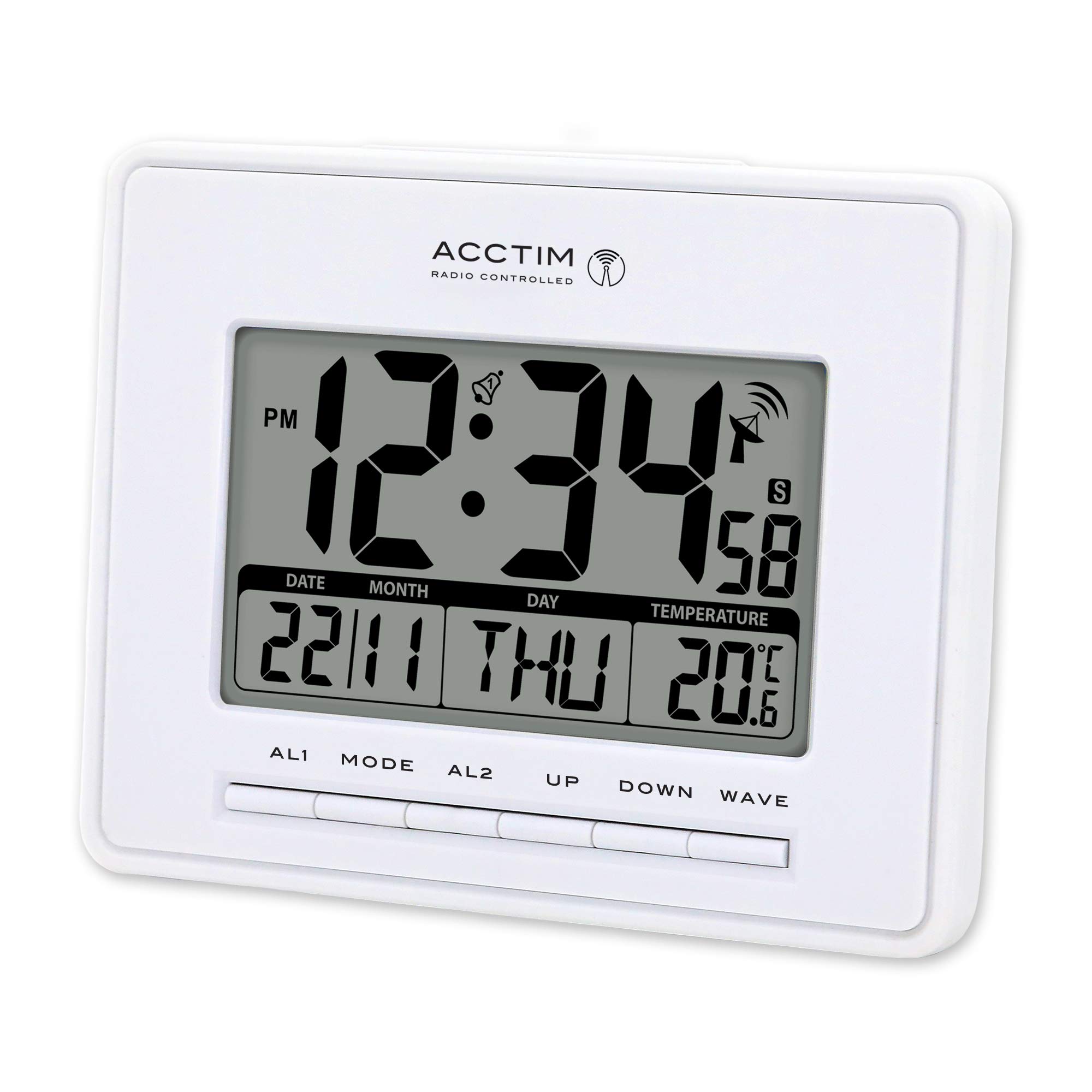
This image displays the front of the Acctim Infinity 71952 alarm clock. The large blue LCD screen shows the time (12:34 PM), date (22/11), day (THU), and indoor temperature (20.6°C). Below the screen are control buttons labeled AL1, MODE, AL2, UP, DOWN, and WAVE.
Bistaratzeko elementuak:
- Denbora bistaratzea: Shows current time (12 or 24-hour format).
- PM adierazlea: Appears for PM hours in 12-hour format.
- Alarma adierazleak: Bell icons for AL1 and AL2 when active.
- Radio Control Signal: Antenna icon indicates signal reception strength.
- Data bistaratzea: Shows day and month.
- Asteko eguna: Displays the current day (e.g., THU).
- Tenperatura bistaratzea: Shows indoor temperature in Celsius or Fahrenheit.
Kontrol-botoiak:
- AL1: Accesses and sets Alarm 1.
- JARRAIBIDEAK: Toggles between display modes and enters setting modes.
- AL2: Accesses and sets Alarm 2.
- GORA: Increases values during setting, activates/deactivates functions.
- BEHERA: Decreases values during setting, activates/deactivates functions.
- OLATUA: Initiates manual radio control signal search.
Bateriaren instalazioa
The clock requires 3 x AAA batteries (not included) for operation.
- Bilatu bateriaren konpartimentuaren estalkia erlojuaren atzealdean.
- Remove the cover by sliding it down or lifting it off.
- Insert 3 new AAA batteries, ensuring the correct polarity (+ and -) as indicated inside the compartment.
- Jarri bateriaren konpartimenduaren estalkia ongi.
Upon battery insertion, the clock will power on and attempt to receive the radio control signal.
Initial Setup (Radio Control)
The Acctim Infinity 71952 is a radio-controlled clock, designed to automatically synchronize its time with the atomic clock signal (available in the UK and Ireland). This ensures accurate timekeeping and automatic adjustment for Daylight Saving Time (summer/winter time changes).
- After installing batteries, place the clock near a window for optimal signal reception.
- The clock will automatically begin searching for the radio signal. A flashing antenna icon on the display indicates it is searching.
- Once the signal is received and synchronized, the antenna icon will become solid, and the correct time and date will be displayed. This process may take several minutes or up to 24 hours depending on location and signal strength.
- To manually initiate a signal search, press the OLATUA botoia.
Oharra: If the signal is weak or unavailable, the clock will operate as a standard quartz clock, and you may need to set the time manually.
Eskuzko ordua eta data ezartzea
If radio control is not desired or unavailable, you can set the time and date manually.
- Eduki sakatuta MODUA button for approximately 3 seconds until the time display starts flashing.
- Erabili UP or BEHERA buttons to adjust the flashing value (e.g., hour).
- Sakatu MODUA again to confirm the setting and move to the next adjustable item (e.g., minute, year, month, day, 12/24-hour format, temperature unit).
- Errepikatu 2. eta 3. urratsak nahi dituzun ezarpen guztiak doitu arte.
- Sakatu MODUA one last time or wait for 15 seconds for the clock to exit the setting mode automatically.
Alarma ezarpenak
Erlojuak bi alarma independente ditu (AL1 eta AL2).
Alarma bat ezartzea:
- Sakatu AL1 or AL2 botoia behin sakatu uneko alarmaren ordua bistaratzeko.
- Eduki sakatuta AL1 or AL2 button for approximately 3 seconds until the alarm hour starts flashing.
- Erabili UP or BEHERA alarma-ordua doitzeko botoiak.
- Sakatu AL1 or AL2 again to move to the alarm minute setting.
- Erabili UP or BEHERA alarmaren minutuak doitzeko botoiak.
- Sakatu AL1 or AL2 one last time or wait for 15 seconds to exit the alarm setting mode.
Activating/Deactivating an Alarm:
- Ordua bistaratzeko modu arruntean, sakatu UP button repeatedly to cycle through alarm activation options: AL1 ON, AL2 ON, AL1 & AL2 ON, ALARMS OFF.
- A bell icon will appear on the display next to AL1 or AL2 when the respective alarm is active.
Atzeratzea Funtzioa:
- When an alarm sounds, press any button (except AL1 or AL2) to activate the snooze function. The alarm will temporarily stop and sound again after a few minutes.
- Alarma erabat gelditzeko, sakatu AL1 or AL2 button corresponding to the sounding alarm.
Tenperatura bistaratzea
The clock displays the indoor temperature. During manual time setting, you can switch between Celsius (°C) and Fahrenheit (°F) using the UP or BEHERA buttons when the temperature unit is flashing.
Zainketa eta Mantentzea
- Garbitu erlojua zapi leun eta lehor batekin. Ez erabili garbitzaile edo disolbatzaile urratzailerik.
- Saihestu erlojua tenperatura altuetan, eguzki-argia zuzenean edo hezetasun handian jartzea.
- If the display becomes dim or the clock malfunctions, replace the batteries.
- Kendu pilak erlojua denbora luzez erabiliko ez bada, isuriak saihesteko.
Arazoak konpontzea
| Arazoa | Kausa posiblea | Irtenbidea |
|---|---|---|
| Pantailarik ez edo pantaila iluna | Bateriak gutxi daude edo gaizki sartuta daude. | Ordeztu AAA pila berriekin, polaritate zuzena ziurtatuz. |
| Ordu okerra bistaratu da | No radio signal received or manual time not set. | Place clock near a window and press OLATUA to initiate signal search. If signal is consistently poor, set time manually. |
| Radio control signal icon is flashing or absent | Weak signal, interference, or out of reception range. | Move the clock to a different location, preferably near a window, away from electronic devices that may cause interference. Try a manual signal search with the OLATUA botoia. |
| Alarma ez da jotzen | Alarma ez dago aktibatuta edo gaizki konfiguratuta. | Ensure the alarm time is set correctly and the alarm is activated (bell icon visible). |
Zehaztapenak
- Eredua: Acctim Infinity 71952
- Bistaratzeko mota: LCD digitala
- Ordutegia: Radio Controlled (UK & Ireland only) / Quartz
- Funtzioak: Time, Date, Day of Week, Indoor Temperature, Dual Alarm, Snooze
- Doikuntza automatikoak: Daylight Saving Time (Summer/Winter)
- Energia iturria: 3 x AAA bateria (ez daude barne)
- Neurriak (H x W x L): 12.5 cm x 16.4 cm x 2.3 cm
- Pisua: 0.242 kg
- Kolorea: Zuria
Bermea eta Laguntza
Bermeari buruzko informazioa eta bezeroarentzako laguntza lortzeko, erosketa unean emandako dokumentazioa kontsultatu edo zure saltzailearekin harremanetan jarri. Gorde erosketaren frogagiria bermearen erreklamazioetarako.


