1. Sarrera
This manual provides essential information for setting up, operating, and maintaining your TECLAST X11 2-in-1 Laptop/Tablet. The TECLAST X11 is a versatile device designed to function as both a portable tablet and a compact laptop, running on Windows 10 Home. It features a 10.1-inch Full HD display, an Intel N4020 processor, 6GB RAM, and 128GB of internal storage.
2. Zer dago kutxan
- TECLAST X11 Tablet
- Elikatze-moldagailua
- USB kablea
- Erabiltzailearen eskuliburua (dokumentu hau)
Note: The keyboard and stylus pen are sold separately and are not included in the standard package.
3. Produktua amaitu daview
3.1 Ezaugarri nagusiak
- 2-en-1 diseinua: Seamlessly switch between tablet and laptop modes.
- Pantaila: 10.1-inch IPS Full HD (1920x1200) touchscreen.
- Prozesadorea: Intel Gemini Lake Reflash N4020 CPU (up to 2.8GHz).
- Memoria eta biltegiratzea: 6GB RAM, 128GB eMMC ROM (expandable up to 256GB via TF card).
- Sistema eragilea: Pre-installed Windows 10 Home.
- Konektibitatea: Dual-band 2.4G/5G WiFi, Bluetooth 4.2.
- Kamerak: 5MP rear camera, 2MP front camera.
- Portuak: USB 3.0, Mini-HDMI, Headphone Jack, DC Port.
- Kickstand: Adjustable U-shaped kickstand (0° to 145°).
3.2 Gailuaren diseinua
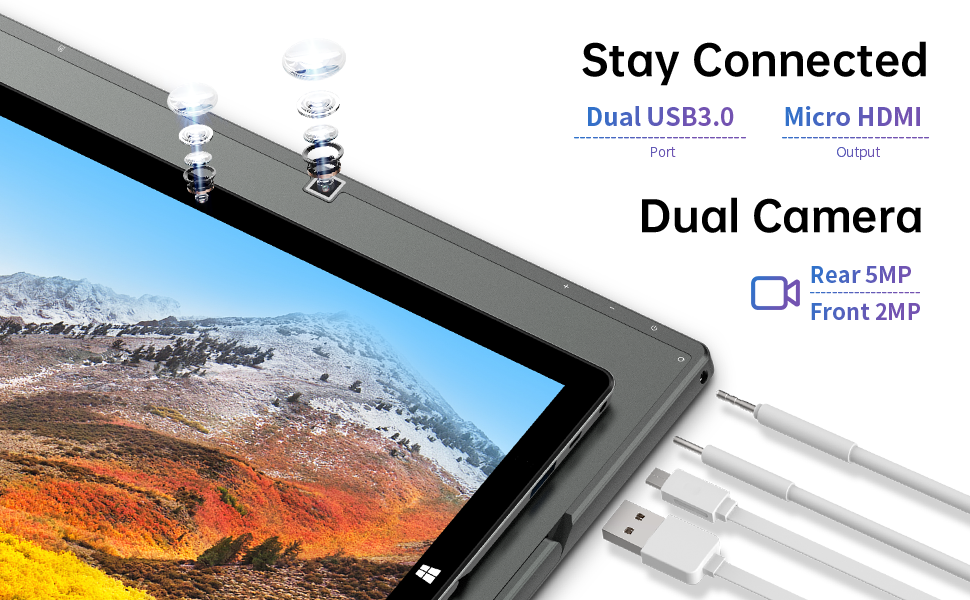
Irudia: Albokoa view of the TECLAST X11 tablet highlighting the USB 3.0 port, Micro HDMI output, and front/rear cameras.

Irudia: Xehetasun handikoa view of the TECLAST X11's side ports, including USB 3.0, Mini-HDMI, DC power input, and headphone jack.
4. Konfigurazioa
4.1 Hasierako karga
Before first use, fully charge your TECLAST X11 tablet. Connect the provided power adapter to the DC port on the device and plug it into a power outlet. The charging indicator will illuminate.
4.2 Piztu/Itzaltzea
- Pizteko: Eduki sakatuta pizteko botoia pantaila argitu arte.
- Itzaltzeko: Press and hold the Power button, then select "Shut down" from the on-screen options. Alternatively, go to Start Menu > Power > Shut down.
- Lo egiteko modua: Sakatu labur pizteko botoia gailua lo moduan jartzeko edo esnatzeko.
4.3 Hasierako Windows konfigurazioa
Upon first power-on, follow the on-screen instructions to complete the Windows 10 setup process. This includes selecting your region, language, connecting to a Wi-Fi network, and creating a user account.
5. Funtzionamendu-argibideak
5.1 Moduen artean aldatzea
The TECLAST X11 is designed for flexibility, allowing you to switch between tablet and laptop modes.
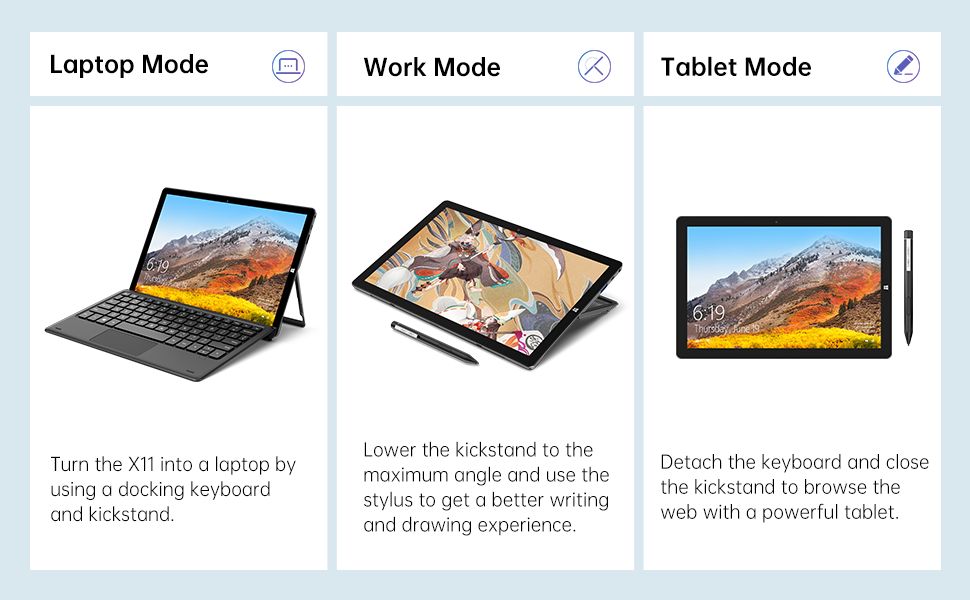
Image: The TECLAST X11 in laptop mode with the keyboard attached and kickstand deployed.
Ordenagailu eramangarriaren modua: Attach the magnetic docking keyboard and deploy the integrated kickstand. The device will automatically detect the keyboard and switch to laptop interface.

Image: A user holding the TECLAST X11 in tablet mode, interacting with the touchscreen.
Tablet modua: Detach the keyboard. The device will automatically switch to tablet mode, optimizing the interface for touch input.

Irudia: Atzealdea view of the TECLAST X11 showing the adjustable kickstand extended.
Kickstand erabilera: The integrated U-shaped kickstand can be adjusted from 0° to 145° for comfortable viewing or typing angles.
5.2 Ukipen-pantaila erabiltzea
The 10.1-inch IPS display supports 10-point multi-touch. Use standard touch gestures for navigation, zooming, and interaction with applications.
5.3 Kanpoko konexioa
- USB 3.0: Connect external devices such as USB drives, mice, or printers.
- Mini-HDMI: Konektatu kanpoko monitore edo telebista batera pantaila handiagoa lortzeko.
- Bluetooth 4.2: Pair with Bluetooth-enabled accessories like headphones or speakers.
- Wi-Fi: Connect to wireless networks for internet access. Supports 2.4G and 5G bands.
5.4 Bideo erakustaldia
Video: An official TECLAST video demonstrating the features and versatility of the X11 Windows tablet with its detachable keyboard and various usage scenarios.
6. Mantentzea
6.1 Gailua garbitzea
- Erabili zapi leun eta lihorik gabeko bat pantaila eta kanpoko gainazalak garbitzeko.
- Marka egoskorretarako, apur bat dampen the cloth with water or a screen-safe cleaning solution.
- Saihestu produktu kimiko gogorrak, material urratzaileak edo gehiegizko hezetasuna erabiltzea.
6.2 Bateria zaintzea
- Bateriaren iraupena luzatzeko, saihestu tenperatura altuenak.
- Ez utzi gailua denbora luzez guztiz kargatuta edo deskargatuta.
- Erabili jatorrizko edo bateragarri ziurtatutako kargagailua soilik.
6.3 Software eguneraketak
Regularly check for and install Windows updates to ensure optimal performance, security, and access to the latest features. Go to Start Menu > Settings > Update & Security > Windows Update.
7. Arazoak
| Gaia | Irtenbide posiblea |
|---|---|
| Gailua ez da pizten | Ensure the device is charged. Connect the power adapter and try again. If unresponsive, press and hold the Power button for 10-15 seconds to perform a hard reset. |
| Wi-Fi konexio arazoak | Check if Wi-Fi is enabled in Windows settings. Restart your router and the tablet. Ensure you are within range of the Wi-Fi signal. |
| Teklatuak ez du erantzuten | Ensure the keyboard is securely attached to the magnetic docking port. Restart the tablet. Verify that the keyboard was purchased separately and is compatible. |
| Errendimendu motela | Close unnecessary applications. Check for Windows updates. Ensure sufficient free storage space. Run a disk cleanup. |
| Screen rotation not working | Check if auto-rotate is enabled in Windows Action Center (swipe in from the right edge of the screen or click the icon in the taskbar). |
8. Zehaztapenak
| Ezaugarri | Xehetasuna |
|---|---|
| Ereduaren izena | X11 2-in-1 Tablet |
| Pantailaren tamaina | 10.1 hazbete |
| Pantailaren bereizmena | 1920 x 1200 pixel (FHD IPS) |
| Prozesadorea | Intel Gemini Lake Reflash N4020 (1.1GHz - 2.8GHz) |
| RAM | 6 GB DDR4 SDRAM |
| Disko gogorra | 128 GB eMMC (expandable up to 256GB via TF card) |
| Txartel grafikoa | Intel UHD Graphics 600 integratua |
| Sistema eragilea | Windows 10 Home |
| Haririk gabeko mota | Bluetooth 4.2, Dual-band WiFi (2.4G + 5G) |
| Atzekoa Webkamaren ebazpena | 5 MP |
| Aurrealdea Webkamaren ebazpena | 2 MP |
| Portuak | USB 3.0, Mini-HDMI, Headphone Jack, DC Port |
| Elementuaren pisua | 2.31 libra (gutxi gorabehera 1.05 kg) |
| Pilak | 1 litio-polimeroko bateria (barne) |
9. Bermea eta Laguntza
TECLAST provides a 12 hilabeteko berme zerbitzua for the X11 2-in-1 Laptop/Tablet. If you encounter any issues or have questions regarding your device, please contact TECLAST customer support. Refer to the contact information provided with your product packaging or visit the official TECLAST webgunea laguntza xehetasunetarako.


